
Firing checkbox selection along with submit button | Community
Skip to main content
Durga_Nandyala
October 5, 2022
Solved

Firing checkbox selection along with submit button

  • October 5, 2022
  • 2 replies
  • 783 views

Hello Team, 

I have a situation where I have more than 9 credits cards in a page and max comparisions you can do is with 3 cards


I want to track the final selction of cards instead of firing calls on different selectiosn before customer decides to hit the actual "Compare" button. This empty card slots doesn't have any CSS elements but the Card comapre button does


So, how do I fire the call only when they hit the compare button?


Thanks,
Durga
 

This post is no longer active and is closed to new replies. Need help? Start a new post to ask your question.
Best answer by ranjithd

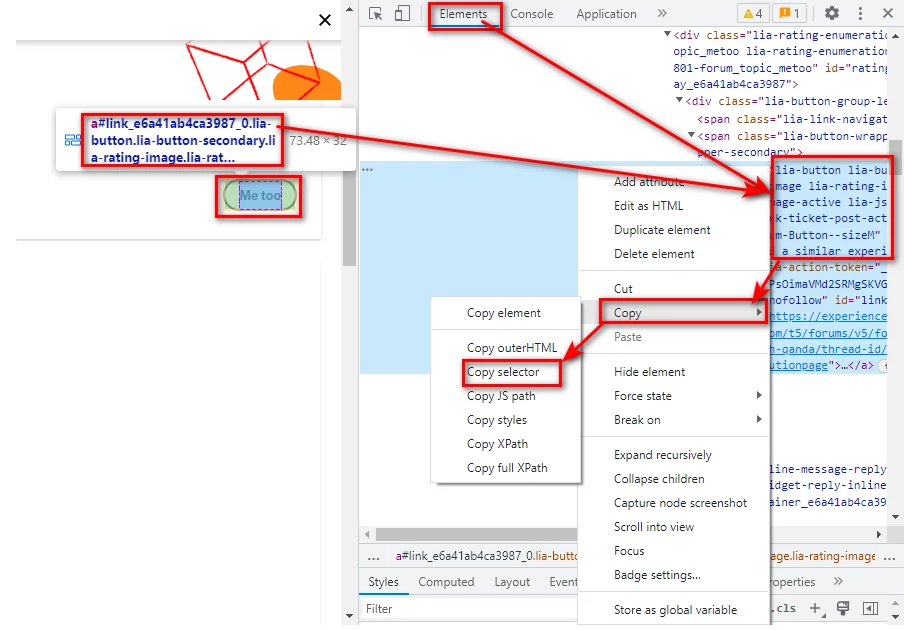
You can use any other selector like CSS element ( Attributes tags like alt, title, or href) or HTML (H1 or p ) elements for the card heading & CTA button. Still, if you facing difficulties in identifying selectors use the inspect and, and you can send the hit in 2 ways & store it with some other evar values to classifications. Methods.1. custom tracking( s.tl() method ) & it creates an additional server call, 2. you can send it by next page view call( s.t() method ) without any additional server call.


Sample selector screenshot for your reference.


2 replies

yuhuisg
Community Advisor
Community Advisor
October 6, 2022

You'll need to use a selector for when the "Compare" button is active, i.e. not greyed out.

After that, to get the names of the compared cards, you'll need to use some creative JavaScript to crawl the DOM to retrieve the cards.

ranjithd
ranjithdAccepted solution
October 7, 2022

You can use any other selector like CSS element ( Attributes tags like alt, title, or href) or HTML (H1 or p ) elements for the card heading & CTA button. Still, if you facing difficulties in identifying selectors use the inspect and, and you can send the hit in 2 ways & store it with some other evar values to classifications. Methods.1. custom tracking( s.tl() method ) & it creates an additional server call, 2. you can send it by next page view call( s.t() method ) without any additional server call.


Sample selector screenshot for your reference.