Error Connecting to Salesforce Marketing Cloud Into AEP | Community
Skip to main content
Level 2
June 18, 2025
Question

Error Connecting to Salesforce Marketing Cloud Into AEP

  • June 18, 2025
  • 2 replies
  • 714 views

Hi, I am facing an issue while connecting Sales Marketing Cloud account from Sources into AEP, I have provided required credentials like:

Host
Client ID
Client secret

By providing these credentials, this is the error I am facing:
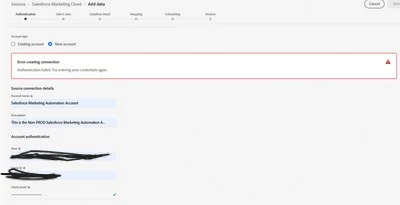
According to Adobe documentation, we need to whitelist the IPs and add the IPs range provided in Adobe documentation: Salesforce Source Connector Overview | Adobe Experience Platform, into Salesforce instance, but even after adding the IPs in Salesforce allowlist, it is not solving the above issue, can anyone help me understand what the underlying issue is here and if someone has connected SFMC as a Source into AEP please let me know how to debug this issue

This post is no longer active and is closed to new replies. Need help? Start a new post to ask your question.

2 replies

Level 2
June 18, 2025

@ribhuba ,


You need to make sure that you have added correct IP ranges to whitelist. Are you 100% sure that the IPs you have whitelisted are correct?

In addition to this:

1) Make sure you have added correct SFMC credentials, the Salesforce user has appropriate API access.

2) Perform network connectivity test between AEP & SFMC using 'ping'.

3) Check AEP logs to figure out the exact error.


Thanks,

Pankaj

4) Check Salesforce's monitoring and logging tools for any errors related to API calls from AEP's IP addresses. This can provide insights from the Salesforce side.

RibhuBaAuthor
Level 2
June 18, 2025

Hi @pankaj1390 , thanks for your response, to your point:
if I have added correct IP ranges to whitelist. Are you 100% sure that the IPs you have whitelisted are correct? 
Ans: I have followed as per Adobe documentation mentioned above, also I have noticed that those range of IPs are in CIDR notation, have asked Adobe support to give us a correct range of those IPs for our sandbox, waiting on that. I have also used common networking conversion technique to decode those ranges and matched it with other tools available on the internet, it matched.

In addition to this:

1) Make sure you have added correct SFMC credentials, the Salesforce user has appropriate API access

Ans: have checked from AEP and SFMC end, the required access is there and in addition to that, I have tried to establish a connection in SFMC using Adobes' Flow Service API, here is the response that I got for the connection:

2) Perform network connectivity test between AEP & SFMC using 'ping'.


Ans: Can you tell me how to do this exactly, not sure how to test this
3) Check Salesforce's monitoring and logging tools for any errors related to API calls from AEP's IP addresses. This can provide insights from the Salesforce side

Ans: Reviewed this with from SFMC end and a support ticket was raised to which the response was there were no errors or connection attempts made to the SFMC system on reviewing the logs from Salesforce support end.
I am open to any other suggestions, thanks!

RibhuBaAuthor
Level 2
June 18, 2025

For your reference for the IP whitelisting documentation from Adobe: IP Address Allowlist for Sources | Adobe Experience Platform

kautuk_sahni
Community Manager
Community Manager
June 30, 2025

@ribhuba Just checking in — were you able to resolve your issue?
We’d love to hear how things worked out. If the suggestions above helped, marking a response as correct can guide others with similar questions. And if you found another solution, feel free to share it — your insights could really benefit the community. Thanks again for being part of the conversation!

Kautuk Sahni