
ECID cookieLifetime is not getting reflected | Community
Skip to main content
RitendraS11
Level 4
October 17, 2022
Solved

ECID cookieLifetime is not getting reflected

  • October 17, 2022
  • 1 reply
  • 869 views

Hi Everyone,

I have the below problem statement as part of the custom implementation of the OPT-IN feature.

We want to send tags in both cases (Customer opts-in OR doesn't opt-In) with a difference that mandatory tags will be sent in case of customer has opted-In.

Now, the customer has multiple applications on the website (running on .net and AEM SITES). So, the customer wants to have one visitor across the website - while navigating to multiple applications of the website. To implement that, when the customer is not opted-In, we want to set the ECID cookies lifetime to "None" and hence no visitorID is created.

To implement this, we have tried with custom code to set the cookie Lifetime - but, it doesn't work.

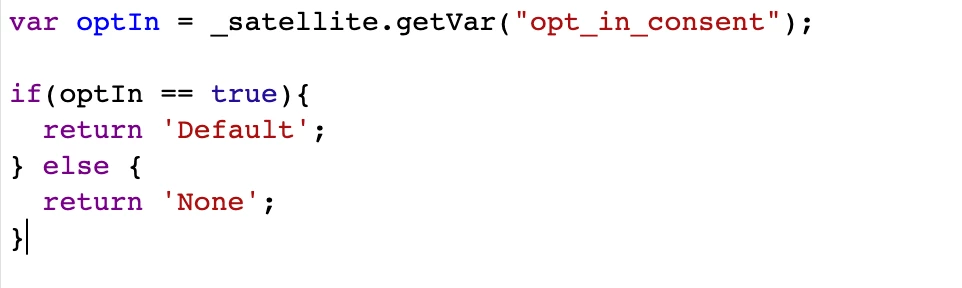
So, we created a dataElement, which returns a value as "Default" OR "None" based on the conditions of Opt-In. This works fine and the ECID cookies(AMCV and AMCVS) are not created - everything works OK except for one case.


Exception case: When customer visits the site for 1st time - the cookie banner is shown and dataElement returns "None" as cookie lifetime for ECID. Now, the customer opts_In for cookies - the dataElement value gets updated. But, the ECID cookies are not created. When I refresh the page OR navigate to other pages, it creates ECID cookies (AMCV and AMCVS). 

Is there any solution recommendation to handle this specific case? Please suggest!

Thanks for looking into my query!
 

This post is no longer active and is closed to new replies. Need help? Start a new post to ask your question.
Best answer by yuhuisg

I'm not sure if you can reset ECID's Visitor object by calling Visitor.getInstance() again. My understanding is that once it has been created in a web page, it stays there until the user navigates to another web page, and then the cycle repeats.

That is why I had said that you could try using plain ol' JavaScript "document.cookie" to update the cookie as you need. So, not using Visitor.getInstance(), but really

document.cookie = "[AMCV cookie name]=[AMCV cookie value];max-age=0;domain=mydomain.com".

1 reply

yuhuisg
Community Advisor
Community Advisor
October 18, 2022

I believe this method doesn't work because the ECID setting takes effect when the Launch library is loaded, and doesn't change subsequently as the user interacts with your web page, including opting in/out of consent.

You might need to have a rule with custom code that changes the cookie's lifetime with good ol' JavaScript "document.cookie".

RitendraS11
Level 4
October 18, 2022

I did try that way, but it doesn't work - every time the ECID cookies were got created and a visitor is registered. So, tried this approach of setting the value in extension and using DataElement.

Code sample used for the previous/suggested implementation :

var optIn = _satellite.getVar("opt_in_consent");

if(optIn == true){
// Optin
    var visitor = Visitor.getInstance ("<ORG_ID>@AdobeOrg",{ 
       trackingServer: "<trackingServer>",
       trackingServerSecure: "<trackingServer_secure>",
       disableThirdPartyCookies:true,
       doesOptInApply : false,
       cookieLifetime: "Default" 
    });
    adobe.optIn.approve(adobe.OptInCategories.ANALYTICS, true);
    adobe.optIn.approve(adobe.OptInCategories.ECID, true);
    adobe.optIn.complete();	
  
} else {
// Optout
    var visitor = Visitor.getInstance ("<ORG_ID>@AdobeOrg",{ 
       trackingServer: "<trackingServer>",
       trackingServerSecure: "<trackingServer_secure>",
       doesOptInApply : false,
       disableThirdPartyCookies:true,
       cookieLifetime: "None" 
    });
    adobe.optIn.approve(adobe.OptInCategories.ANALYTICS, true);
    adobe.optIn.approve(adobe.OptInCategories.ECID, true);
    adobe.optIn.complete();	
}


yuhuisg
Community Advisor
yuhuisgCommunity AdvisorAccepted solution
Community Advisor
October 18, 2022

I'm not sure if you can reset ECID's Visitor object by calling Visitor.getInstance() again. My understanding is that once it has been created in a web page, it stays there until the user navigates to another web page, and then the cycle repeats.

That is why I had said that you could try using plain ol' JavaScript "document.cookie" to update the cookie as you need. So, not using Visitor.getInstance(), but really

document.cookie = "[AMCV cookie name]=[AMCV cookie value];max-age=0;domain=mydomain.com".
