Creatin a segment with total purchase (SUM) | Community
Skip to main content
November 14, 2022
Solved

Creatin a segment with total purchase (SUM)

  • November 14, 2022
  • 1 reply
  • 1027 views

Hi,


I have an Event schema (Purchase) and need to know who purchase more than 100$ during the last 30 days. Can't really find <SUM> or count, any idea?


thanks

This post is no longer active and is closed to new replies. Need help? Start a new post to ask your question.
Best answer by Avinash_Gupta_

@jackb4 : You would have to use Segment's builder Aggregation functions. To create an aggregation function,


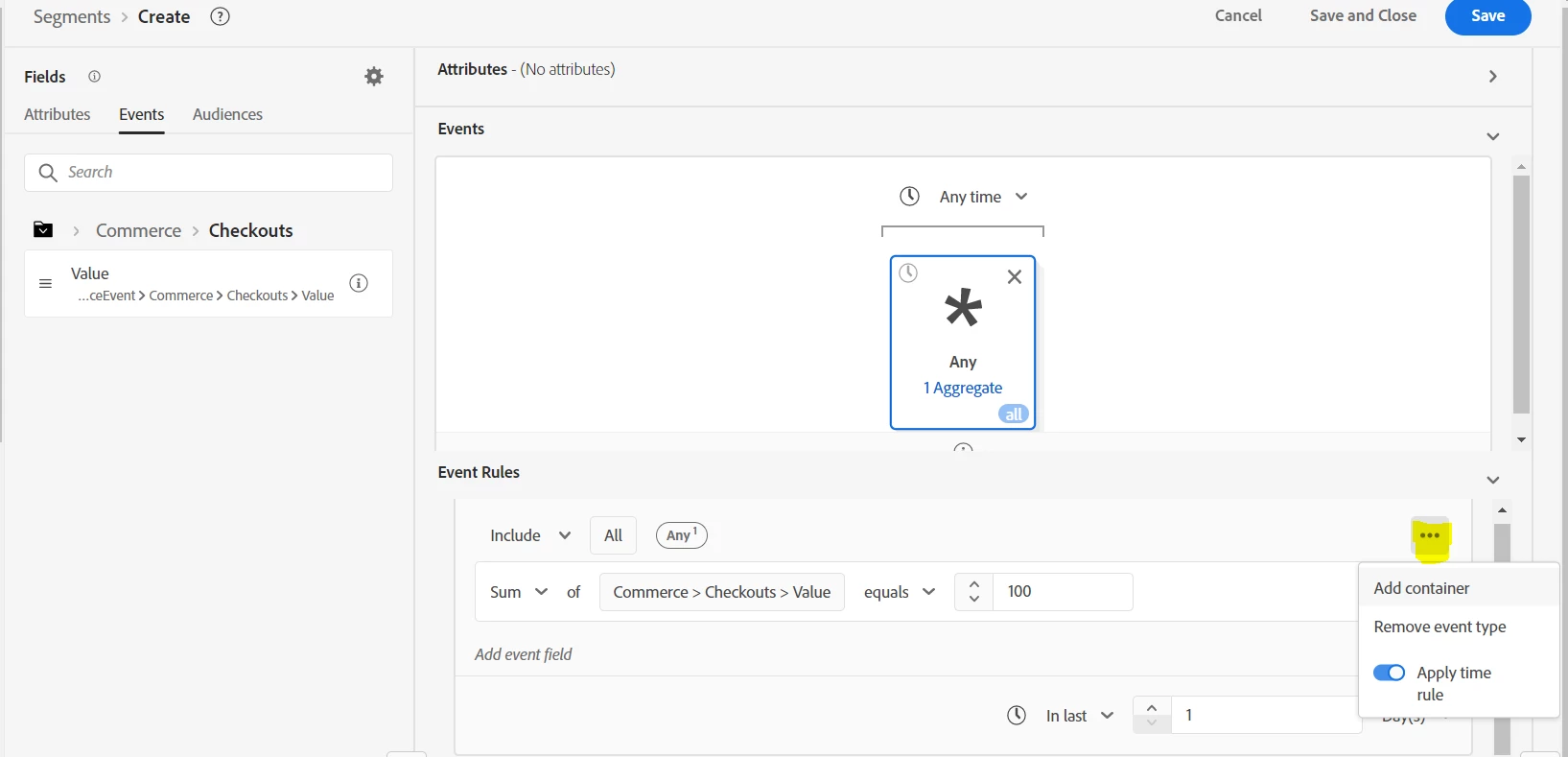
1. Select an event from the left rail, and insert it into the Events container. For example, select the checkout event.

2. After placing the event within the Events container, select the ellipses icon (…), followed by Aggregate.

3. Aggregation is now added. You can now select the aggregation function, choose what attribute to aggregate.


Once Aggreate functions are added, click on ellipses icon mentioned in the below screenshot and you can apply the time rule. Select the time frame of last 30 days and you are all set.


Hope this helps.

1 reply

Avinash_Gupta_
Community Advisor and Adobe Champion
Avinash_Gupta_Community Advisor and Adobe ChampionAccepted solution
Community Advisor and Adobe Champion
November 14, 2022

@jackb4 : You would have to use Segment's builder Aggregation functions. To create an aggregation function,


1. Select an event from the left rail, and insert it into the Events container. For example, select the checkout event.

2. After placing the event within the Events container, select the ellipses icon (…), followed by Aggregate.

3. Aggregation is now added. You can now select the aggregation function, choose what attribute to aggregate.


Once Aggreate functions are added, click on ellipses icon mentioned in the below screenshot and you can apply the time rule. Select the time frame of last 30 days and you are all set.


Hope this helps.

Level 2
March 13, 2024

Hi @avinash_gupta_ ,

We have the same requirement to add the amounts from the purchase events but for certain SKUs. So I added a where clause for the SKU in addition to the setups you had mentioned.


To explain further, we have profiles being batched in. I created an experience event schema/dataset to ingest daily purchases per contact per SKU. I used the Sum function in Audience creation screen, however it doesn't seem to work as expected. i.e., I have two profiles and purchases for these two profiles.

For one profile there are two records for the same SKU that totals more than $1000(individual amounts $1000 & $1500). The other profile has only one record for this SKU with the amount of $1000. However, the aggregate check for <= $1000 pulls both profiles into audience. I am attaching the audience composition screenshot for your reference. Please advice if this had worked for you with diff setup.


Thanks

Sharmila