
comparing 2 profile attributes | Adobe Higher Education
Skip to main content
Michael_Soprano
Level 10
April 24, 2024
Beantwortet

comparing 2 profile attributes

  • April 24, 2024
  • 1 Antwort
  • 1044 Ansichten

Hi, 


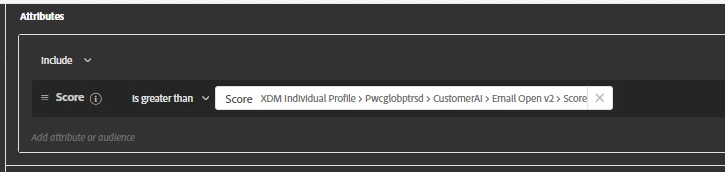
I have 2 profile attributes, compare them and as a output I would like to know which has higher value. 

How to do that in Audiences? Something like that in the second screenshot?
 

Dieses Thema wurde für Antworten geschlossen.
Beste Antwort von Kumar29917170hcyp

Hi @michael_soprano,

The sole purpose of an audience created in the platform is to qualify profiles based on the criteria defined. In addition, you can also add some profile attributes to the export. You are already able to compare the value of the attribute to qualify/disqualify a profile.


Now to export the higher-value attribute out, you will have to store it pre-calculated. You can add another attribute in the schema and while ingesting the data you can compare and map the value using a Data Prep function (IIF a>b, a, b)


Regards,

Kumar Saurabh


1 Antwort

Adobe Employee
April 25, 2024

Hi @michael_soprano,

The sole purpose of an audience created in the platform is to qualify profiles based on the criteria defined. In addition, you can also add some profile attributes to the export. You are already able to compare the value of the attribute to qualify/disqualify a profile.


Now to export the higher-value attribute out, you will have to store it pre-calculated. You can add another attribute in the schema and while ingesting the data you can compare and map the value using a Data Prep function (IIF a>b, a, b)


Regards,

Kumar Saurabh


Michael_Soprano
Level 10
May 4, 2024

Thanks for your response. I am not sure if I understood you properly. My user has two attributes: 

atr_1: 0,6

atr_2: 0,2

If atr_1 > atr_2 then I would assign him to seg_1 

else if 

atr_2 > atr_1 then I  would assign him to seg_2


Taking these assumptions into account I am not able to use Audiences for that?

Danny-Miller
Adobe Employee
Adobe Employee
June 10, 2024

@michael_soprano It works just fine.  You create two segments with the logic as you outlined using the approach you did in your screenshot.