Adobe Experience Platform Data Collection - Edit Rule - Right Operand needs to be changed to exclude the very special URL | Community
Skip to main content
December 7, 2021
Solved

Adobe Experience Platform Data Collection - Edit Rule - Right Operand needs to be changed to exclude the very special URL

  • December 7, 2021
  • 1 reply
  • 983 views

There is a rule, that is set up properly to exclude actions for URLs, that contain mysubstring.

This rule works fine - it doesn't run a javascript code if the URL contains a mysubstring substring.


However, I need to make an exclusion from that rule, if the URLs additionally contain myspecialsubstring substring.

As result, I need to modify Right Operand input (its current value is simply mysubstring ) with something new. What should I put into that field (probably regex rule) ?  Thank you.


P.S. This page https://experienceleague.adobe.com/docs/data-workbench/using/dataset/c-reg-exp.html?lang=en# didn't help me too much.
This post is no longer active and is closed to new replies. Need help? Start a new post to ask your question.
Best answer by pradeep_nextrow

@sergio7 I think the help section that you are referring is pointing to Workbench help (adobe analytics premium). You can try referring https://rubular.com/. Before that have you tried to add multiple conditions like this?

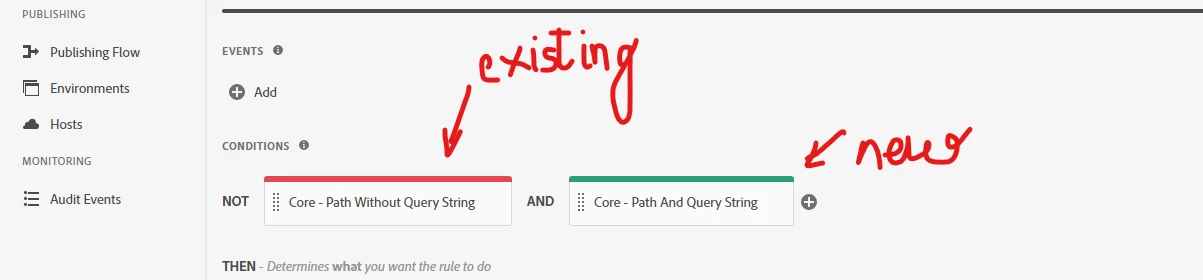
Step1: You already have a exclude condition like this for "mysubstring" (existing)


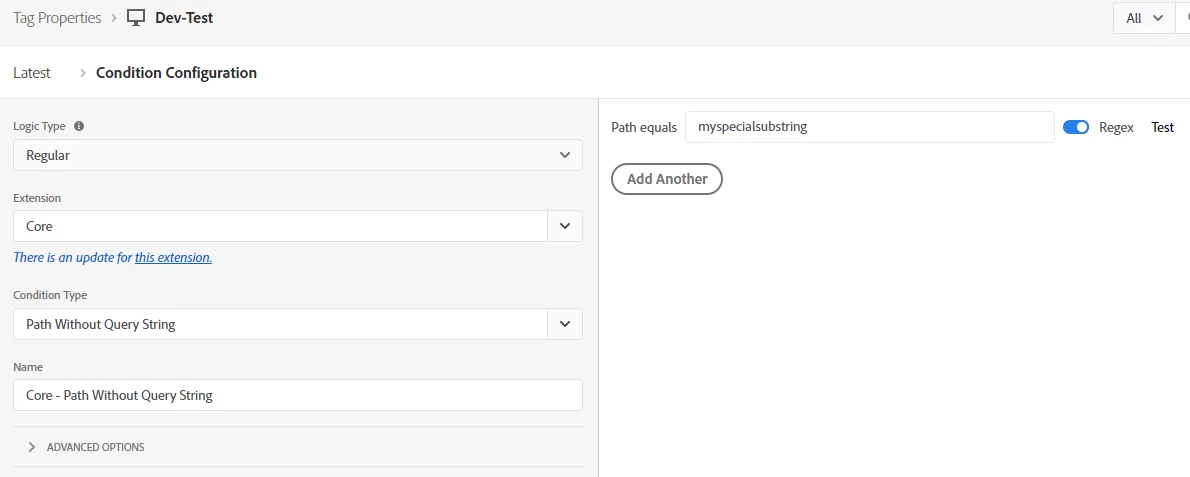
Step 2: Add another condition (new) for include and just enable regex like this:

(you can also include some other complex regex as well to match specific patterns. In the site rubular.com you can validate as well. That holds good in Launch too)


1 reply

pradeep_nextrow
pradeep_nextrowAccepted solution
Level 4
December 14, 2021

@sergio7 I think the help section that you are referring is pointing to Workbench help (adobe analytics premium). You can try referring https://rubular.com/. Before that have you tried to add multiple conditions like this?

Step1: You already have a exclude condition like this for "mysubstring" (existing)


Step 2: Add another condition (new) for include and just enable regex like this:

(you can also include some other complex regex as well to match specific patterns. In the site rubular.com you can validate as well. That holds good in Launch too)