Adobe analytics launch extension | Report suites name | Community
Skip to main content
Level 5
August 17, 2022
Solved

Adobe analytics launch extension | Report suites name

  • August 17, 2022
  • 1 reply
  • 936 views
In our company, we have more than 20 websites/apps that were set up by a consulting company. However, their devs set up each product in different ways (some used code, some extensions, etc). In one product in particular instead of adding the name of the report suit into the adobe analytics extension in the data collection platform, the dev added %Report Suit%: (I don´t know why I cannot add the image here but here is a link to it) https://ibb.co/yd05L2N This is the only setup that doesn´t contain the name of our product´s report suit and I have no idea why considering the website has 2 report suits, one for production and one for development stages. Can someone explain please what is the difference between using %report suit% instead of "name of the report suit"? what is the best practice? In case I change the report suite in the analytics launch extension, would this cause any major issues to the setup? the debugger recognizes the correct report suit name tho.
This post is no longer active and is closed to new replies. Need help? Start a new post to ask your question.
Best answer by AtulChavan

Hi @fern1 ,

I think right place to ask this question is AEP's, data collection sub community : https://experienceleaguecommunities.adobe.com/t5/adobe-experience-platform-data/ct-p/adobe-launch-community

But here is my take -  At first glance present state setup looks fine to me as "%report suit%" is a data element [i.e. variable] which is actually resolving to a report suit value when referenced in analytics extension. If you could inspect and spot "report suit" data element, it should help you to understand how is that resolving correct report suit name while sending tracking data to analytics.

What is best practice ? -  Dont hardcode, create data element and reasons are below 
1. If its required to change report suit name all you would need to modify your data element instead making change at 3 places which is more error prone.
2. If you have multiple report suits to deal with , would you prefer to create multiple tag properties ? You may have logic instead that decides dynamically to which report suit data to be sent.[just an example]
3. In your case it looks like by looking at page URL/instance it must be deciding to which report suit data to be sent i.e. dev/stage/prod..
4. etc

How to upload image while posting question/reply ? 2 ways..

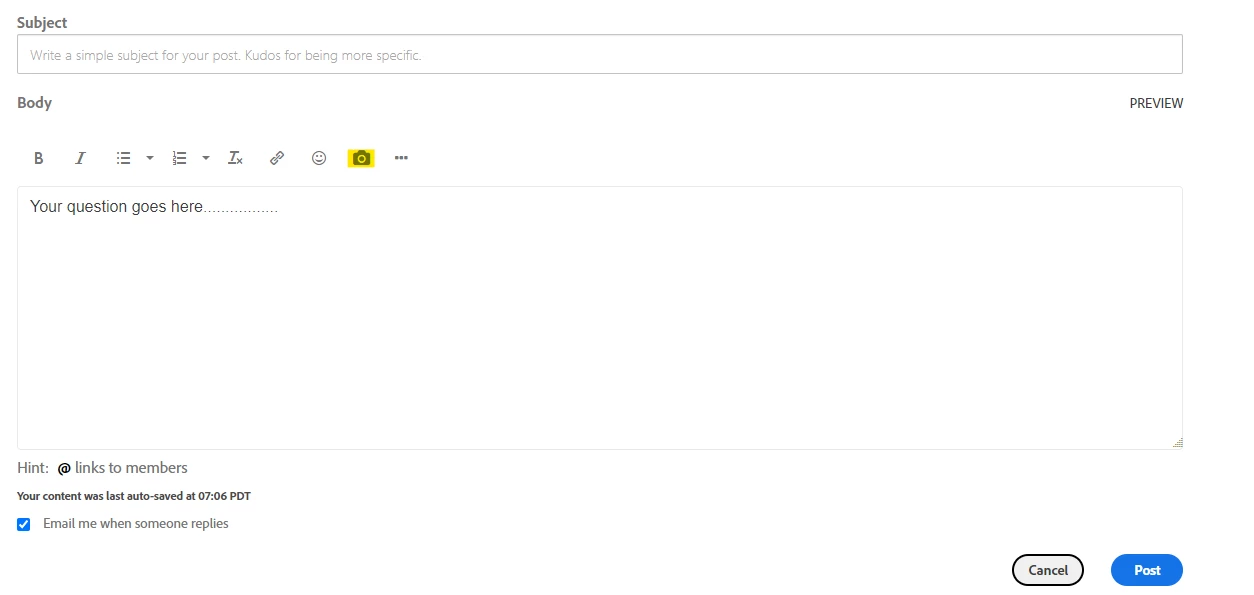
1. Just refer to screenshot, all you need to select camera icon and upload your image. like I did just
2. Copy image and paste into editor directly. 


1 reply

AtulChavan
Community Advisor
AtulChavanCommunity AdvisorAccepted solution
Community Advisor
August 17, 2022

Hi @fern1 ,

I think right place to ask this question is AEP's, data collection sub community : https://experienceleaguecommunities.adobe.com/t5/adobe-experience-platform-data/ct-p/adobe-launch-community

But here is my take -  At first glance present state setup looks fine to me as "%report suit%" is a data element [i.e. variable] which is actually resolving to a report suit value when referenced in analytics extension. If you could inspect and spot "report suit" data element, it should help you to understand how is that resolving correct report suit name while sending tracking data to analytics.

What is best practice ? -  Dont hardcode, create data element and reasons are below 
1. If its required to change report suit name all you would need to modify your data element instead making change at 3 places which is more error prone.
2. If you have multiple report suits to deal with , would you prefer to create multiple tag properties ? You may have logic instead that decides dynamically to which report suit data to be sent.[just an example]
3. In your case it looks like by looking at page URL/instance it must be deciding to which report suit data to be sent i.e. dev/stage/prod..
4. etc

How to upload image while posting question/reply ? 2 ways..

1. Just refer to screenshot, all you need to select camera icon and upload your image. like I did just
2. Copy image and paste into editor directly. 


fern1Author
Level 5
August 17, 2022

Hi @atulchavan! thank you for your reply.

I´ll be checking that.. 

just to jump in the 3rd point... That interface wasn't available to me before. I've attached imgs in other questions but for some reason, my interface was different today.

anyway, I´ll be checking your points and inspecting how the setup was done before. 
thanks!