Why aren't my data elements populating with values? | Community
Skip to main content
jesseeluke
Level 2
August 14, 2018
Solved

Why aren't my data elements populating with values?

  • August 14, 2018
  • 5 replies
  • 4257 views

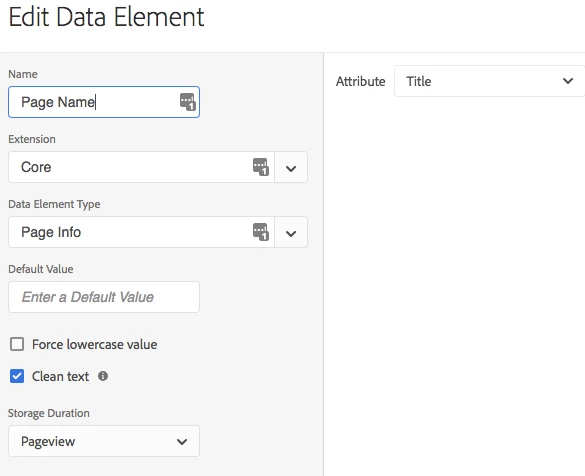
I've created data elements for things like my page title, URL path, campaign parameter, etc., but the appropriate values for these are not populating in my reports or debuggers. Instead, I'm getting the actual reference to the data element in my reports. Why is this happening? Am I doing something wrong? Is this a null value of some kind?
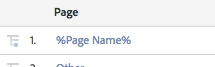
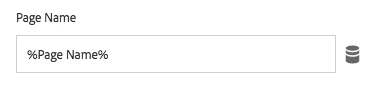
It seems as if things are set correctly in Launch as far as I can tell. Any thoughts?
This post is no longer active and is closed to new replies. Need help? Start a new post to ask your question.
Best answer by Stewart_Schilling

OK!   I learned something new today. This is not a bug after all (Thanks Ben Robison for setting me straight!)

In Launch, since any extension can expose data element types, the "Return Empty String for undefined data elements" must exist at a higher level.  It exists at the Property level.

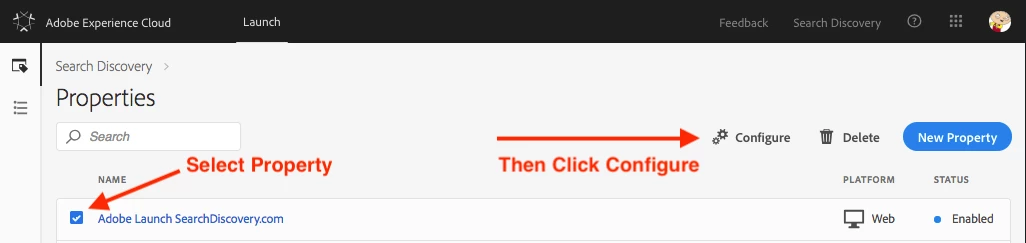
To enable it, go to the Properties page and select your property. Then click "Configure" as shown below.

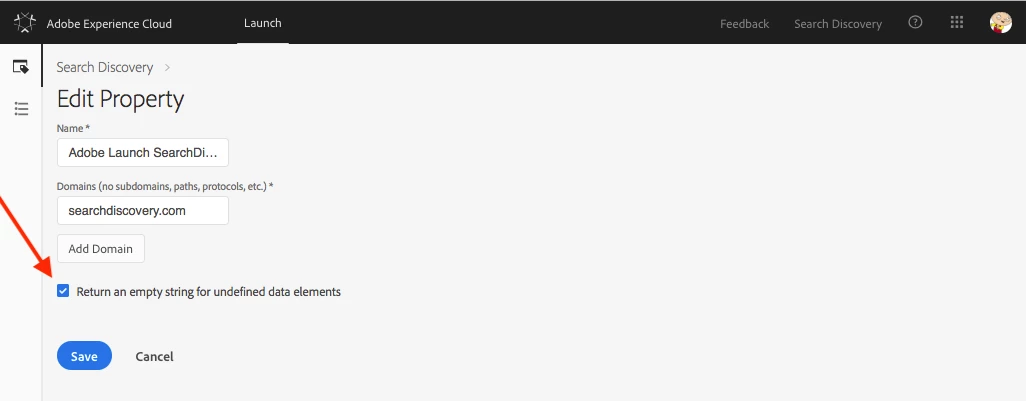
This brings up the view shown below.  Select the checkbox and click save.  Then rebuild your library with these changes.

If this answers your question, please mark this answer as correct.  Thank you!

-Stew

5 replies

Stewart_Schilling
Community Advisor
Community Advisor
August 16, 2018

I think you may have uncovered a bug.

In DTM, there is a global configuration at the web property level , Return empty string for undefined Data Elements

This option does not appear to exist for Launch.

For the Launch Core > Page Info > Title data element, if a page does not have a title tag, then the data element is undefined.

In the AA extension, since the data element cannot be resolved, it just keeps the reference (%Page Name%) as you are seeing.

Level 6
August 16, 2018

Could it be that it doesn't like spaces in the DataElements even if it is not prohibitting it?

And the option stewarts16448458​ mentioned can indeed be found in the property configuration.

Stewart_Schilling
Community Advisor
Stewart_SchillingCommunity AdvisorAccepted solution
Community Advisor
August 16, 2018

OK!   I learned something new today. This is not a bug after all (Thanks Ben Robison for setting me straight!)

In Launch, since any extension can expose data element types, the "Return Empty String for undefined data elements" must exist at a higher level.  It exists at the Property level.

To enable it, go to the Properties page and select your property. Then click "Configure" as shown below.

This brings up the view shown below.  Select the checkbox and click save.  Then rebuild your library with these changes.

If this answers your question, please mark this answer as correct.  Thank you!

-Stew

jesseeluke
Level 2
August 16, 2018

Yep, that works. I also removed the spaces in my data element names which seemed to help as well. Definitely having growing pains with Launch. Thanks!

jantzen_b
Adobe Employee
Adobe Employee
August 16, 2018

Yes, as a general best practice please avoid space and special characters where possible. In the past, we've seen strange issues in other products with special characters. I'm glad you were able to get this figured out with our awesome community members!

Thanks, stewarts16448458​ & thomas.amsler!