Expose Adobe Launch library path in the _satellite object | Community
Skip to main content
January 3, 2022
New

Expose Adobe Launch library path in the _satellite object

  • January 3, 2022
  • 2 replies
  • 1130 views

Description - A request to expose the current loaded Adobe library path in the _satellite object.
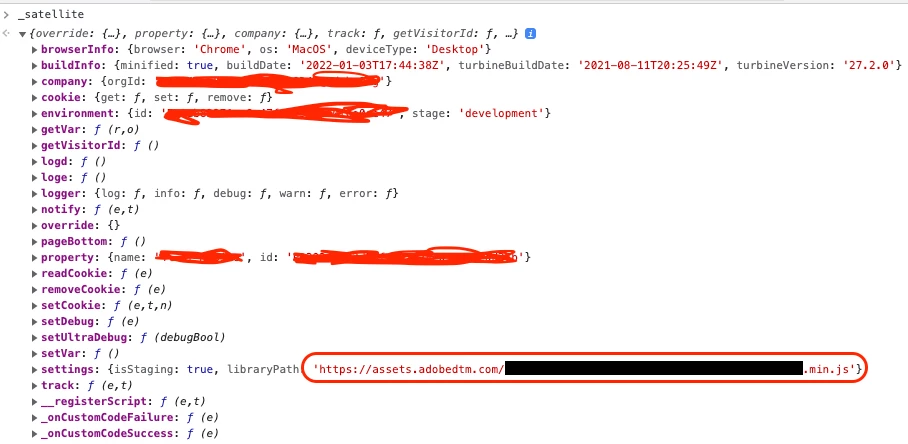


Why is this feature important to you - Our organization is transitioning over from different Tag Management System to Adobe Launch. There is a need to track the path of the loaded TMS URL path in a prop. Our team is responsible to verify that the Developers load the appropriate Launch URL in Development/Staging and Production environment whenever a new web page is created. So we track this path in a prop on the Adobe Analytics reports and set alerts if something goes wrong.


How would you like the feature to work - Have the full path of the current loaded library in the _satellite.environment object. Also to have a new key which says if the Adobe Launch is using self-hosting or Akamai.


Current Behaviour -

Current _satellite object has the environment object which holds the type of environment, but it does not contain the path of the the Launch library loaded. 

2 replies

Kishore_Reddy
Community Advisor
Community Advisor
January 4, 2022

Would like to see interesting updates on this thread!

Alexis_Cazes_
Level 10
January 19, 2022

We do something similar in our implementation where we report in a debug evar and prop the Adobe Launch property name, the environment and version of different analytics products.


Personally I do not believe that the `libraryPath` is needed. 


You should leverage the details inside:

  • environment: by reporting which env is being used you can be fairly confident is development has deployed correct endpoint to correct application environment. If you see in your prod report suite staging or development environment then it should fire an alert
  • property: the property name coupled with the environment name should give you all the details you need to understand if the correct library is deployed on a specific platform. This is why property naming is important. You should always name it in a way that it relates to the platform on which it is deployed
  • buildInfo: details in this variable are useful for debug purpose. For example if you see a drop in your data or a huge increase break it down by the buildDate and that should indicate if a specific Adobe Launch release created the issue. If the buildDate did not change then something external to tagging created the issue.

You can create a data element to concatenate these values into an eVar or a prop. Separate them by a | for example in a format like:

env:dev|prop: My property|buildD: 01/01/2020|


By doing so you can then use classification rule builder to automatically split these values in their own reports.


Hope this helps.