Events are firing multiple times | Community
Skip to main content
Level 2
August 11, 2022
Solved

Events are firing multiple times

  • August 11, 2022
  • 1 reply
  • 1665 views

We have a Event 11 to fire when a file was downloaded, such as pdf's. We also have a link click event 9 to fire for all the links on the site. However, when a PDF was downloaded, I am seeing file download event (event11) firing twice. It is firing once as a separate event and also firing second time along with link click event (event9). Wondering why it is incorporating Event 11 with Event9 when it is fired. Below are some of the screenshots and would really appreciate any suggestions/solutions: 

File Download (Event 11) call:
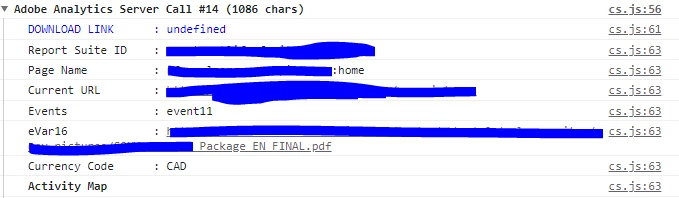
Link Click (Event 9) call:


This post is no longer active and is closed to new replies. Need help? Start a new post to ask your question.
Best answer by yuhuisg

I assume that you have the following setup:

  • Automatic link tracking for file downloads, which includes the ".pdf" file extension
  • Custom link tracking with event9 (as you've described)

If so, then I believe this is what is happening: when a user clicks a link that links to a ".pdf" file, the following occurs:

  1. Your Rule that sets event11 runs, because the user had clicked a ".pdf" link.
  2. AA's automatic link tracking runs, because the user had clicked a link that is a ".pdf" file extension, and sends its beacon. This beacon also sends event11, because it got set above.
  3. Your custom link tracking then runs, because the user had clicked a link, and sends its beacon. This beacon sends event9 because of the custom link tracking, but also event11, because it got set at step 1 above.

You have 2 options here:

  1. Disable automatic link tracking. Note, though, that this generally isn't advised, because you could miss out on tracking link clicks for lots of other files that might be available in your website.
  2. In your custom link tracking, set "s.linkTrackEvents" to only track "event9". This might be the easiest solution, though it could backfire, if you expect other events to be tracked with this custom link tracking in other scenarios than the one you've described.

1 reply

yuhuisg
Community Advisor
yuhuisgCommunity AdvisorAccepted solution
Community Advisor
August 12, 2022

I assume that you have the following setup:

  • Automatic link tracking for file downloads, which includes the ".pdf" file extension
  • Custom link tracking with event9 (as you've described)

If so, then I believe this is what is happening: when a user clicks a link that links to a ".pdf" file, the following occurs:

  1. Your Rule that sets event11 runs, because the user had clicked a ".pdf" link.
  2. AA's automatic link tracking runs, because the user had clicked a link that is a ".pdf" file extension, and sends its beacon. This beacon also sends event11, because it got set above.
  3. Your custom link tracking then runs, because the user had clicked a link, and sends its beacon. This beacon sends event9 because of the custom link tracking, but also event11, because it got set at step 1 above.

You have 2 options here:

  1. Disable automatic link tracking. Note, though, that this generally isn't advised, because you could miss out on tracking link clicks for lots of other files that might be available in your website.
  2. In your custom link tracking, set "s.linkTrackEvents" to only track "event9". This might be the easiest solution, though it could backfire, if you expect other events to be tracked with this custom link tracking in other scenarios than the one you've described.