Element Tag or Selector Picker | Community
Skip to main content
SarahEOwen
Level 9
September 3, 2017
Solved

Element Tag or Selector Picker

  • September 3, 2017
  • 6 replies
  • 3611 views

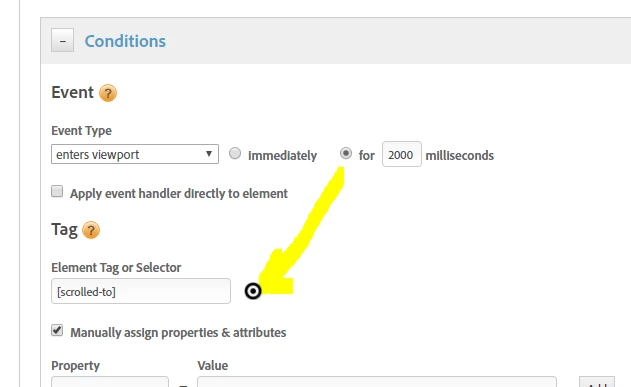
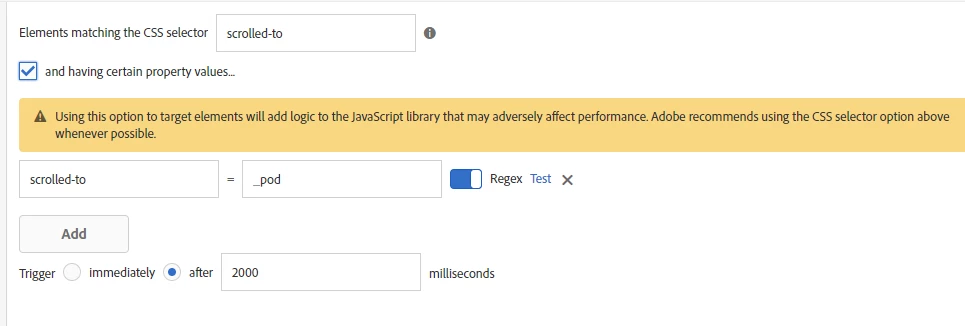
In DTM, there is a bulls-eye icon that you can click to help you find an element tag or selector (see screen shot 1). I don't see it in Launch (see screen shot 2). Is it coming later?

Screen Shot 1 :: DTM

Screen Shot 2 :: Launch

This post is no longer active and is closed to new replies. Need help? Start a new post to ask your question.
Best answer by thebenrobb

Unfortunate answer, probably not soon, and our engineering manager is very sad about that.  Our security team has concerns about that feature.  I don't understand the full technical details, but conceptually, in order to make that work, we have to get the content of the page and read through it in order to grab the css selector that identifies that element you click on.  That can be performed on internal company pages that have potentially sensitive information on it.  Which is bad.  We don't do anything nefarious with it, but just the fact that we can access it is bad.  So until we can figure out another way of doing that, that feature will not find a home in Launch.

6 replies

thebenrobb
Adobe Employee
thebenrobbAdobe EmployeeAccepted solution
Adobe Employee
September 8, 2017

Unfortunate answer, probably not soon, and our engineering manager is very sad about that.  Our security team has concerns about that feature.  I don't understand the full technical details, but conceptually, in order to make that work, we have to get the content of the page and read through it in order to grab the css selector that identifies that element you click on.  That can be performed on internal company pages that have potentially sensitive information on it.  Which is bad.  We don't do anything nefarious with it, but just the fact that we can access it is bad.  So until we can figure out another way of doing that, that feature will not find a home in Launch.
SarahEOwen
Level 9
September 8, 2017

Hmmmmm, that is too bad. Maybe the team that maintains the Visual Experience Composer (VEC) for Target can help address the security team's concerns. It seems like the Element Tag or Selector feature in DTM is the younger brother of the VEC feature in Target.

Thanks for always answering my questions so happily!

Sarah

jantzen_b
Adobe Employee
Adobe Employee
October 19, 2017

Sarah,

In the meantime, you can use a number of browser add-on's or the browser's built in tools to grab a CSS selector from an element on the page. Let me know if you want additional instruction on how to do it.

Thanks,
Jantzen

SarahEOwen
Level 9
October 19, 2017

Hi Jantzen.Belliston​ -

I would love to hear what browser add-on's you use

Thanks so much -

Sarah

jantzen_b
Adobe Employee
Adobe Employee
October 19, 2017

Personally, I just use Chrome's built in tools.

To use it:

  • Open the browser tools by right clicking and choosing "Inspect"
  • Choose the element selector tool (Cmd/Ctrl + Shift + C)
  • Click on the desired element
  • The HTML making up the element will be highlighted in the code window
  • Right click the highlighted line
  • Choose "Copy" --> "Copy Selector" from the dropdown
  • Paste that code into the box within DTM/Launch

Let me know if you need some screenshots.

-Jantzen

SarahEOwen
Level 9
October 19, 2017

Hi Jantzen.Belliston​ -

Ah - I do use "Inspect" but I didn't know about right click > copy > copy selector. Thanks for sharing that tip with me!

Have a great day -

Sarah