Angulartics2 with Launch Provider | Community
Skip to main content
Level 2
January 30, 2019
Solved

Angulartics2 with Launch Provider

  • January 30, 2019
  • 15 replies
  • 15550 views

I am looking for additional guidance around using Angulartics2 framework with the Launch, by Adobe provider to implement data collection for Adobe Analytics. I am able to make it work but I am looking for best practices, suggested patterns, success stories, reusable components, etc. Any help from experts is greatly appreciated. Thank you.

This post is no longer active and is closed to new replies. Need help? Start a new post to ask your question.
Best answer by Stewart_Schilling

Please take a look at the Data Layer Manager and AA Product String Builder extensions from Search Discovery.

The Data Layer Manager provides a standard way for applications to trigger Launch rules and to access the information in the data layer. It also cleanly handles the issues around asynchronous Launch load by de-queuing any events pushed prior to the Launch init.

I have an update coming very soon that will provide:

1) A new event type (Data Layer Push)

2) A new data element type (Context Aware Data Element) that ensures that application context is properly preserved when referencing a data layer value.

The interface from the application is pushing events onto a data layer array. For example, to trigger an event representing a "Product Added" (to cart), the following might be the application's action:

window.appEventData = window.appEventData || [];

This would trigger any rule that is configured to use the Data Layer Manager > Data Layer Push event with Event set to "Product Added".
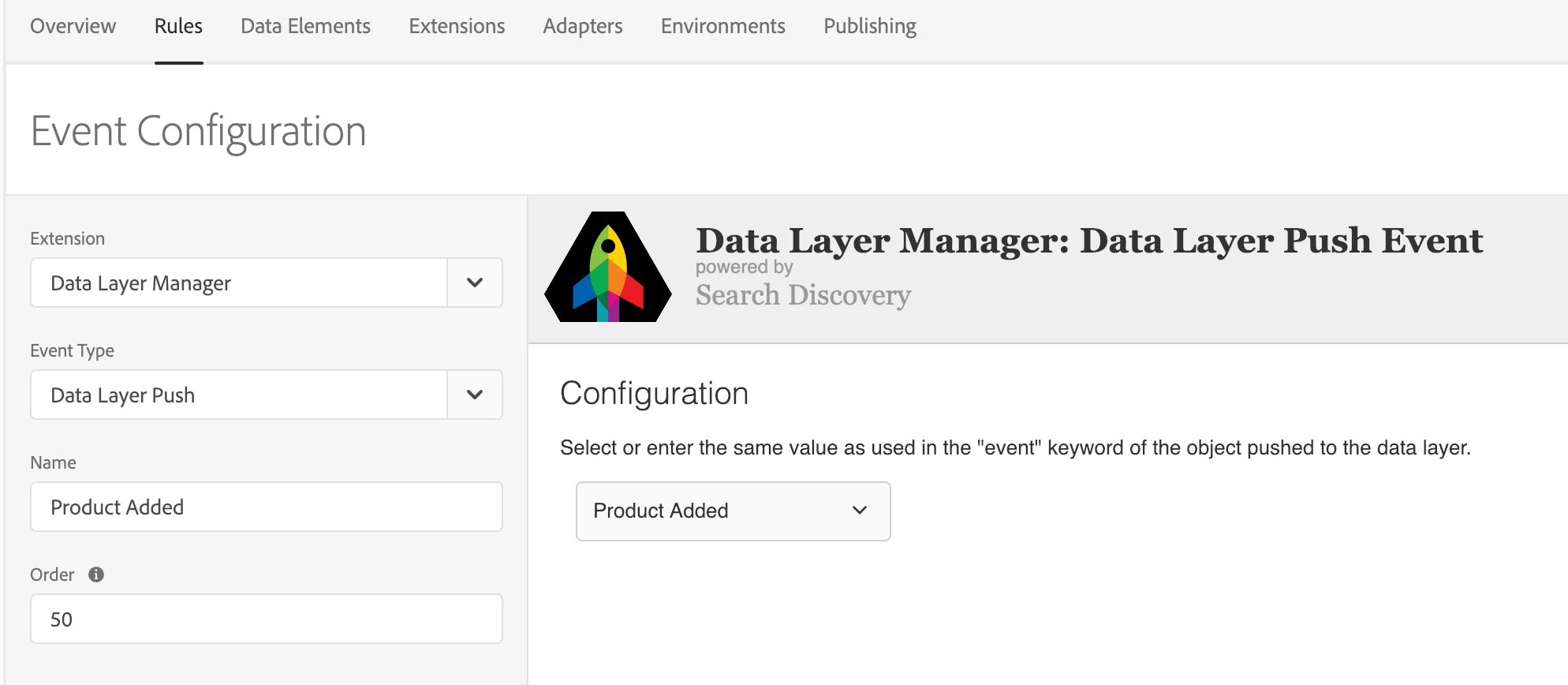
Launch can have as many rules as needed triggered off the event that was pushed (and using the payload data that was passed).  An example of an AA action sequence might have "AA: Clear Vars" > "AA: Set Vars" > "AA Product String: Set Vars" > "AA: Send Beacon".  The "AA: Set Vars" action would set the "prodView" event and any other simple "s" variables.

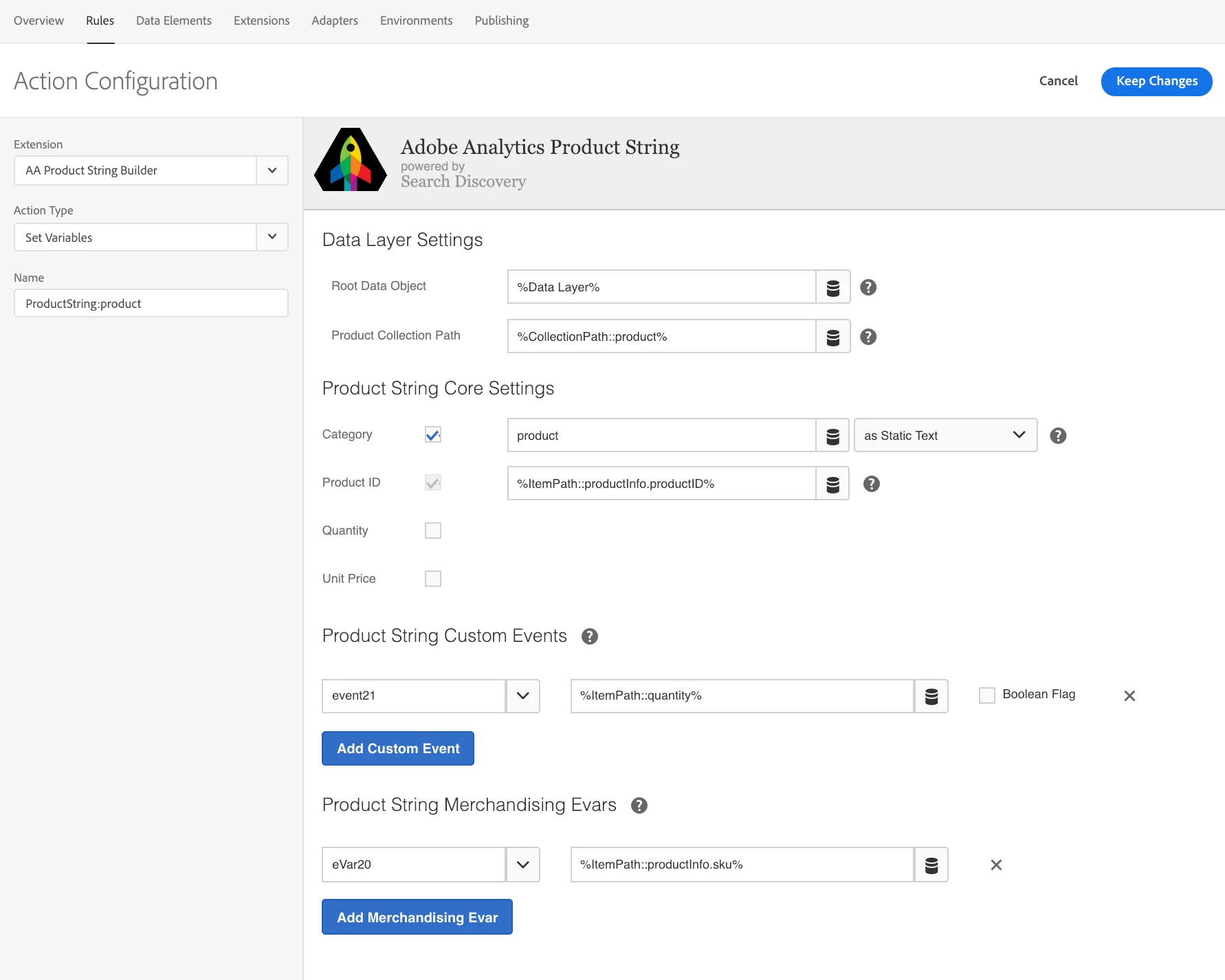
The "AA Product String: Set Vars" action would handle the Product String setup as below:
I think that if the Angularitics system included a configurable way of filtering the slew of Angular lifecycle events to those that we care most about and a way to transform scope into just the desired attributes the solution would be really strong.

15 replies

Stewart_Schilling
Community Advisor
Stewart_SchillingCommunity AdvisorAccepted solution
Community Advisor
January 31, 2019

Please take a look at the Data Layer Manager and AA Product String Builder extensions from Search Discovery.

The Data Layer Manager provides a standard way for applications to trigger Launch rules and to access the information in the data layer. It also cleanly handles the issues around asynchronous Launch load by de-queuing any events pushed prior to the Launch init.

I have an update coming very soon that will provide:

1) A new event type (Data Layer Push)

2) A new data element type (Context Aware Data Element) that ensures that application context is properly preserved when referencing a data layer value.

The interface from the application is pushing events onto a data layer array. For example, to trigger an event representing a "Product Added" (to cart), the following might be the application's action:

window.appEventData = window.appEventData || [];

This would trigger any rule that is configured to use the Data Layer Manager > Data Layer Push event with Event set to "Product Added".

Launch can have as many rules as needed triggered off the event that was pushed (and using the payload data that was passed).  An example of an AA action sequence might have "AA: Clear Vars" > "AA: Set Vars" > "AA Product String: Set Vars" > "AA: Send Beacon".  The "AA: Set Vars" action would set the "prodView" event and any other simple "s" variables.

The "AA Product String: Set Vars" action would handle the Product String setup as below:

I think that if the Angularitics system included a configurable way of filtering the slew of Angular lifecycle events to those that we care most about and a way to transform scope into just the desired attributes the solution would be really strong.

bobagrandAuthor
Level 2
January 31, 2019

Thank you,

I will take a look at these extensions, although it is a bit off topic. Angulartics allows to abstract direct calls and triggering events by decorating action controls with parameters to be captured for analytics. Your example may be implemented with Angulartics by decorating any clickable object (<div> in this case) as follows:

<div angulartics2On="click"

         angularticsAction="Product Added"

         angularticsCategory="Products"

         angularticsLabel="Product Added"

         angularticsValue="PI2345678"

         [angularticsProperties]="{quantity: '1', sku: 'SK12345678', sellingPrice: '72.67'}">

      Click here to add product

    </div>

Angulartics takes care of firing necessary calls invoking Launch rules behind the curtain. This syntax seems to reduce a risk of making programming mistakes and is easier to test. I am wondering if you or anyone at this forum can share their experience in using Angulartics. Thanks.

Urs_Boller
Community Advisor
Community Advisor
February 9, 2019

bobagrand

we are in progress of implementing analytics on several Angular websites, trying to use the mentioned extension.

While the clickevent provided by the extension works as expected, the basic "onRouteChange" is the problem. Well, it's not a problem itself, you run into issues when you want more information about the page than just a basic route name. the reason is that at this point the app just doesn't know anything what is fetched later asynchroniously...

I really like the idea stewarts16448458​ described above. using a datalayer and having an extension that listen to the datalayer might work better.

as far as I remember the Angulartics2 extension itself provides sort of a datalayer, but might be wrong about that...

maybe jexnerW4D​ can jump in and provide some knowledge?

bobagrandAuthor
Level 2
February 11, 2019

We implemented a data layer for Adobe Analytics without installing any additional extension for Launch. Angulartics2 can construct a payload with data layer but that is not required either. You can simply construct a data layer attached to DOM and let Launch translate all the variables into corresponding eVars and props. The key here is to construct and attach the data layer before Angulartics fires pageTrack or eventTrack event.

Stewart_Schilling
Community Advisor
Community Advisor
February 11, 2019

"The key here is to construct and attach the data layer before Angulartics fires pageTrack or eventTrack event."

This is one of the things that we set out to solve with the Data Layer Manager - By using a native JS Array at window scope, any application can push a data layer event regardless of whether Launch or the DLM has initialized. When DLM initializes, it inspects the array and processes any previously pushed events.   In the case of the Angulartics pageTrack and eventTrack events, if they simply pushed to the DLM array, then Launch could respond to the events triggered by the pushes.  

It's more of the GTM pattern - I wonder if you're already doing this when GTM/GA is your destination.

Gigazelle
Adobe Employee
Adobe Employee
February 15, 2019

Hi Boris, were Urs's and Stewart's answers able to get you where you needed?

bobagrandAuthor
Level 2
February 17, 2019

Not really, we deviated from the topic a little. I would like to keep the thread open.

Adobe Employee
February 28, 2019

Hi All,

My feeling is that we're talking about two fundamentally different approaches here. Both have their merits and use cases.

I'd like to help you further, bobagrand​, but I have to admit that I haven't yet worked with decorated HTML at all. I guess the question is how to access all the data in the decorated HTML inside your Launch Rules and Actions.

Sounds to me like a blog article I need to write once I worked it out...

Urs_Boller
Community Advisor
Community Advisor
June 14, 2019

just a short feedback from current progress with angular: we decided not to use the angulartics extension.

instead, the devs implemented the "appEventData" DataLayer and are pushing data as described. what looked promising in the beginning (easy setup of the extension and mapping to data elements and rules) might end up with a lot of work for the devs. what we see are a lot of "multi pageviews": same pages have up to 6 calls to the data layer, some are only triggering once (on first view).

to sum it up:

- link tracking works great with custom solution

- pageviews look great, except they are called either once or multiple times. waiting for fixes.

I might come back to this thread and provide a solution as soon as we have the final code ...

Stewart_Schilling
Community Advisor
Community Advisor
June 19, 2019

Can I assist you with the Data Layer Manager?