
Adobe Launch page load rules not firing on second page view | Community
Skip to main content
bellis0
Level 2
January 23, 2021
Solved

Adobe Launch page load rules not firing on second page view

  • January 23, 2021
  • 3 replies
  • 9885 views

Hi All,


Apologies for this being somewhat vague but we have not been able to pinpoint the reason for this very strange issue. The issue is that when a user first lands on our website everything is loading as expected, but after navigating to any other page on the site (the second page view), the majority of our page load rules do not fire. (Note: this is NOT a single page app, so page load is the correct trigger). Also to note, as soon as you navigate a second time and onward (3rd page view+) everything works fine again. 


I will be happy to share more specific information on the 3rd party tags that are associated with this issue, but I just wanted to throw this out there to see if anyone has experienced this before.

This post is no longer active and is closed to new replies. Need help? Start a new post to ask your question.
Best answer by Andrey_Osadchuk

Thank you for sharing the link!


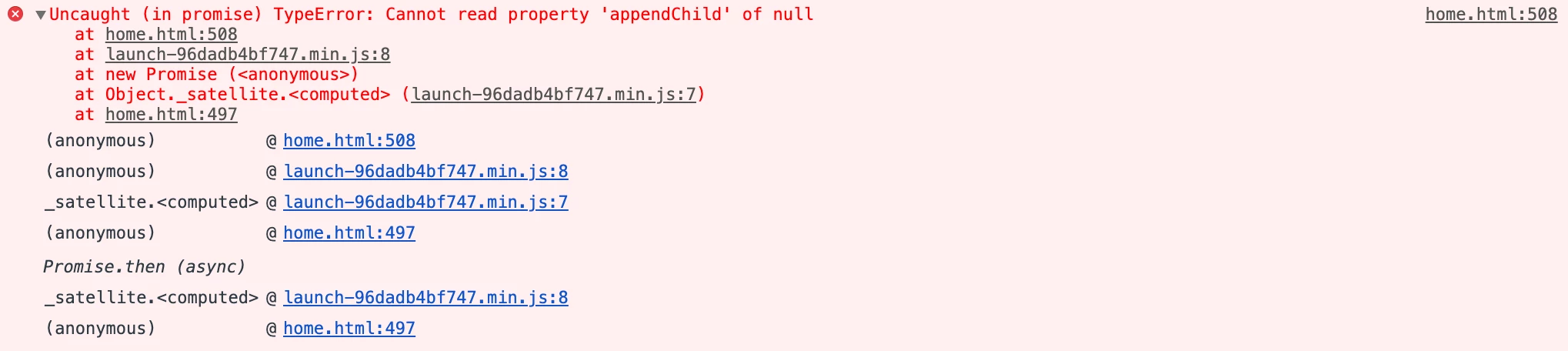
First, pay attention to the errors in the console. Here is what I could see on the first page

and the following error is on the contact us page (second page):


Regarding the tags that may fail to fire, I have looked at the setup with the Launch Inspector and did not find the rule "PL : Top : All Pages". However, there is a rule "PL : Top : All : All Pages" with some custom code that should fire gtag.


The 6th action in the rule looks as follows, is it the tag you were referring to as the failed tag?


if (_satellite.getVar("are Targeting Cookies Allowed")) { var currentTagName = "Performics Google Global Site Tag"; _satellite.setVar("Current Tag Name", currentTagName); _satellite.getVar("Tag Started"); _satellite.getVar("ctl.util.loadScript"); //Global site tag (gtag.js) _satellite.ctl.util.loadScript({ src: "//www.googletagmanager.com/gtag/js?id=DC-10006467", preLoad: function () { window.dataLayer = window.dataLayer || []; window.gtag = function (){dataLayer.push(arguments);} gtag("js", new Date()); gtag('config', 'DC-10006467'); gtag("config", "DC-9129572"); // PFX Global Site Tag gtag('config', 'AW-626667738'); // added 8/7/20 gtag('config', 'AW-608245086'); // added 8/31/20 } }); _satellite.setVar("Current Tag Name", currentTagName); _satellite.getVar("Tag Finished"); }


The call of "_satellite.ctl.util.loadScript()" looks quite odd. Do you know what this is and why this is used?

A similar call is also used in the 8th action too.


3 replies

yuhuisg
Community Advisor
Community Advisor
January 24, 2021

Are there any conditions in your page load rules?

When you enable Launch logging in the Adobe Experience Cloud Platform Debugger, do you get any log output about your page load rules on the 2nd pageview?

bellis0
bellis0Author
Level 2
January 25, 2021
In regard to the page load conditions, we have targeted 3 rules that are not firing correctly, and one that is technically firing but very few tags within the rule are actually working. For the first 3 rules, the conditions are mainly applying regex to the url and also based on our cookie compliance tool (fire if targeting cookies are allowed, etc. ). The rule that half the tags are working in is a page load TOP all pages without any conditions. An example of the strange behavior is that our Google Universal Analytics tag is in that rule and looks to be firing because we can see the script on the page, but the google account configuration is not working properly so gtag is not available on the page.
Andrey_Osadchuk
Level 10
January 25, 2021

Could you share a link?

bellis0
bellis0Author
Level 2
January 25, 2021
Hi Andrey, here is a link: https://www.lumen.com/es-ar/home.html. The issue is occurring on a handful of our international sites, such as this one. The issue can be best recreated incognito, and by closing the browser after every test. Upon hitting the home page, you can see a good representation of the number of tags that we have firing across the majority of the site. When you visit another page (contact us for example) you will see far less tags (easiest to see in Omnibug), but you will see that our PL : Top : All Pages rule does in fact fire (yet gtag is not loading/defined on the page).
Andrey_Osadchuk
Andrey_OsadchukAccepted solution
Level 10
January 25, 2021

Thank you for sharing the link!


First, pay attention to the errors in the console. Here is what I could see on the first page

and the following error is on the contact us page (second page):


Regarding the tags that may fail to fire, I have looked at the setup with the Launch Inspector and did not find the rule "PL : Top : All Pages". However, there is a rule "PL : Top : All : All Pages" with some custom code that should fire gtag.


The 6th action in the rule looks as follows, is it the tag you were referring to as the failed tag?


if (_satellite.getVar("are Targeting Cookies Allowed")) { var currentTagName = "Performics Google Global Site Tag"; _satellite.setVar("Current Tag Name", currentTagName); _satellite.getVar("Tag Started"); _satellite.getVar("ctl.util.loadScript"); //Global site tag (gtag.js) _satellite.ctl.util.loadScript({ src: "//www.googletagmanager.com/gtag/js?id=DC-10006467", preLoad: function () { window.dataLayer = window.dataLayer || []; window.gtag = function (){dataLayer.push(arguments);} gtag("js", new Date()); gtag('config', 'DC-10006467'); gtag("config", "DC-9129572"); // PFX Global Site Tag gtag('config', 'AW-626667738'); // added 8/7/20 gtag('config', 'AW-608245086'); // added 8/31/20 } }); _satellite.setVar("Current Tag Name", currentTagName); _satellite.getVar("Tag Finished"); }


The call of "_satellite.ctl.util.loadScript()" looks quite odd. Do you know what this is and why this is used?

A similar call is also used in the 8th action too.


Andrey_Osadchuk
Level 10
January 25, 2021
And pay attention to the IF condition in the custom code. The code will be executed only when _satellite.getVar("are Targeting Cookies Allowed") returns TRUE.