Tracking iOS Permission Request Alerts | Community
Skip to main content
October 2, 2020
Solved

Tracking iOS Permission Request Alerts

  • October 2, 2020
  • 2 replies
  • 1461 views

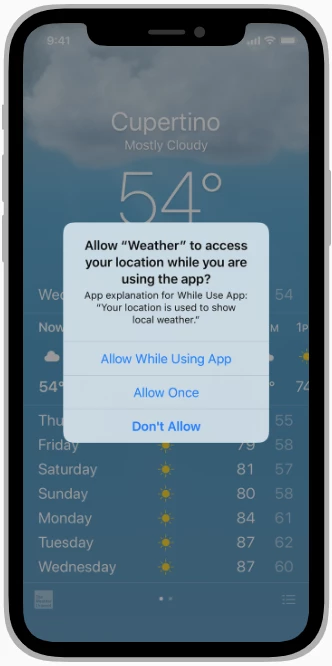
Is the AEP Mobile SDK capable of tracking user selections within system alerts?

For instance, can trackAction be called on the location permission options depicted in this screenshot? (i.e. "Allow While Using App", "Allow Once", "Don't Allow")
 

This post is no longer active and is closed to new replies. Need help? Start a new post to ask your question.
Best answer by SteveBe8

Hey @det2020 -

Most of the time a user's selection on OS prompts like requesting for permission will result in a call to a delegate method that the developer controls. 

In the case of location permission, the CLLocationManagerDelegate will be notified via the locationManagerDidChangeAuthorization: method.

In a delegate method like that, you can invoke any AEP Mobile SDK method you'd like.

Hope this helps!

-steveb

2 replies

SteveBe8Adobe EmployeeAccepted solution
Adobe Employee
October 2, 2020

Hey @det2020 -

Most of the time a user's selection on OS prompts like requesting for permission will result in a call to a delegate method that the developer controls. 

In the case of location permission, the CLLocationManagerDelegate will be notified via the locationManagerDidChangeAuthorization: method.

In a delegate method like that, you can invoke any AEP Mobile SDK method you'd like.

Hope this helps!

-steveb

Adobe Employee
October 2, 2020

Another helpful hint -> The Places extension holds the authorization status for a user in the extension's shared state. This shared state can be added as a Data Element in launch so that you can include the status in various workflows. 


The first image below shows how you can define a Data Element for Auth Status. The second image shows that you can use any data element in Launch workflows as a condition or part of an action (i.e. post back). 


How would this be valuable in a workflow? Let's say you want to optimize features in the app for users that have enabled location features. You can use the auth-status to create a segment for these users that can be used for messaging or to change the experience in the app.