Test Environment | Community
Skip to main content
Level 3
February 16, 2023
Solved

Test Environment

  • February 16, 2023
  • 2 replies
  • 2999 views

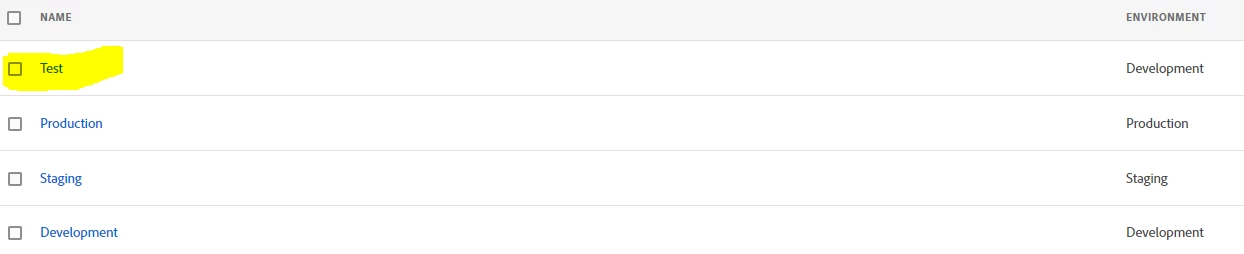
We have added extra environment that is Test Environment and share JS with developer. But in publishing flow i can move between dev, staging and production. How i can make sure Test script also work. When i moved to staging than acceptance link is working but test environment link is not working.


This post is no longer active and is closed to new replies. Need help? Start a new post to ask your question.
Best answer by Jennifer_Dungan

For a build that's in prod, whichever dev environment you built during the flow will still have that version of the code (that is until you build a new version of the code)...


But if you need to spool up a copy of your production scripts into your new "Test" dev environment, then just create a new library, choose "Test" from the environment drop down, give it a name and build it (all the prod resources and versions will be included as part of the "upstream" resources)


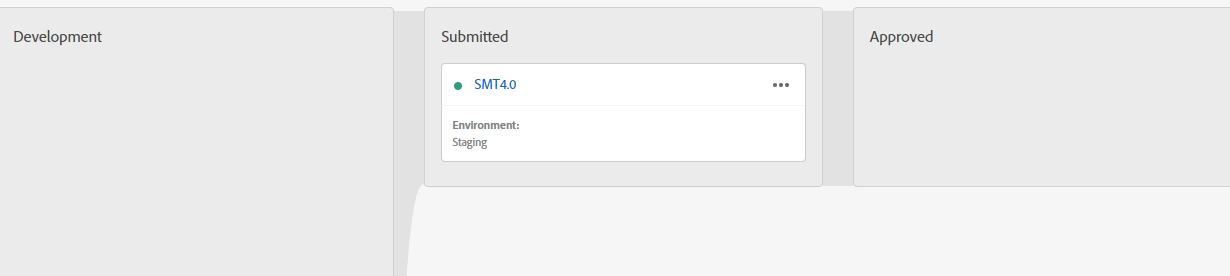
In the above flow, you don't need to add any resources. If you look at the library setting, there is a collapsed "upstream" resources.. if you expand this, you will see all the resources that are automatically part of the build.
2 replies

yuhuisg
Community Advisor
Community Advisor
February 16, 2023

Your "Test environment" would fall under Development. In AEP Tags (a.k.a. Adobe Launch), you can only create new environments under Development.

In your workflow, when you create a library, you need to assign an environment to it. So you'd assign "Test environment", so that your library's changes get loaded in your developers' websites.

Level 3
February 17, 2023

@yuhuisg 

@jennifer_dungan , i have this library in published (i think prduction), how i can ensure same works at test environment also


New Member
September 8, 2024

I just did a quick test to check this.

I created a new Launch property with 2 Development environments:

I checked that Publishing Workflow is empty.


So I created 2 libraries: Library 1 (using Dev1) and Library 2 (using Dev2). Both libraries don't have any Rules, Data Elements nor Extensions yet.


After saving and building these 2 empty Libraries, Publishing Workflow shows both of them with the green status.

Going back into Library 1, I add the Core extension, then save and build the library.

Library 2 is still empty and doesn't show any Extensions in its "Resources Upstream" section.


Now, with Library 1, I Approve & Publish to Production. So, Publishing Workflow shows Library 1 in Production. But notice now that Library 2 has an orange indicator. This means that Launch changed Library 2 when I published Library 1.

Opening Library 2, I now see the Core extension is in the "Resources Upstream" section.


So we have the answer to your query:


@chirag_madan wrote:

Hi @jennifer_dungan Thanks for detailed explication. I have one scenario, let’s say we have 2 dev websites with different dev codes.

 Dev website1: Dev env1

 Dev website2 : Dev env2


ruleA published on dev1>staging>priduction.


I didn’t used dev 2 as if now and it is not having any changes. Now when i go to dev website2 will it have the rule published in production in effect as per upstream concept or i have to explicitly create a nee library in and push it to dev 2 to check productioN changes.

The answer is Yes, Dev 2 will get Dev 1's published changes, even though Dev 2 has not been published yet.

This makes sense as the expected behaviour in Launch: all development libraries automatically get all published changes. Otherwise, having many "branches" will cause a lot of synchronisation and maintenance challenges.


Hi @yuhuisg thanks for doing extensive research. This is helpful. The scenario i mentioned was bit different. I was thinking if we have 2 dev environments created both placed on different dev websites. Now we made some changes to dev 1 and published the changes in production. Dev2 was never there in publishing flow. Now when i go to dev website2 where dev2 environment script is deployed, will it have the changes already published using dev1 in production. Not building even empty dev2 environment library.

Jennifer_Dungan
Community Advisor and Adobe Champion
February 16, 2023

So you can have multiple "development" environments, one staging environment and one prod environment.


When you go to publishing flow, in your development flow column, you can create multiple Libraries (in the environment drop down, all the available development libraries should be listed)


If any of your Dev environments already have a Library attached to it, they will appear greyed out in the dropdown.


You will need to create libraries for each "Development" environment.


This is most often used when you have multiple QA/Dev servers (you can create a build for QA1, a build for QA2, etc - and for multiple releases working in parallel where "change 1" may go before or after "change 2"... you can test the tracking in isolation and deploy in whatever order you need)... I suspect in your case, your developers have a separate development environment that they want more isolated from your QA changes?


If that's the case, you shouldn't need to promote your "Test" builds up any further than development.. but when your changes go to prod you will need to sync up your developer's version of the code to what is in production....

Level 3
February 17, 2023

@jennifer_dungan , i have this library in published (i think prduction), how i can ensure same works at test environment also


Jennifer_Dungan
Community Advisor and Adobe Champion
Jennifer_DunganCommunity Advisor and Adobe ChampionAccepted solution
Community Advisor and Adobe Champion
February 17, 2023

For a build that's in prod, whichever dev environment you built during the flow will still have that version of the code (that is until you build a new version of the code)...


But if you need to spool up a copy of your production scripts into your new "Test" dev environment, then just create a new library, choose "Test" from the environment drop down, give it a name and build it (all the prod resources and versions will be included as part of the "upstream" resources)


In the above flow, you don't need to add any resources. If you look at the library setting, there is a collapsed "upstream" resources.. if you expand this, you will see all the resources that are automatically part of the build.