Send props by data collection not work | Community
Skip to main content
June 9, 2022
Solved

Send props by data collection not work

  • June 9, 2022
  • 1 reply
  • 1516 views

Hello everyone, everything good?

I'm trying to send information through the data collection.
This information is a prop that should tell me if it's true or false.

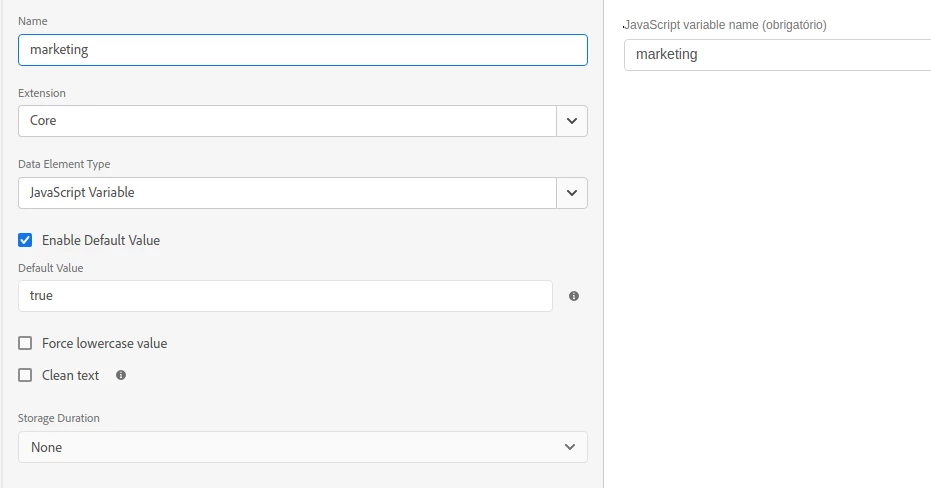
In the data collection I created a rule with "Core - Direct Call" event and in the actions I pointed to my prop2, I also created a "Data Elements" called "marketing":
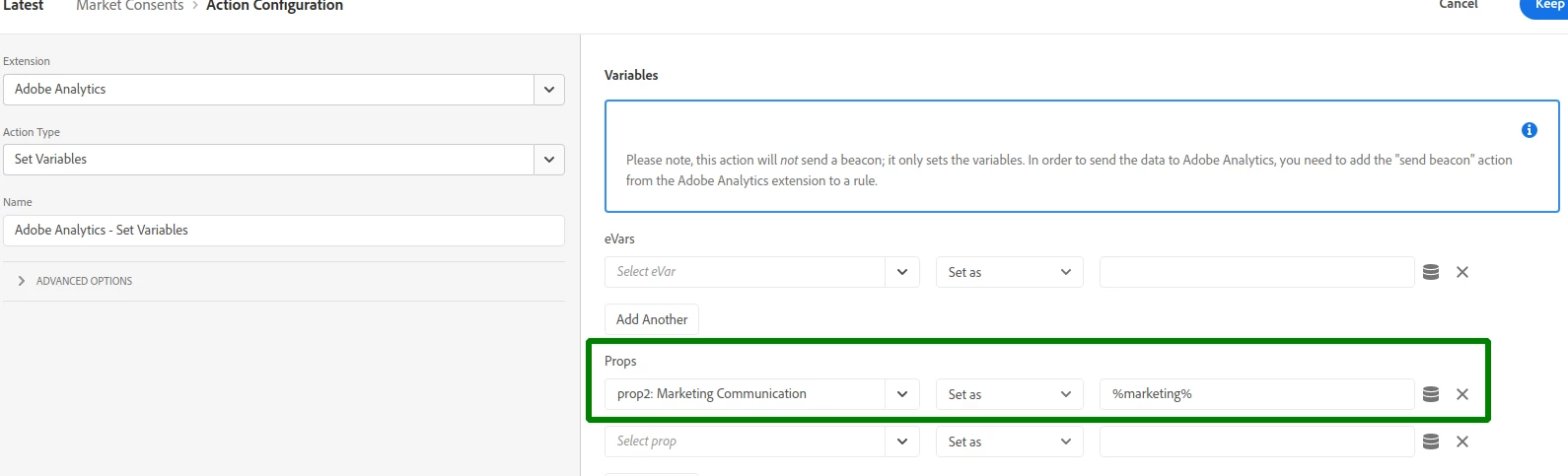
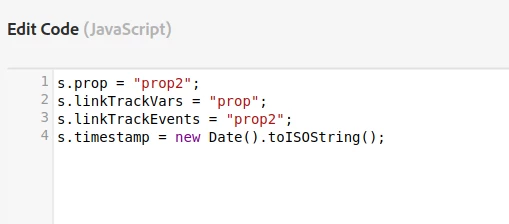
And in that same rule I put the following custom code:
and here is my data element:

When firing from the browser console I see that it sends the information:


But unfortunately this information does not arrive on the adobe dashboard.
Can anyone tell me what is wrong with this implementation?

This post is no longer active and is closed to new replies. Need help? Start a new post to ask your question.
Best answer by yuhuisg

You're doing it wrongly.

If you're able to set the prop/eVar/event/etc using the form in the "Set Variables" action, like what you've done in the first screenshot, then that's all you need. You don't need to set any custom code at all.

If you want to set it with custom code, though, then well, your code is wrong. It should be like this:

s.prop2 = _satellite.getVar('marketing');  // this sets your prop2 variable with the value returned by the "marketing" data element

s.linkTrackVars = 'prop2';
// ideally, you shouldn't set linkTrackVars like this, just in case linkTrackVars had already been set with some other value in another rule or action
// so the below is actually better:
s.linkTrackVars = s.apl(s.linkTrackVars, 'prop2');
// now, you'll also need to add the "apl" plugin, available from the Common Analytics Plugins extension
// if you don't want to use that extension, then the following works too:
if (s.linkTrackVars) {
s.linkTrackVars = [s.linkTrackVars, 'prop2'].join(',');
} else {
s.linkTrackVars = 'prop2';
} // finally, you don't need to set linkTrackEvents since you're not setting any success events

1 reply

yuhuisg
Community Advisor
yuhuisgCommunity AdvisorAccepted solution
Community Advisor
June 12, 2022

You're doing it wrongly.

If you're able to set the prop/eVar/event/etc using the form in the "Set Variables" action, like what you've done in the first screenshot, then that's all you need. You don't need to set any custom code at all.

If you want to set it with custom code, though, then well, your code is wrong. It should be like this:

s.prop2 = _satellite.getVar('marketing');  // this sets your prop2 variable with the value returned by the "marketing" data element

s.linkTrackVars = 'prop2';
// ideally, you shouldn't set linkTrackVars like this, just in case linkTrackVars had already been set with some other value in another rule or action
// so the below is actually better:
s.linkTrackVars = s.apl(s.linkTrackVars, 'prop2');
// now, you'll also need to add the "apl" plugin, available from the Common Analytics Plugins extension
// if you don't want to use that extension, then the following works too:
if (s.linkTrackVars) {
s.linkTrackVars = [s.linkTrackVars, 'prop2'].join(',');
} else {
s.linkTrackVars = 'prop2';
} // finally, you don't need to set linkTrackEvents since you're not setting any success events
FelipepgAuthor
June 14, 2022

Thank you very much for the answer and for the clarification, I did a test now with a console.log(s.prop2) and it brought the value I sent to adobe.


But this information still hasn't arrived on the dashboard, would you have any more configuration to do on the dashboard to present this result?

yuhuisg
Community Advisor
Community Advisor
June 15, 2022

Hmm, why is the "prop2" value being set as the boolean value true? Have you implemented this properly? Is your "marketing" data element really supposed to return that boolean value?

Please share the updated screenshots of your setup to help in troubleshooting.