Scroll Depth Tracking | Community
Skip to main content
srijithkumarkb
Level 2
July 19, 2019
Solved

Scroll Depth Tracking

  • July 19, 2019
  • 22 replies
  • 39853 views

I am trying to track percent page viewed on all pages using Adobe Launch. I am new to Adobe so could any one help me on how we have to implement this using Launch.Please help me with the steps on how to achieve this.

This post is no longer active and is closed to new replies. Need help? Start a new post to ask your question.
Best answer by kumararajak

Hi Srjith,

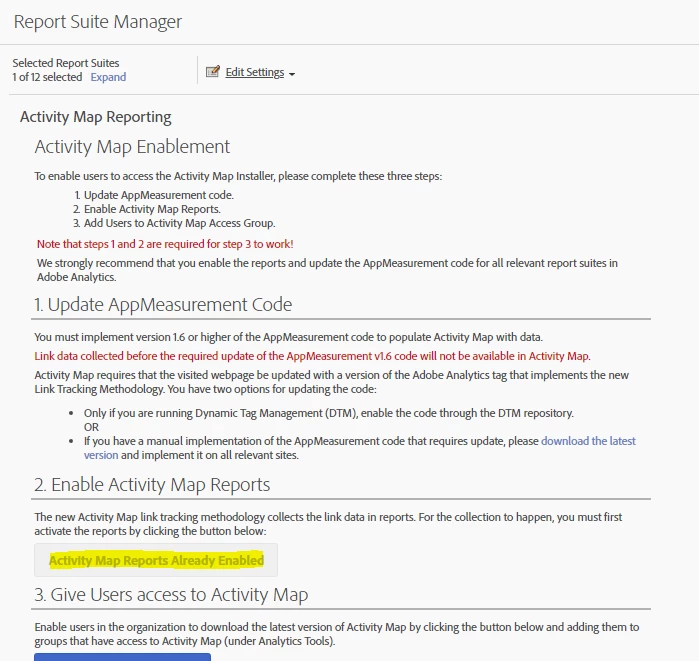
First, Update Your AppMeasurement (Javascript) Code to v1.6 (or higher) then
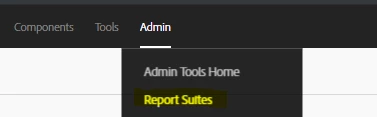
  1. Log in to Adobe Analytics and navigate to Analytics > [Admin > Report Suites > # > Edit Settings > Activity Map] > Activity Map Reporting .
  2. Activity Map collects the link data in Activity Map reports. For the activation to happen, you must first activate the variables by clicking Enable Activity Map Reports.This step adds all the Analytics dimensions that you need to collect data.
  3. After about an hour, check the Activity Map Page report, which shows all the pages where users clicked on a link.

22 replies

srijithkumarkb
Level 2
July 24, 2019

Hi Kumararaja,

Thanks for sending additional info regarding the % pageviewed, To capture the page load time can u give an expression how to capture the values in and evar or an event.

How do we declare the values that need to be captured in an eVar or would it be an event. (please provide an example)

****This is the custom script*****

function getPageLoadTime() {

if (typeof(performance) !== 'undefined' && typeof(performance.timing) == 'object') {

var timing = performance.timing;

// fall back to less accurate milestones

var startTime = performance.timing.redirectStart ||

performance.timing.fetchStart ||

performance.timing.requestStart;

var endTime = performance.timing.domContentLoadedEventEnd ||

performance.timing.domInteractive ||

performance.timing.domComplete ||

performance.timing.loadEventEnd;

if (startTime && endTime && (startTime < endTime)) {

return (endTime - startTime);

}

}

return 'data not available';

}

kumararajak
Level 5
July 24, 2019

Hi Srijith,

Please follow the steps below

Place the below code in the Plugin section

/* ******** Get page load plugins - start ******** */

function s_getLoadTime(){if(!window.s_loadT){var b=new Date().getTime(),o=window.performance?performance.timing:0,a=o?o.requestStart:window.inHeadTS||0;s_loadT=a?Math.round((b-a)/100):''}return s_loadT}

/* ******** Get page load plugins - end ******** */

Custom code

s.eVar01=s.prop01=s_getLoadTime();

if(s_getLoadTime())s.events=s.apl(s.events,'event01='+s_getLoadTime(),',',1);

I just provided 01 for sample, you please check and assign the number of the evar/prop and event as per your need/avaialability

Hope this helps.

Regards,

Kumararaja K

vinayp20414773
July 24, 2019

Hi,

Thanks for explaining it. I have implemented the same with Adobe Analytic Extension in Launch. Do I need to create a separate Rule after this or this will work globally with all the pages?

Regards,

kumararajak
Level 5
July 24, 2019

HI Vinay,

Its not mandatory to set rule to work globally with all pages. Its all depend on when you want to fire this.

Regards,

Kumararaja K

srijithkumarkb
Level 2
July 24, 2019

Thanks so much appreciated:)

kumararajak
Level 5
July 24, 2019

Dear Srijith,

Please mark correct if you got the information you needed to close out from unanswered.

Regards,

Kumararaja K

srijithkumarkb
Level 2
August 2, 2019

Hi Kumararajak

Thanks for the solution provided it worked. Do you know how do we integrate google marketing platform to adobe. Below are the things we need to track after integrating any help will be appreciated.

Track Advertising Campaign Impressions Served

Track Advertising Campaign Impressions Clicked

Track Information From Paid Advertising Platforms (Google Marketing Platform)

Track Information From The Trade Desk

Track Information From Affiliates (Nerdwallet, Etc.)

Track Information From Paid Social (Linkedin, Facebook, Twitter)

Track Costs From Advertising Integrations

kumararajak
Level 5
August 2, 2019

Dear Srijith,

Confiugre Last touch marketing channel,

Also, Try Adverstising analytics.

Regards,

Kumararaja K

srijithkumarkb
Level 2
August 13, 2019

Hi Kumararajak,

How do I enable activity map for all link clicks on all webpages. I am using adobe launch for the implementation.

please let me know the steps on tracking the link clicks using this feature

kumararajak
kumararajakAccepted solution
Level 5
August 13, 2019

Hi Srjith,

First, Update Your AppMeasurement (Javascript) Code to v1.6 (or higher) then
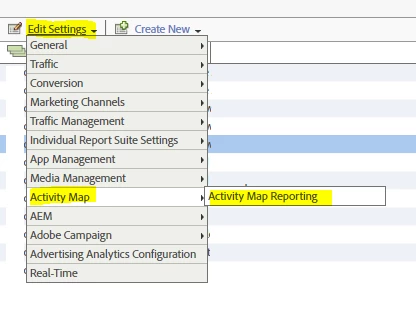
  1. Log in to Adobe Analytics and navigate to Analytics > [Admin > Report Suites > # > Edit Settings > Activity Map] > Activity Map Reporting .
  2. Activity Map collects the link data in Activity Map reports. For the activation to happen, you must first activate the variables by clicking Enable Activity Map Reports.This step adds all the Analytics dimensions that you need to collect data.
  3. After about an hour, check the Activity Map Page report, which shows all the pages where users clicked on a link.