Production Environment - Use Linked DTM Embed Code option cannot be saved? | Community
Skip to main content
May 28, 2018
Solved

Production Environment - Use Linked DTM Embed Code option cannot be saved?

  • May 28, 2018
  • 4 replies
  • 3229 views

Hi

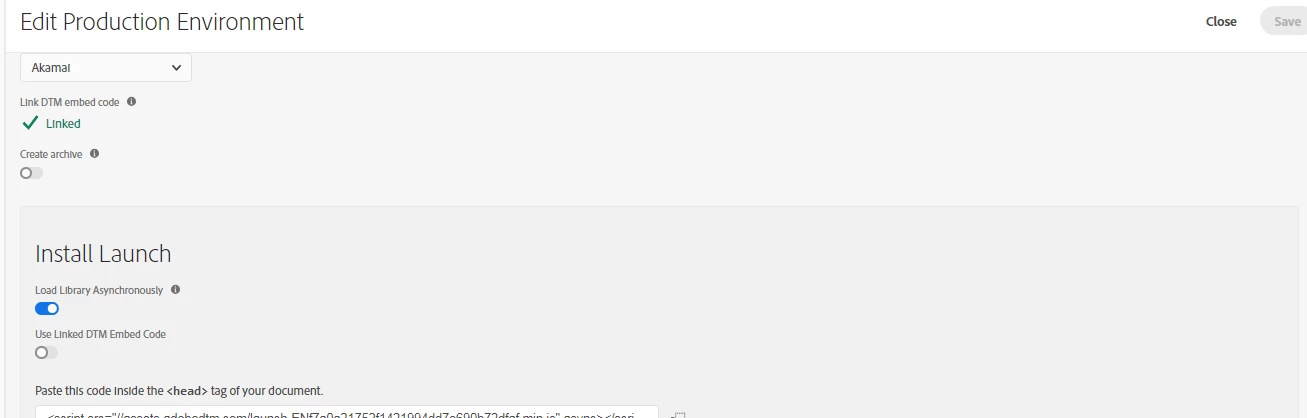
After I created the prduction environment which is linked to DTM embed code. Under Install Launch I turned on Use Linked DTM Embed Code, obviously. But it would not allow me to save the the change, then I selected crate archive and then deselected it just to have the save button to turn blue and then I clicked on Save.

and then I went back to it, it showed the Use Linked DTM Embed Code is off.
This post is no longer active and is closed to new replies. Need help? Start a new post to ask your question.
Best answer by seburke1

@dexterl58973421

The use DTM embed code is a visibility toggle.  Once it's linked as you did when you created the environment.  Launch will publish to that embed code as well as its own.  The toggle just shows you what the dtm embed code was so you could use it again if you wish.  This is a common question and we are looking at revisiting the ui to clear this up.

I hope that helps,

Seth

4 replies

Gigazelle
Adobe Employee
Adobe Employee
November 16, 2018

Hi Dexter, were you able to resolve this issue?

vargas515
February 26, 2019

I am having this same problem. Was this ever resolved?

seburke1Adobe EmployeeAccepted solution
Adobe Employee
February 26, 2019

@dexterl58973421

The use DTM embed code is a visibility toggle.  Once it's linked as you did when you created the environment.  Launch will publish to that embed code as well as its own.  The toggle just shows you what the dtm embed code was so you could use it again if you wish.  This is a common question and we are looking at revisiting the ui to clear this up.

I hope that helps,

Seth

vargas515
February 26, 2019

It does. I realized that after I sent out that question. Thanks!