Premium eVar - Unable to Select | Community
Skip to main content
Level 3
November 14, 2019
Solved

Premium eVar - Unable to Select

  • November 14, 2019
  • 5 replies
  • 6875 views

Hi Experts,

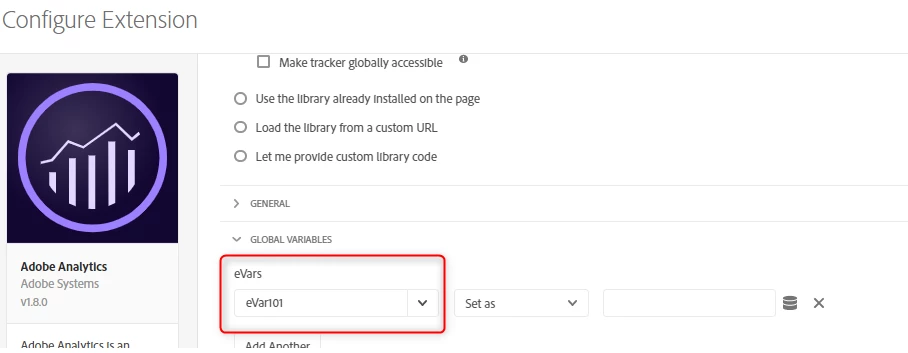
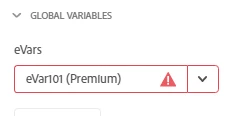
Please let me know why I'm not able to select eVar101 (premium) inside Launch - Adobe Analytics extension. (refer screenshot below)
Thanks,

PV

This post is no longer active and is closed to new replies. Need help? Start a new post to ask your question.
Best answer by prathiv23

Hi All,

Issue resolved.

  • This issue is caused by a change in the new release of the Analytics extension (v1.8.0).
  • There is however a relatively easy workaround: you can type the name of the variable manually (just do not include the tag "(Premium)")
  • Please type only eVar101( removing the word 'premium')

5 replies

prathiv23Author
Level 3
November 14, 2019

Hi @Andrey Osadchuk. 

Can you please help me on this issue ?

Please note that I do have Premium membership inside Adobe Experience Cloud.

Thanks

PV

Level 2
November 14, 2019

Hi Prathiv,

It seems there is an issue with the Adobe contract type sync. I will suggest please contact your adobe account manager or Customer care.

Regards

Karandeep Singh

prathiv23Author
Level 3
November 14, 2019

Hi @karandeeps66682857

Thanks for the heads-up.

Strangely, the issue is happening for single property present inside Launch

I can select 'premium eVars' in other Launch properties

Thanks,

PV

KDSingh14
Level 3
November 15, 2019

Hi Prathiv,

That is quiet strange. Can you please in incognito mode and check if that helps.

Regards

Karandeep Singh

prathiv23AuthorAccepted solution
Level 3
November 18, 2019

Hi All,

Issue resolved.

  • This issue is caused by a change in the new release of the Analytics extension (v1.8.0).
  • There is however a relatively easy workaround: you can type the name of the variable manually (just do not include the tag "(Premium)")
  • Please type only eVar101( removing the word 'premium')