
Not able to attach not used Environment to Library | Community
Skip to main content
OscarMartinezM
Level 3
May 27, 2022
Solved

Not able to attach not used Environment to Library

  • May 27, 2022
  • 1 reply
  • 1725 views

Hi all, 

I have a property having around 40 environments created for Development. Also, the property has around 10 libraries with environments attached and published in Development stage.

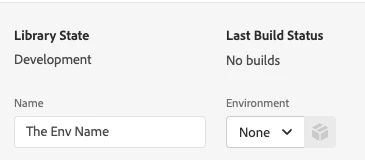
But, when I try to create a new Library, I get no Environments to select, the input for selecting is empty.

The thing is, I need to publish changes for a site that is currently using an Adobe Launch file URL that matches one of the non-used development environments. So I created this new Library for publishing the changes, but as I said before, I'm not able to attach environment.
 

Thank you, 


This post is no longer active and is closed to new replies. Need help? Start a new post to ask your question.
Best answer by yuhuisg

Try the following:

  1. Restart your browser, then try again.
  2. Log out of your Adobe account, (optionally delete all "adobe.com"-related cookies in your browser,) then log in, then try again.
  3. Try again in a private browser window.

If all of those fail, then contact Client Care to help you to resolve this.

1 reply

yuhuisg
Community Advisor
yuhuisgCommunity AdvisorAccepted solution
Community Advisor
May 28, 2022

Try the following:

  1. Restart your browser, then try again.
  2. Log out of your Adobe account, (optionally delete all "adobe.com"-related cookies in your browser,) then log in, then try again.
  3. Try again in a private browser window.

If all of those fail, then contact Client Care to help you to resolve this.

OscarMartinezM
Level 3
May 30, 2022

Hi! Thank you for your response.


So, it means environment should appear on list? There is no real reason for not being in there? (Steps 1-3 already done). 

yuhuisg
Community Advisor
Community Advisor
May 30, 2022

Correct. As far as I know, there is no real reason for your environments to not be in there.