Need advice on AEP Datastream ID changing/switching for an action | Community
Skip to main content
January 25, 2024
Solved

Need advice on AEP Datastream ID changing/switching for an action

  • January 25, 2024
  • 2 replies
  • 1734 views

Need advice on the AEP Datastream ID switching. 

Three Datastream IDs were created that are for the below services.
1. Datastream ID 1st - for Target service only 

2. Datastream ID 2nd - for AEP service only

3. Datastream ID 3rd - for (Target + AEP) service

These 3 datastream IDs were created for a consent point of view on the web page. The consent banner has options for enabling and disabling Target and AEP.

Based on the consent given, the AEM team applied logic for appearing relevant Datastream ID on the page.

Let me explain the issue with one scenario - 
1. A user lands on the web page the first time and consent banner appears and user accepts for TARGET only. 
for the scenario Datastream ID appearing correct(Target enabled Datastream ID) in server call. fine
2. After few minutes the same customer goes to cookie page and change consent again (e.g. disabled TARGET and enable AEP).   

As soon as the consent button is clicked after changing the consent option (e.g. disabled TARGET and enabled AEP) the previous Datastream id is apprearing still on the page but after loading the page manually, ID is correctly showing. issue

Kindly advise for any method for changing/switching Datastream ID as soon as consent button is clicked with different options.


NOTE: Page is not loading after clicking on consent banner. we are not using Adobe Launch. alloy.js directly set into the page.

Thanks

This post is no longer active and is closed to new replies. Need help? Start a new post to ask your question.
Best answer by cmcbride_adobe

What version of alloy.js are you using? Datastream overrides are only supported since v2.18.0 and other overrides in v2.16.0. Your error makes me think you are using a version older than v2.16.0

You can check this with 

alloy("getLibraryInfo").then(data => console.log("Alloy version: ", data.libraryInfo.version)) 

2 replies

V_Sirish_Kaushik1
Level 4
January 26, 2024

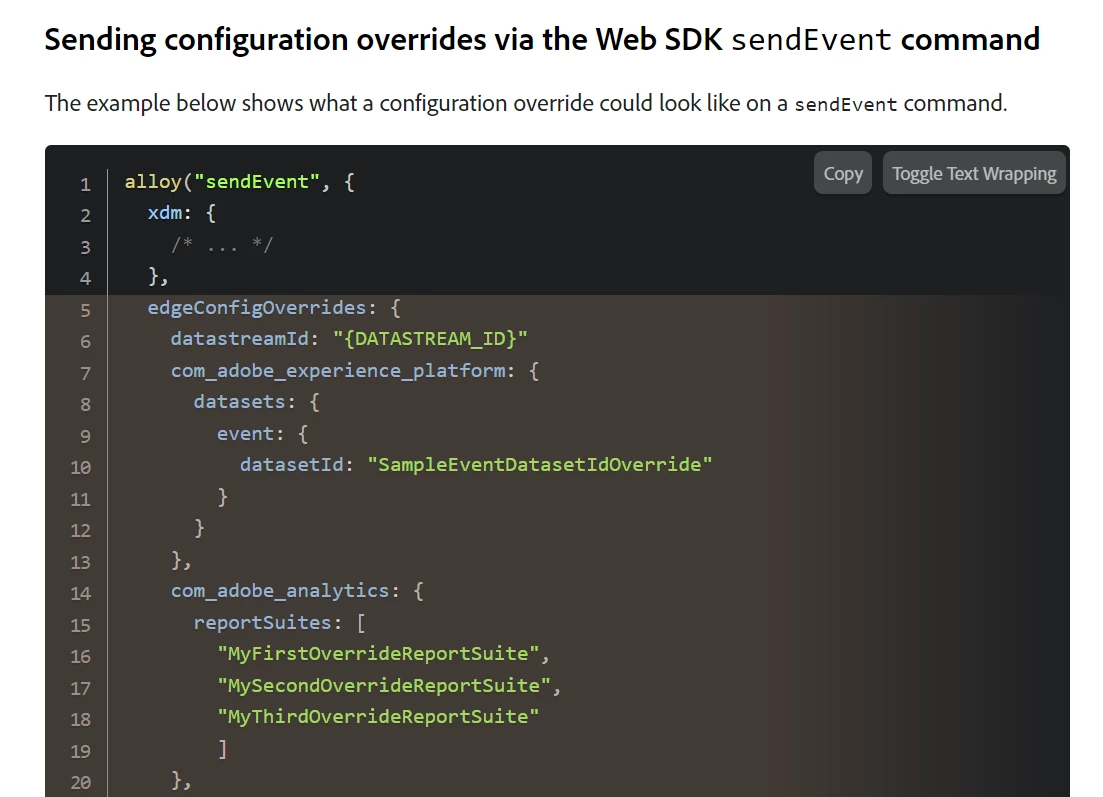
Are you utilising this for overriding datastream? 


This documentation might help. 

https://experienceleague.adobe.com/docs/experience-platform/datastreams/overrides.html?lang=en

NiBa1Author
January 29, 2024

Hi @v_sirish_kaushik1 

Considered this method but showing up below error when an action happened.

Uncaught (in promise ) Error:  [alloy] Invalid sendEvent command 
- Error: 'edgeConfigOverrides' : Unkown field.

Kindly advise on that.

NOTE: We are not using Adobe Launch. we directly inject the alloy.js on the page.

cmcbride_adobe
Adobe Employee
cmcbride_adobeAdobe EmployeeAccepted solution
Adobe Employee
February 7, 2024

What version of alloy.js are you using? Datastream overrides are only supported since v2.18.0 and other overrides in v2.16.0. Your error makes me think you are using a version older than v2.16.0

You can check this with 

alloy("getLibraryInfo").then(data => console.log("Alloy version: ", data.libraryInfo.version)) 

NimashaJain
Adobe Employee
Adobe Employee
February 6, 2024

@niba1 Did you find the suggested solutions helpful? It would be great if you can  mark the answer as correct for posterity. If you have found out solution yourself, share it with wider audience in the community.