Launch page load Rule is firing twice on one page load. | Community
Skip to main content
New Member
May 2, 2023
Solved

Launch page load Rule is firing twice on one page load.

  • May 2, 2023
  • 4 replies
  • 2305 views

Hi,

I can see the launch page load rule is firing twice in the debugger on one page load. I have put two Event: Window loaded and Data Element Change. If both the events are met, then the server call is firing twice. Please suggest if i should remove one of the event from the rule or there is another workaround. Attached is the screenshot of the rule.
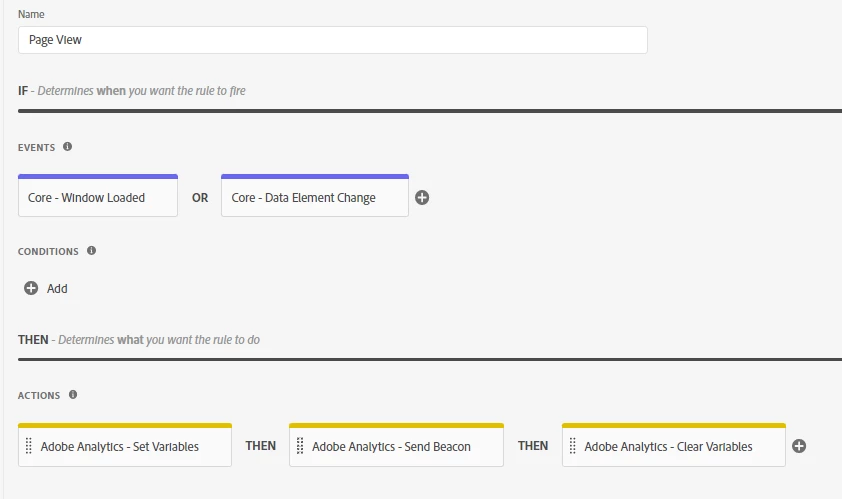
Regards

Akshay

This post is no longer active and is closed to new replies. Need help? Start a new post to ask your question.
Best answer by leocwlau

So from your description, it seems like the window load event is unnecessary. Assuming your website is a single-page-application website, if your website uses a common SPA framework such as ReactJS or Angular where each view should have a history change event you can use, then you don't need to monitor the page name data element.

You must confirm if the page name data element will change even on the initial page load. This is a  common issue for SPA applications should the first page view be tracked by page load event, history change event, or data element change event.

4 replies

ranjithd
Level 4
May 3, 2023

In your example, it appears that your rule is set up to fire when both the "Window Loaded" and the "Data Element Change" events occur. If both of these occurrences occur on the same page load, the rule may be triggered twice.

You might explore a few alternative workarounds:

Remove one of the events: If you can achieve the same functionality with only one of the events triggering the rule, you might want to consider eliminating the other event to avoid duplicate firing.

You may add a condition to the rule that restricts it from triggering multiple times on the same page load. For example, you might add a condition to the rule that only allows it to fire if a custom data element that tracks whether the rule has previously fired is not set.

Use an alternative event: Depending on the goal of the rule, you might be able to use a different event that is less likely to trigger numerous times on the same page load. You might, for example, implement a custom event that is only triggered when a certain action on the page is taken.


leocwlau
Community Advisor and Adobe Champion
May 5, 2023

What data element change you are monitoring? Since this rule has two events, it is just working as expected that it will trigger twice or even more depending on how many times that data element had changed.

New Member
May 5, 2023

I am monitoring the page name change in the data element. and it is happening once on every page.

leocwlau
Community Advisor and Adobe Champion
leocwlauCommunity Advisor and Adobe ChampionAccepted solution
Community Advisor and Adobe Champion
May 9, 2023

So from your description, it seems like the window load event is unnecessary. Assuming your website is a single-page-application website, if your website uses a common SPA framework such as ReactJS or Angular where each view should have a history change event you can use, then you don't need to monitor the page name data element.

You must confirm if the page name data element will change even on the initial page load. This is a  common issue for SPA applications should the first page view be tracked by page load event, history change event, or data element change event.