latest Launch rule not firing | Community
Skip to main content
April 11, 2023
Solved

latest Launch rule not firing

  • April 11, 2023
  • 3 replies
  • 1350 views

I'm testing the Launch rule in the dev enviornment, however for some reason it doesn't show me the latest changes. I have double checked that its the correct library I'm using via Debugger, however still clueless. Just to be sure that its the code not 'sync'd' fully, Is it possible to see through browser console which rule version I currently see on the webpage?


This post is no longer active and is closed to new replies. Need help? Start a new post to ask your question.
Best answer by dwright-adobe

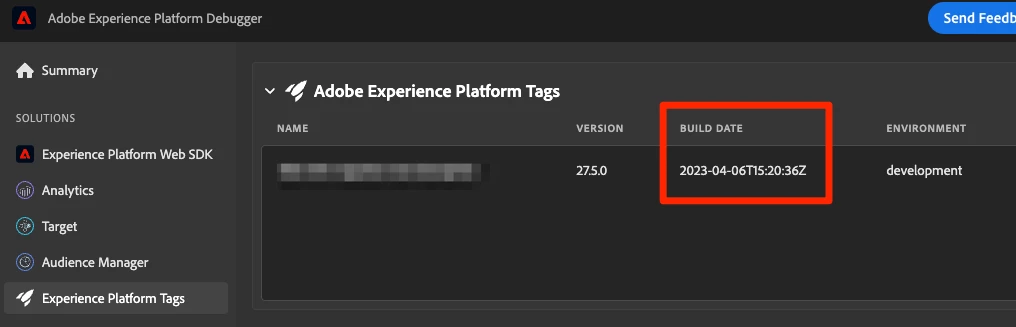
Did you check the build date of the library? Also, check the Publishing Flow page in tags/Launch to see if there were any build errors. Also double-check that you added the changes you are expecting to the library. Sometimes I forget! 😄 


3 replies

dwright-adobeAdobe EmployeeAccepted solution
Adobe Employee
April 11, 2023

Did you check the build date of the library? Also, check the Publishing Flow page in tags/Launch to see if there were any build errors. Also double-check that you added the changes you are expecting to the library. Sometimes I forget! 😄 


yuhuisg
Community Advisor
Community Advisor
April 11, 2023

Do you get the same issue if you test your website in a private browser window?

Alexis_Cazes_
Level 10
April 14, 2023

Sometime Adobe Launch can take an insane amount of time to sync (i.e: 1h) to production once you fully done your publish. It happens from time to time in our company.


Best solution is to keep hard reloading your page or using incognito browser and use this command in developer console `_satellite.buildInfo` , the `buildDate` property will correspond to last time the library was updated in production