Inflated page name eVar migrating from DTM to Launch | Community
Skip to main content
Level 4
September 4, 2020
Solved

Inflated page name eVar migrating from DTM to Launch

  • September 4, 2020
  • 2 replies
  • 2281 views

Hi everyone!

We recently migrated from DTM to Launch.

We save our page name to eVar1. What we've noticed since migrating is that on pages where there are events firing e.g. direct call rules or clicks, the number of unique visitors to eVar1 is a great deal higher than the unique visitors to the page name dimension.
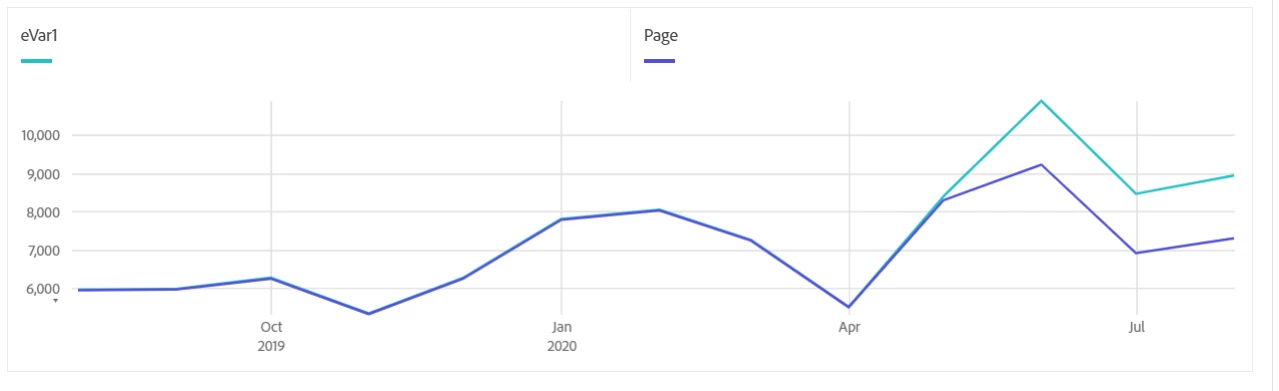
There haven't been any changes to the configuration of the events other than having to add in the clear variables action in the Launch rules so that the events string is reset after an event is fired.

I can't work out what is going on here.

Any help would be greatly appreciated.


This post is no longer active and is closed to new replies. Need help? Start a new post to ask your question.
Best answer by Brian_Johnson_

Hi, @philipk92120636 -

Have you been able to work this out? If not...

When looking at the network calls in real time (network tab, Adobe debugger...), do you see the visitor ID value changing between the page call and the event call(s), or does it stay the same? Is there any custom logic used to generate the event call(s), or do they use Launch's standard "send beacon" action?

2 replies

Brian_Johnson_
Brian_Johnson_Accepted solution
Level 8
September 16, 2020

Hi, @philipk92120636 -

Have you been able to work this out? If not...

When looking at the network calls in real time (network tab, Adobe debugger...), do you see the visitor ID value changing between the page call and the event call(s), or does it stay the same? Is there any custom logic used to generate the event call(s), or do they use Launch's standard "send beacon" action?

Level 4
September 17, 2020
When I review the calls on the page the visitor ID maintains the same value from the original page view hit across the link tracking calls on the page. I'm using the standard 'Send Beacon' action. There's one page load rule that sets all the variables and a direct call rule that fires on completion of different sections of the form. Both set variables, send beacon, and then clear variables. The direct call is an s.tl() call.
jantzen_b
Adobe Employee
Adobe Employee
September 24, 2020
Were you able to solve this issue? If so, would you mind posting the solution so others that find this thread have the answer?
