How to update Event in analytics template in XDM custom code section for Update Variable? | Community
Skip to main content
December 23, 2024
Solved

How to update Event in analytics template in XDM custom code section for Update Variable?

  • December 23, 2024
  • 1 reply
  • 767 views

I'm trying to figure out how to update an analytics event, when using the analytics template, within the update variable action.
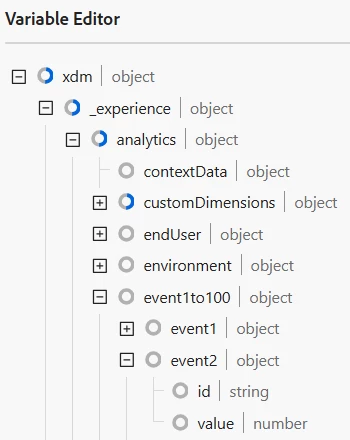
 

I tired something like this:


content._experience = content._experience || {};
content._experience.analytics.event1to100 = content._experience.analytics.event1to100 || {};
content._experience.analytics.event1to100.event2.value = 1;


But I get an error: Failed to execute "Update variable" for "MY_Test" rule. Cannot set properties of undefined (setting 'value') TypeError: Cannot set properties of undefined (setting 'value')


Not sure what I'm missing here? I'm able to update props.


content._experience = content._experience || {};
content._experience.analytics.customDimensions.props = content._experience.analytics.customDimensions.props || {};
content._experience.analytics.customDimensions.props.prop1 = "Updated Prop1 Value";
content._experience.analytics.customDimensions.props.prop3 = "Updated Prop3 Value";

Thanks!

This post is no longer active and is closed to new replies. Need help? Start a new post to ask your question.
Best answer by user10962

I figured it out. You have to take it to the specific event:


content._experience = content._experience || {};
content._experience.analytics.event1to100.event2 = content._experience.analytics.event1to100.event2 || {};
content._experience.analytics.event1to100.event2.value = 1;

1 reply

user10962AuthorAccepted solution
December 23, 2024

I figured it out. You have to take it to the specific event:


content._experience = content._experience || {};
content._experience.analytics.event1to100.event2 = content._experience.analytics.event1to100.event2 || {};
content._experience.analytics.event1to100.event2.value = 1;

bjoern__koth
Community Advisor and Adobe Champion
January 9, 2025

alternatively, skipping the XDM schema, you could also leverage the data.__adobe.analytics object


content.__adobe = content.__adobe || { }; content.__adobe.analytics = content.__adobe.analytics || { }; let s = content.__adobe.analytics; s.events = "events2"; // no linkTrackVars or linkTrackEvents needed // also, you can set your props here s.prop3 = "Updated Prop3 Value";

Which approach to choose is a general question to decide on.

I personally try to avoid using the XDM fieldgroup by any means, just because it makes your life so complicated.

Either you come up with data elements for everything or, like in your case, try to fill it with custom code and leaving you with this crazy bloated data structure.


Up to you 😉


Cheers from Switzerland!