How to identify which tag implementation (DTM or Launch) configured for a site. | Community
Skip to main content
October 25, 2018
Solved

How to identify which tag implementation (DTM or Launch) configured for a site.

  • October 25, 2018
  • 5 replies
  • 8270 views

I just want to know which adobe tag implementation (DTM or Launch) is used for a website using JS script.

This post is no longer active and is closed to new replies. Need help? Start a new post to ask your question.
Best answer by gflare

There's a few different things you could use.  Personally I love ' _satellite.property.name ' because it returns the name of the Launch Property directly.

However, just according to the official launch documentation, you could use _satellite.buildInfo .

_satellite.buildInfo has various pieces of information within, and contains items specific to turbine.

from: https://docs.adobelaunch.com/client-side-information/launch-object-reference

Example Values

{

  turbineVersion: "14.0.0",

  turbineBuildDate: "2016-07-01T18:10:34Z",

  buildDate: "2016-03-30T16:27:10Z",

  environment: "development"

}

5 replies

Adobe Employee
October 25, 2018

Hi eldhov19157560​,

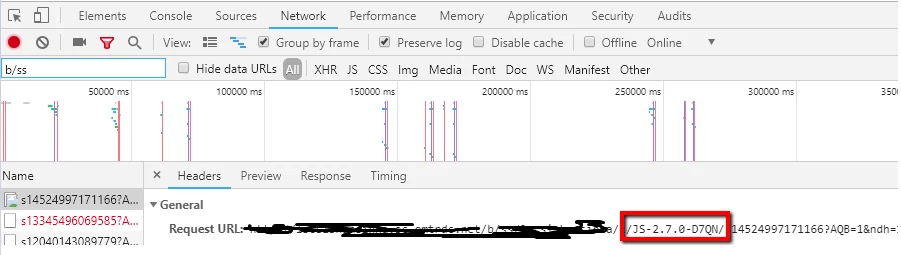
You can check the code version in the server call/image request triggering to Analytics to know the tag implementation. In DTM, you will find something starting with 'D' (as shown in screenshot below), whereas in Launch, you will find something starting with 'L'.

Hope it helps!

October 25, 2018

Thanks for the information.

But this is not sufficient for my use case, I am currently working on an automated tool to debug the tag implementations.

I am looking for something like   '_satellite.' variable or any other variables which can be accessed from JS console.

I can check the dtm/launch script tag from the page view source (..assets.adobedtm.com/launch or assets.adobedtm.com), but in this case also there is an issue. If we migrate DTM to Launch using the upgrade to option then the script tag still pointed to old DTM not the Launch script.

gflareAccepted solution
October 25, 2018

There's a few different things you could use.  Personally I love ' _satellite.property.name ' because it returns the name of the Launch Property directly.

However, just according to the official launch documentation, you could use _satellite.buildInfo .

_satellite.buildInfo has various pieces of information within, and contains items specific to turbine.

from: https://docs.adobelaunch.com/client-side-information/launch-object-reference

Example Values

{

  turbineVersion: "14.0.0",

  turbineBuildDate: "2016-07-01T18:10:34Z",

  buildDate: "2016-03-30T16:27:10Z",

  environment: "development"

}

October 26, 2018

But the buildInfo is only available for Launch.

So, we have add a condition

if 'buildInfo' or '_satellite._container' is not undefined then it is Launch implementation  otherwise it is DTM implementation.

Is this the only option available?

October 26, 2018

From official documentation standpoint, yes I believe that's your only option (checking for the existence of turbine, basically).

I would avoid '_satellite._container' , just from a general practice standpoint.