How to have a IF-THEN-ELSE condition in the UI mapping about datastream | Community
Skip to main content
Level 3
February 4, 2025
Question

How to have a IF-THEN-ELSE condition in the UI mapping about datastream

  • February 4, 2025
  • 4 replies
  • 2423 views

Hi all, 
in this interface in AEPabout datastream mapping:
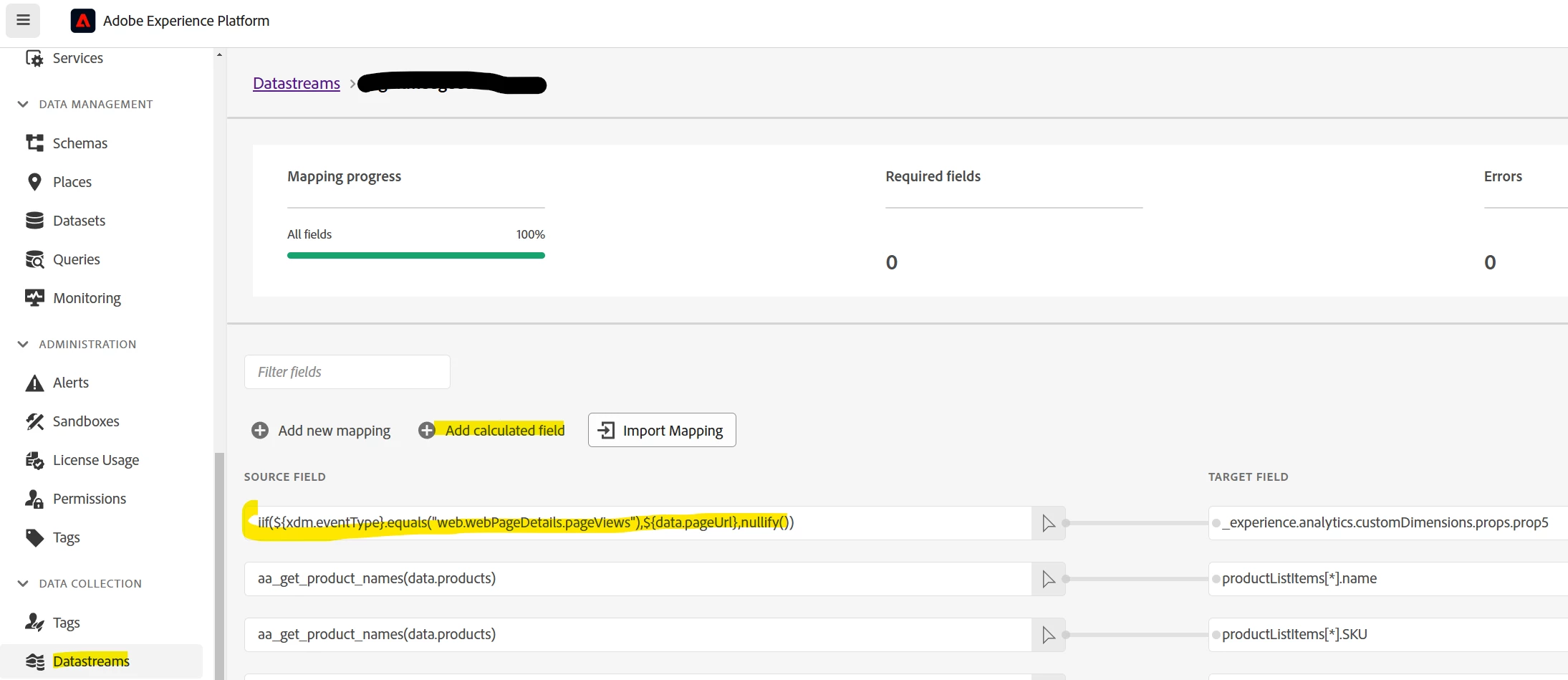


I'm trying to have a IF THEN ELSE condition. My goal is to have the value of data.pageUrl mapped to prop5 only if xdm.eventType = web.webPageDetails.pageViews
So I created a calculated field with the condition 
iif(${xdm.eventType}.equals("web.webPageDetails.pageViews"),${data.pageUrl},nullify()) 

But the output is not working as expected: not only the field mapped (prop5) is null, multiple others attributes also inherit of this. They are empty.
So I try by adapting the function:
iif(${xdm.eventType}.equals("web.webPageDetails.pageViews"),${data.pageUrl},"")

iif(${xdm.eventType}.equals("web.webPageDetails.pageViews"),${data.pageUrl},null)

iif(${xdm.eventType} == "web.webPageDetails.pageViews",${data.pageUrl},nullify())

  
Do you have any idea of the reason of this? According to the doc, it should only impact the target field....

Does one of you also need to play with a if-then-else condition?


Thanks in advance


Robin

4 replies

Level 3
February 4, 2025

I did an extra test with the following condition:
iif(${xdm.eventType}.equals("web.webPageDetails.pageViews"),"true","false")

The target field is the prop5 of Adobe analytics.
As result in Adobe Analytics I have this:

So the condition is working when it's true but nothing about the false ....

Is the IIF different than the IF ?


Jennifer_Kunz
Adobe Champion
Adobe Champion
February 4, 2025

I've had similar issues, where "", null, and nullify() all throw errors (eg, The source field iif(xdm.web.webPageDetails.name.equals("Subscribe"),1,"") is null or not found) when the condition isn't matched. BUT... for me it has only ever affected that field. The errors don't seem to affect anything, really, they're just annoying when doing validation in the debugger or in assurance. 
These have worked for me (I find things have worked better for me without the $ and curly brackets, though I can hardly claim to know why or recommend it as a best practice):

iif(xdm.eventType.equals("articleComplete"),1,"")
iif(matches_regex(xdm.web.webPageDetails._tenantID.attributes.articlePrimaryTopic,".*"),xdm.web.webPageDetails._tenantID.attributes.articlePrimaryTopic,xdm._tenantID.users.profile.events.topicFollowed)

...Other than they cause the seemingly-harmless error I mentioned before. Is that error ("Source field is null or not found") what you are getting?

Harveer_SinghGi1
Community Advisor
Community Advisor
February 5, 2025

Hi @robinl39529461 ,

The logic you are using is missing an additional check for cases where xdm.eventType = web.webPageDetails.pageViews but data.pageUrl does not exist, in this case the logic will work but still return a null in true case.

To fix this you need to first check if the source field contains any value and then run the remaining logic on it, like below,


iif(contains_key("data.pageUrl") && xdm.eventType.equals("web.webPageDetails.pageViews"), data.pageUrl, nullify()) //or iif(contains_key("data.pageUrl") && xdm.eventType == "web.webPageDetails.pageViews", data.pageUrl, nullify())


This should fix the issue.

Cheers!

Level 3
February 6, 2025

Thanks both for helping on this.

The iif function is working as expected, I was wrong.

The issue is coming from a different calculated field in the mapping of my datastream. 

This one: 

aa_get_product_names(data.products)  


data.products is not always present and/or populated in the input json file, and apparently the function doesn't like it.

I removed this mapping from my datastream and all was ok but when I added it back, it went wrong again (others attributes are set to empty).

So now I'm trying to check if the attribute exists or not to call this function but it still wrong.

Here is the code I used to validate if the attribute is present:

iif(contains_key("data.products"), aa_get_product_names(data.products), nullify())


But I have to complete the condition because sometime, it's present but empty... could it cause issue ?

So I tested it like this but it's still not ok:

iif(contains_key("data.products") && (data.products!=""),aa_get_product_names(data.products), nullify())

Do you have any experience with the function aa_get_product_names?
I used this one because my input attribute looks like this:
"products": ";insurance"

Many thanks in advance
 

Robin

akrumins
Level 2
May 21, 2025

Hi,

I tried this but it still doesn't work.
No idea of the reason but the function aa_get_product_names is causing side effect (call incomplete).
To test this, I removed if from the mapping datastream and all was back to normal.
So I tried also to manage the product mapping using context data, like this:

iif((contains_key("data.products") && data.formName!="" && data.products!="" && data.products!=null), data.products, nullify())

mapped to those target field:
=> productListItems[*].name 
=> productListItems[*].SKU

but not working also. Maybe because I want to map a string to an array ???
The funny part is that if I test this way, it's ok:
iif((contains_key("data.products") && data.formName!="" && data.products!="" && data.products!=null), "Robin", "Sonika")


But I still don't get my real input data....
The solution was to adapt the structure of the json file to avoid to have to map it in datastream UI.
It's done like this and all is ok now:

            "productListItems": [{

                "name": "Pizza",

                "SKU": "Pizza"

            }],

Be careful that [ and ] are needed to be considered as an array and it works:


So no idea why was the explanation but at least I was able to make it works using a different way to send the data.


Thanks a lot for your help and all your propositions


Robin


@robinl39529461 wrote:


No idea of the reason but the function aa_get_product_names is causing side effect (call incomplete).


Hi team,


The AEP Error Response "Transformer internal error" and call incomplete occur because the function aa_get_product_names() requires a string, even if the iif() conditions are false. 

So, my recommended solution is to use the concat() function to join data.products and an empty string. That way the required string for aa_get_product_names() will always be met whether or not the field is present. i.e.,:

iif(contains_key("data.products"), aa_get_product_names(concat(data.products,"")), nullify())


kautuk_sahni
Community Manager
Community Manager
February 17, 2025

@robinl39529461 Did you find the suggestions helpful? Please let us know if you need more information. If a response worked, kindly mark it as correct for posterity; alternatively, if you found a solution yourself, we’d appreciate it if you could share it with the community. Thank you!

Kautuk Sahni