How to create three different click events in a single rule and identify in custom code which element triggered the click? | Community
Skip to main content
Level 2
December 13, 2024
Solved

How to create three different click events in a single rule and identify in custom code which element triggered the click?

  • December 13, 2024
  • 2 replies
  • 1437 views

I have created three different element click events in one rule and want to retrieve the currently triggered element in custom code.


This post is no longer active and is closed to new replies. Need help? Start a new post to ask your question.
Best answer by Harveer_SinghGi1

Hi @prasanthv , you should be able to achieve this using the event object and some custom code.


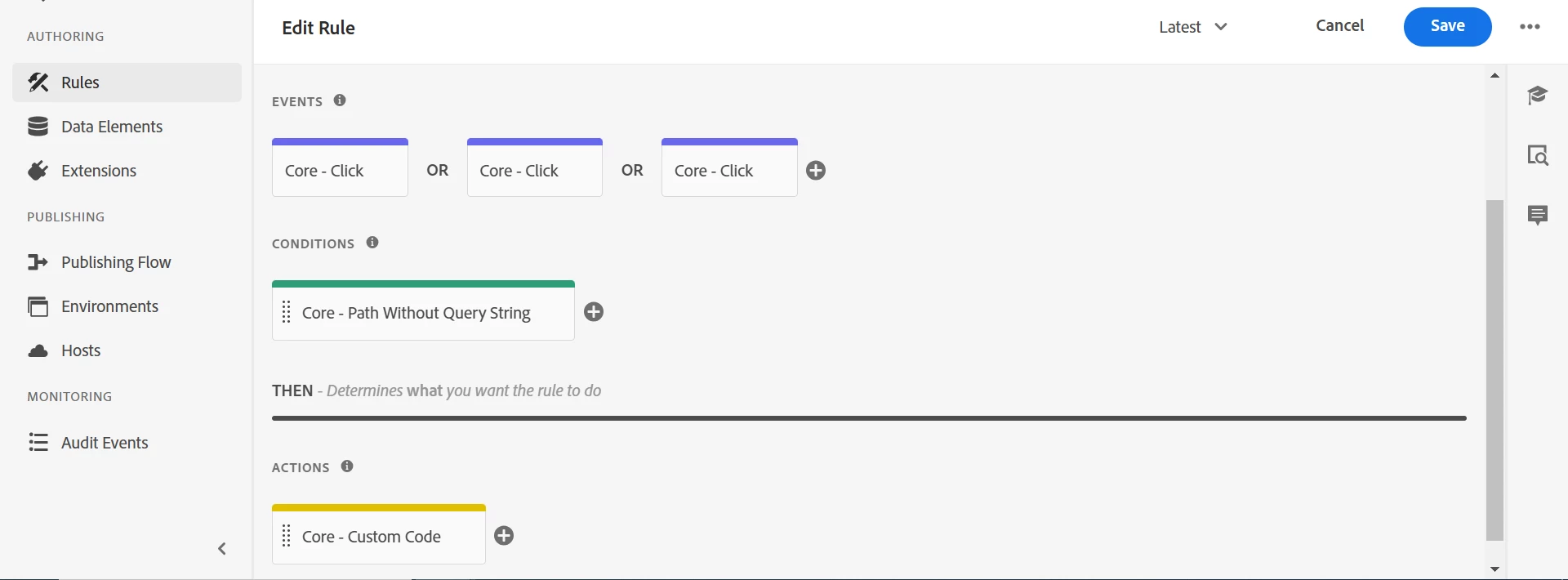
A very simple example, I set up a rule with three click events using 3 different element IDs as selectors,


  • Click Event 1: Uses ID "carousel-43c8d133ed-item-2122a9f81a-tab"
  • Click Event 2: Uses ID "carousel-43c8d133ed-item-da32481ec8-tab"
  • Click Event 3: Uses ID "carousel-43c8d133ed-item-5f1778b56a-tab"

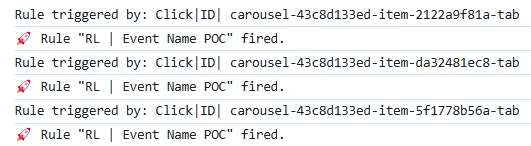
Then in rule actions I can use event.element.id to identify which of these events triggered the rule like below,


console.log("Rule triggered by: Click|ID|", event.element.id);


And it worked prefectly,


As I said, this is a very simple example, you can utilize event object based on the event triggers that you are using.
 

2 replies

Gokul_Agiwal
Community Advisor
Community Advisor
December 13, 2024

Hi @prasanthv  What is your use case? can you elaborate more 


In case if you just to understand from 3 different element, which element has clicked and get that value - you can write a small JS snippet like below. 

Suppose - you have 3 buttons with tag name called button 

<button>0</button> <button>1</button> <button>2</button>


and then you can iterate through them with using onClick function 

var buttons = document.getElementsByTagName('button'); for (var i = 0; i < buttons.length; i++) { (function (i) { buttons[i].onclick = function () { alert("button " + i + " was clicked"); } }(i)); }

Here is the test fiddle : https://jsfiddle.net/x697pymu/ 

Check this once.

Thanks

PrasanthVAuthor
Level 2
December 16, 2024

Hi Gokul,


Thank you for your prompt response.


It is a single page application, On page load, the three buttons are not rendered yet. The button will display only when the modal is shown.


The rule gets triggered if i create the click event using the Adobe event type.


Please let me know if you need more details.

Gokul_Agiwal
Community Advisor
Community Advisor
December 16, 2024

Hi @prasanthv  So are you using Web SDK for your implementation? Send Event method? Or is it normal implementation having Adobe analytics extension?  

Harveer_SinghGi1
Community Advisor
Harveer_SinghGi1Community AdvisorAccepted solution
Community Advisor
December 17, 2024

Hi @prasanthv , you should be able to achieve this using the event object and some custom code.


A very simple example, I set up a rule with three click events using 3 different element IDs as selectors,


  • Click Event 1: Uses ID "carousel-43c8d133ed-item-2122a9f81a-tab"
  • Click Event 2: Uses ID "carousel-43c8d133ed-item-da32481ec8-tab"
  • Click Event 3: Uses ID "carousel-43c8d133ed-item-5f1778b56a-tab"

Then in rule actions I can use event.element.id to identify which of these events triggered the rule like below,


console.log("Rule triggered by: Click|ID|", event.element.id);


And it worked prefectly,


As I said, this is a very simple example, you can utilize event object based on the event triggers that you are using.


PrasanthVAuthor
Level 2
December 18, 2024

Hi Harveer,

Thank you for your valuable response!