Capturing a quantity value after click | Community
Skip to main content
December 2, 2020
Solved

Capturing a quantity value after click

  • December 2, 2020
  • 1 reply
  • 2110 views

Hello,

We have a feature on our website where visitors can add our products to their cart, with a specified quantity for each part.  What I'm trying to do is capture the value entered after a visitor clicks the Add to BOM button.  Here is a link to one of our product pages.  


I'm fairly new with Launch, and have been struggling on how to set up a rule.  Any feedback/suggestions would be appreciated.


Thank you!


This post is no longer active and is closed to new replies. Need help? Start a new post to ask your question.
Best answer by Brian_Johnson_

@robertw54618073 

At a high level, you'd need to create a rule that fires when either the"click" event occurs on the button, or "submit" event occurs on the form where the button is found. The selectors for these elements are, from what I found, "a.btn.add-btn" and "form.ng-valid.ng-dirty.ng-valid-parse", respectively.


To pick up the quantity value, you'll want to use a data element to grab the value. I'd start with the following config:


  • Extension: Core
  • Data Element Type: DOM Attribute
  • Storage Duration: None
  • CSS Selector: input[ng-model='quantity']
  • Use the value of: Value

In your rule, reference the data element to get hold of the quantity. From there, do whatever you need with it.


Note: The selectors I've suggested are based on limited knowledge of the site, so it's possible (likely?) you'll need to come up with more reliable options. If a suitable ID can be added to the button and text box elements, that would make this much easier for you going forward.

1 reply

Brian_Johnson_
Brian_Johnson_Accepted solution
December 2, 2020

@robertw54618073 

At a high level, you'd need to create a rule that fires when either the"click" event occurs on the button, or "submit" event occurs on the form where the button is found. The selectors for these elements are, from what I found, "a.btn.add-btn" and "form.ng-valid.ng-dirty.ng-valid-parse", respectively.


To pick up the quantity value, you'll want to use a data element to grab the value. I'd start with the following config:


  • Extension: Core
  • Data Element Type: DOM Attribute
  • Storage Duration: None
  • CSS Selector: input[ng-model='quantity']
  • Use the value of: Value

In your rule, reference the data element to get hold of the quantity. From there, do whatever you need with it.


Note: The selectors I've suggested are based on limited knowledge of the site, so it's possible (likely?) you'll need to come up with more reliable options. If a suitable ID can be added to the button and text box elements, that would make this much easier for you going forward.
December 3, 2020

@brian_johnson_

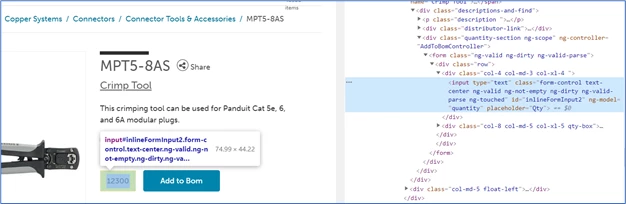
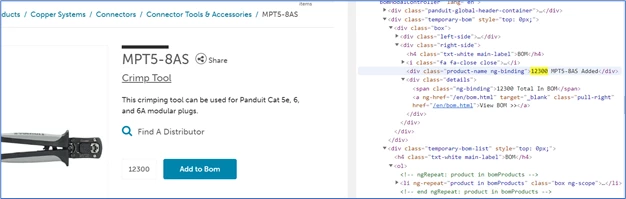
Thank you for your response!  I tried a few options but cannot get the eVar to collect the appropriate quantity values once the submit button (Add to BOM) is clicked.  One thing I noticed is after a visitor clicks Add to BOM, the product quantity entered does not appear in the code in the quantity field box.  (first image below)  However, there is a notification near the top of the page that says quantity entered, along with the product number.  (second image below) 

Could the CSS Selector you mentioned be changed to:  div.product-name_ng-binding ?