Hey MktgCloudUser,
I'm going to guess a bold assumption here, but I think it's likely the issue: "Is that a Core - Custom Code Action Block?" If it is, then hooray we've found the issue! If not, just ignore this long post 
Unfortunately, using a custom code action in this manner will not work for the population of values on click events (or any trigger that is not page top or page bottom - since that code is provided with-library). Adobe launch does not wait for any response or completion of custom code actions, so you've got a race condition going on (which always loses, since Postscribe is pretty inefficient compared to other activities in this chain). It simply writes the code to be executed and then moves on to the next action right away, before the code actually executes.
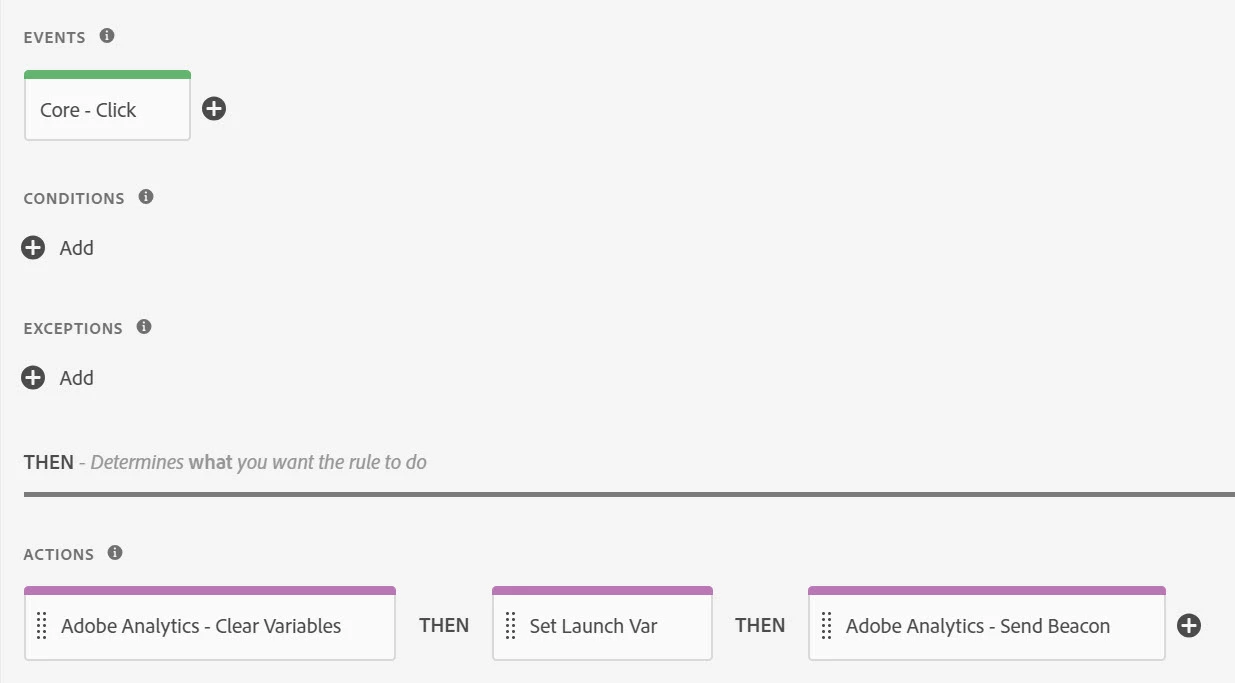
So right now, here's your Rule Action order:
1. Clear Variables
2. Begin postscribe for your custom code (starts writing your non-minified custom code block into the DOM!)
3. Send Beacon runs (this is where your LinkType, LinkName, LinkURL is being populated from)
4. Your postscribed custom code is finally getting around to executing, which is too late to be included in the send beacon (it's already gone)... Also, you clear vars first everytime too, so if you try to fire the rule again it'll clear out and postscribe again, so you'll get no custom variables each and every time a beacon is sent.
The main reason this cannot work within Launch is that the Action of executing Custom Code is never done in a controlled synchronous manner unless included in library (Launch doesn't know that your code needs to return something, nor does it get a callback when it completes). If you want to set variables and still be within the controlled order of Adobe Launch operations, you need to use something that Launch waits for.
I'd recommend one of the following approaches instead (both of these are examples where Adobe Launch waits for a response before continuing to further actions.
Option 1: Using the Action Node from Analytics: Analytics Set Variables
Whether you use a data element within here, or the custom code section at the bottom, Adobe Launch knows it needs to hold off every further Analytics Extension Action until it completes, simply because it's an Analytics Set Variables type node. This will allow you time to complete all your code and set the Vars before the beacon call action happens.
Option 2: Using the Conditions area of the Rule, and then making it return true
This one works in the same way, whether you engage a data element, or use custom code directly it will still work because Adobe Launch knows it needs to wait for a response before letting other Actions or Rules fire. You will have to adjust how you clearVars in order to do this - since this would happen before the actions.
Hopefully this helps answer the questions... and I sure hope I guessed right about that Custom Code action block.