Cannot set analytics report suite in Adobe Launch | Community
Skip to main content
Level 2
May 14, 2019
Solved

Cannot set analytics report suite in Adobe Launch

  • May 14, 2019
  • 5 replies
  • 4313 views

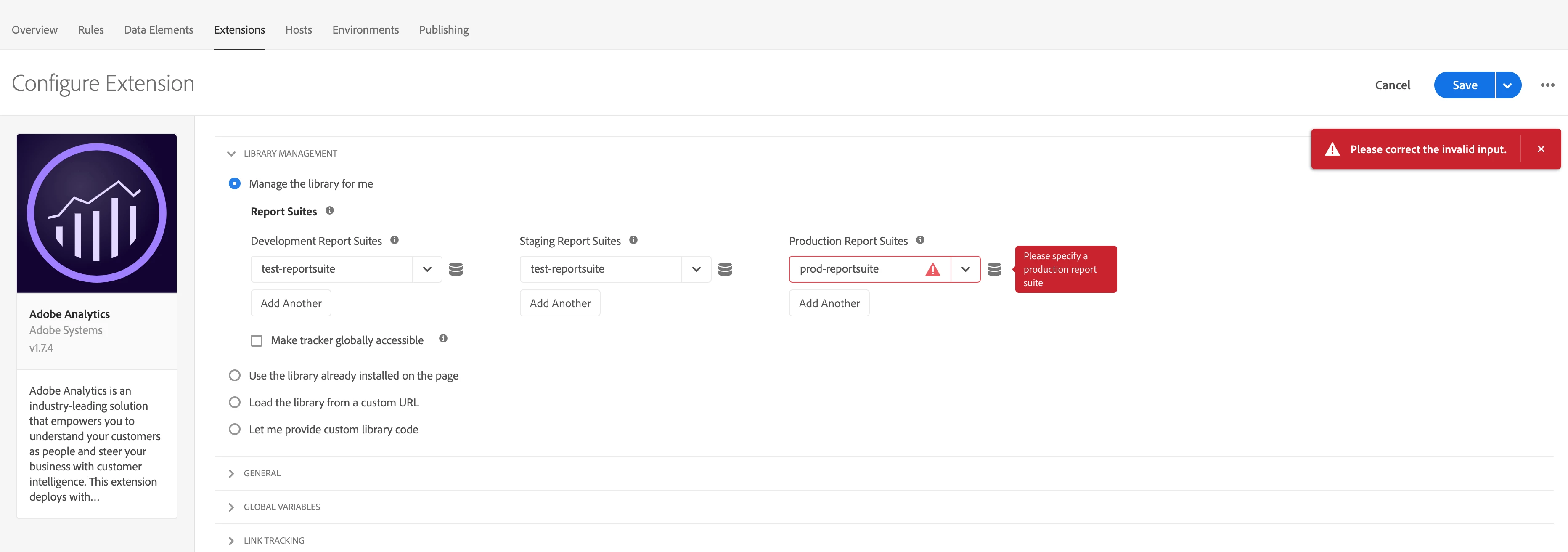
When I am using Analytics extension in Launch, it does not allow me to save the configuration and keep asking for "Production Report Suite". I was able to do the same thing several month ago.

Is this a bug for the new version of the extension?

One possible solution is that I can choose it from data elements. However, can somebody teach me how to do it correctly if I am using data element?
This post is no longer active and is closed to new replies. Need help? Start a new post to ask your question.
Best answer by jantzen_b

We were unable to product this error on several test instances. Try clearing your cache and cookies and logging out and back in again. Also, try verifying your permissions in Analytics and Launch.

If this issue still persists, contact Customer Care so they can directly troubleshoot your specific instance. 

5 replies

Adobe Employee
May 14, 2019

I am unable to reproduce this. Can you tell me the steps that you took to get this error?

Level 2
May 14, 2019

I am able to make the changes. Please delete the browser cache and try again. I am using the same version as you 1.74.

May 16, 2019

Create a new property in Launch, go to extensions -> add Experience Cloud Id -> add Adobe Analytics.

I have cleared the cache and even tried another browser and another computer. None works.

I notice there are several errors in the console on Adobe Analytics extension page.

jantzen_b
Adobe Employee
Adobe Employee
April 2, 2020
Are you still experiencing this issue? I realize this is an old thread so it's likely this is solved but wanted to verify.
jantzen_b
Adobe Employee
Adobe Employee
April 3, 2020
Do any of the answers below answer your initial question? If so, can you select one of them as the correct answer? If none of the answers already provided answer your question, can you provide additional information to better help the community solve your question?
jantzen_b
Adobe Employee
jantzen_bAdobe EmployeeAccepted solution
Adobe Employee
April 7, 2020

We were unable to product this error on several test instances. Try clearing your cache and cookies and logging out and back in again. Also, try verifying your permissions in Analytics and Launch.

If this issue still persists, contact Customer Care so they can directly troubleshoot your specific instance.