can you please provide details of the file / folder structure of Launch files in Akamai. Would it be same as current structure we have in DTM ? | Community
Skip to main content
Level 2
August 22, 2017
Solved

can you please provide details of the file / folder structure of Launch files in Akamai. Would it be same as current structure we have in DTM ?

  • August 22, 2017
  • 2 replies
  • 2522 views

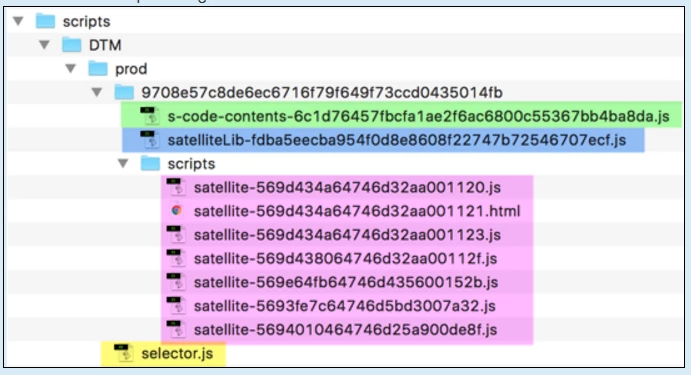
in current we have below folder structure :

We want to know if similar folder structure will be used in Launch or different one ?

How will it be different and will it improve in anyway.

Thanks

This post is no longer active and is closed to new replies. Need help? Start a new post to ask your question.
Best answer by Serban_AndreiSt

Here is a screenshot of how a library structure will look when you enable the Create archive option on an environment.

All the files will be inside a build folder containing the build id number (BLxxxxxx). On the same level with the build folder, there will be a symlink pointing to the Launch library that is inside the build folder. All the custom code files will be inside the build folder. The hosted library files will also be inside the folder (like AppMeasurement.js for example).

For a library hosted on Akamai the things are a little different. When an extension is installed in the Launch catalog, the hosted lib files are stored on Akamai in a central location. Then each build will have the same files like you see in the above screenshot except that the hostedLibFiles folder is no longer there. The library will use the hosted lib files stored in the central location.
2 replies

thebenrobb
Adobe Employee
Adobe Employee
August 22, 2017

It will be different than it is in DTM.  You can view it directly now if you configure an Environment for Archive, then publish a build to that environment and hit the download link.  I will ask one of the developers to provide more details on what changes you'll see and the rationale for them.

Serban_AndreiStAdobe EmployeeAccepted solution
Adobe Employee
August 23, 2017

Here is a screenshot of how a library structure will look when you enable the Create archive option on an environment.

All the files will be inside a build folder containing the build id number (BLxxxxxx). On the same level with the build folder, there will be a symlink pointing to the Launch library that is inside the build folder. All the custom code files will be inside the build folder. The hosted library files will also be inside the folder (like AppMeasurement.js for example).

For a library hosted on Akamai the things are a little different. When an extension is installed in the Launch catalog, the hosted lib files are stored on Akamai in a central location. Then each build will have the same files like you see in the above screenshot except that the hostedLibFiles folder is no longer there. The library will use the hosted lib files stored in the central location.