Can't get Custom Event to work on rule | Community
Skip to main content
Level 2
October 8, 2020
Solved

Can't get Custom Event to work on rule

  • October 8, 2020
  • 1 reply
  • 1403 views

Hi,


I'm trying to get a rule to load via firing a custom event on the rule. We have the following event set up for it:
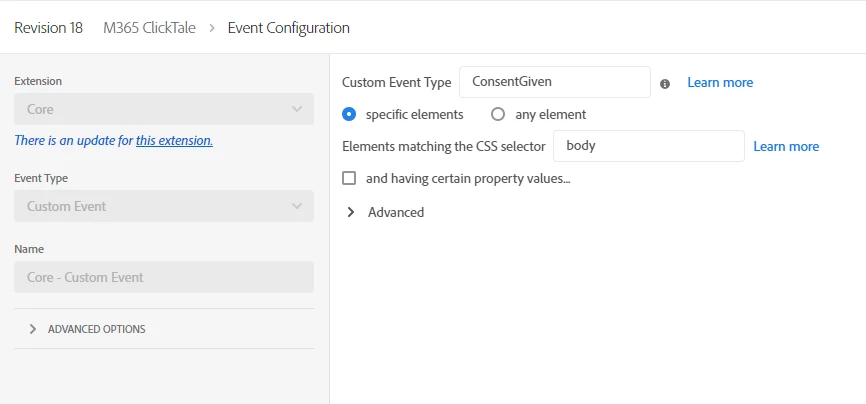
 

However when we run this code:
document.body.dispatchEvent(new CustomEvent('ConsentGiven'));

Nothing happens. 

The odd thing is when we attach the Adobe Experience Cloud Debugger, and have it replace the Launch Embed code with one in dev, then it works. But otherwise, it doesn't.

We're currently loading the code in via JavaScript by injecting an async script tag into the header.

Can anyone let us know what needs to be done to get this custom event to work with the rule?

This post is no longer active and is closed to new replies. Need help? Start a new post to ask your question.
Best answer by thomasm46556898

I figured out the solution.


What was happening is that we are loading 2 properties on our page: One for scripts that can run before a cookie consent check, and one for scripts that can run when the consent was given.


But the property scripts are set up to not load if:


1) The window.__satelliteLoaded variable is set to true

2) window.satellite is already set


But that's easy to solve if you do the following:

window.__satelliteLoaded = false; window._satellite = null;


Before loading the next property. This will allow the second property to load as intended.

1 reply

thomasm46556898AuthorAccepted solution
Level 2
October 8, 2020

I figured out the solution.


What was happening is that we are loading 2 properties on our page: One for scripts that can run before a cookie consent check, and one for scripts that can run when the consent was given.


But the property scripts are set up to not load if:


1) The window.__satelliteLoaded variable is set to true

2) window.satellite is already set


But that's easy to solve if you do the following:

window.__satelliteLoaded = false; window._satellite = null;


Before loading the next property. This will allow the second property to load as intended.

zach_shearer
Level 4
October 12, 2020
@thomasm46556898 thanks for coming back to answer the question for the community. No rush on this but, if you have the time, I'd like to hear a little more about your consent setup. The cookie consent manager that I work with instructs to create suppression conditions for rules based on the consent provided by the user, e.g., block advertising-associated tags when they elect for functional trackers only.