Can I switch environments for Launch using the developer console like I did in DTM? | Community
Skip to main content
jantzen_b
Adobe Employee
Adobe Employee
August 10, 2018
Solved

Can I switch environments for Launch using the developer console like I did in DTM?

  • August 10, 2018
  • 12 replies
  • 21590 views

I used to be able to use

localStorage.setItem('sdsat_stagingLibrary',true)

In the developer console to switch to my staging library in DTM. Is there a similar command in Launch that will switch my library?

This post is no longer active and is closed to new replies. Need help? Start a new post to ask your question.
Best answer by jantzen_b

There are a couple of different Chrome extensions that can help you switch your environments, but there isn't a console command that will switch your library. Please use one of the Chrome extensions listed below:

Adobe Experience Cloud Debugger - Chrome Web Store

Launch Command - Chrome Web Store

Launch and DTM Switch - Chrome Web Store

12 replies

andylunsford1
Community Advisor and Adobe Champion
September 25, 2020

For Safari, there is a solution that I just recently uncovered that has been a lifesaver:


https://requestly.io/desktop


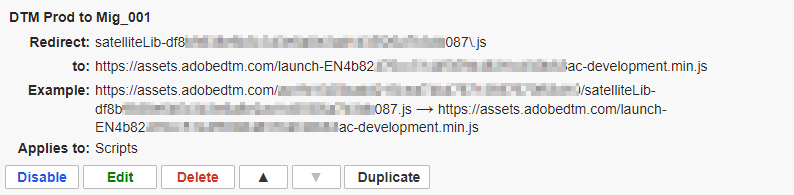
You can create rules using the web extension in Chrome or Firefox that basically point the embed code URL from the production one to staging, and then the desktop app automatically runs your internet through the proxy in the tool and applies them.  All you need to select is "Request Redirect" and then enter your production library URL from the embed code setup, and then the library you want to test from the embed code setup.


It works great for me testing Safari, (I then review using the network tab after checking "Show Develop menu in menu bar").  It's in Beta and only available on MacOS currently, but you probably can do something with Fiddler on Windows, although not as easily.

November 4, 2020

Hi guys- have you seen this: https://pureinfotech.com/install-chrome-extension-chromium-edge/


Not tried it yet, but in theory you can use the chrome Launch extension in MS Edge.


I found this thread when looking for an answer to this issue earlier today and thought this might help.