Can I switch environments for Launch using the developer console like I did in DTM? | Community
Skip to main content
jantzen_b
Adobe Employee
Adobe Employee
August 10, 2018
Solved

Can I switch environments for Launch using the developer console like I did in DTM?

  • August 10, 2018
  • 12 replies
  • 21549 views

I used to be able to use

localStorage.setItem('sdsat_stagingLibrary',true)

In the developer console to switch to my staging library in DTM. Is there a similar command in Launch that will switch my library?

This post is no longer active and is closed to new replies. Need help? Start a new post to ask your question.
Best answer by jantzen_b

There are a couple of different Chrome extensions that can help you switch your environments, but there isn't a console command that will switch your library. Please use one of the Chrome extensions listed below:

Adobe Experience Cloud Debugger - Chrome Web Store

Launch Command - Chrome Web Store

Launch and DTM Switch - Chrome Web Store

12 replies

jantzen_b
Adobe Employee
jantzen_bAdobe EmployeeAuthorAccepted solution
Adobe Employee
August 10, 2018

There are a couple of different Chrome extensions that can help you switch your environments, but there isn't a console command that will switch your library. Please use one of the Chrome extensions listed below:

Adobe Experience Cloud Debugger - Chrome Web Store

Launch Command - Chrome Web Store

Launch and DTM Switch - Chrome Web Store

September 20, 2022

Launch & DTM Switch extension doesn't work always. Not sure what's the problem there. I needed a cross-browser solution and I found this - https://requestly.io/blog/replace-adobe-launch-production-script-with-development-script/ and Requestly work perfectly every time. It has been a huge time saver. It works across Chrome, Firefox, and IE Edge.


PS - I haven't personally tried on Firefox & Edge so far.

Level 2
December 7, 2018

Is there any add-on for Firefox?

Level 2
February 6, 2019

I also need to change to development and staging libraries in IE/Edge (I know, I'd rather just stay in Chrome too, but that is not an option).

Level 2
February 19, 2019

The lack of a console command is a huge problem if you're having trouble with an environment loading. We're having an issue right now where the dev environment script isn't loading correctly, but the Chrome Switch extension only works if it sees Analytics, which it can't since it's not loading. So I'm stuck on dev and can't switch to production. Any ideas?

Level 3
February 27, 2019

Use "Redirector"

The best solution that I've found is an Extension/Tool named "Redirector", which can be seen at this address:  Redirector

This works for me both in Google Chrome and Mozilla Firefox.  I understand that this may be made to work in Microsoft Edge; however, that is outside my abilities.

Use Cases

I have been using this tool on a site that has DTM (the precursor to LAUNCH) implemented in order to test a new LAUNCH deployment.

Once my organisation has migrated from DTM to LAUNCH, I will use Redirector to provide a simple way to switch our live website to using the QA and other DEV environments.

How to Use

I maintain a separate entry for each LAUNCH environment; in the screenshot below, you can see that whenever the browser attempts to the load the DTM file ("satelliteLib-xxxxxxxxxxxx.js"), Redirector steps in and loads the specified LAUNCH library ("launch-ENxxxxxxxxxxxxxx.js") in its place.
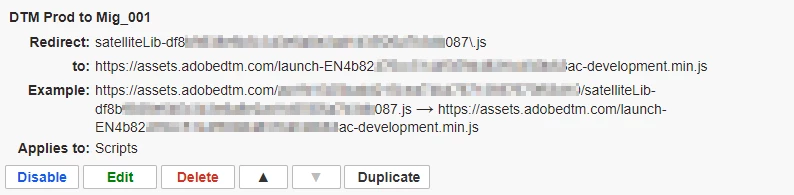
NOTE:  the "Redirect" field in this example is using Regular Expression; the forward slash "\" character is there to escape the period character.

Level 4
February 28, 2019

I've seen some cases where a Dev environment all of the sudden 'disappears' , resulting in any attempts resulting in 404-errors.  If you're using launch command, it's no big deal since you just switch it off - or to a different environment, but if you are using the DTM/Launch Switch you will not be able to switch environments since you cannot get to the menu (i.e. you only get the default chrome extension menu).

If you go into Launch and simply rebuild the library, you should be ok.  If for some reason you really need to change your option in the DTM/Launch switch extension - you'll need to look at the extension's config and clear out the current settings.  This is going to be a growing issue for the chrome extension, as people create and delete Dev environments in Launch.  It should be an easy fix for them though, allowing you to change the saved setting even if DTM/Launch is not found.

Level 2
June 1, 2019

Not having environment support for Edge and FF is a really big problem. Most of us need to QA in Chrome, FF, Safari, and Microsoft.

We at least need a console command to switch environments.

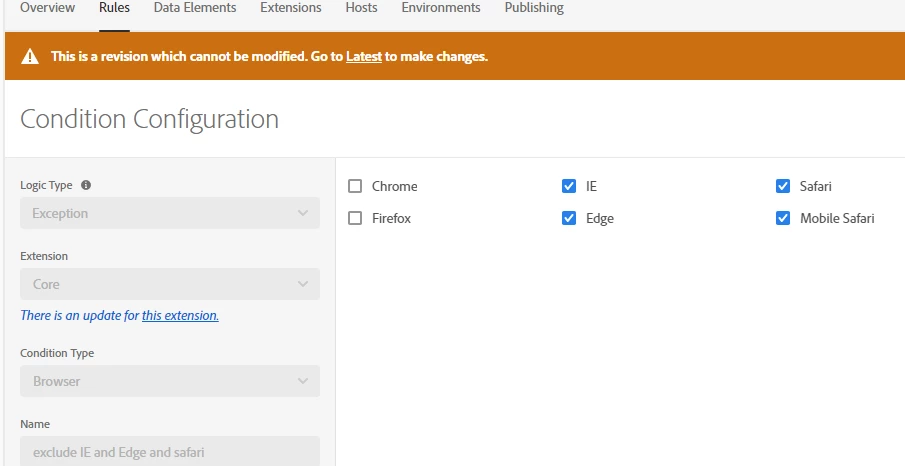
I just needed to make this exclusion based on some errors affecting our clients. The four browsers I needed to exclude were 55% of all my traffic and I have no officially supported way to investigate if my fix works.

Level 3
June 4, 2019

jchuck5612​ - notwithstanding the fact that installing Add-ons/Extensions is not always possible in corporate environments, I really recommend the Redirector plug-in that I wrote about in this thread.

Apart from the cool "feature" that it enables of being able to easily switch between multiple LAUNCH environments in Firefox (by maintaining an entry for each environment that you have), it has a "Notifications" feature that pops up when a redirect has occurred:  you'll never waste time wondering whether or not you've switched into one of your other environments.

It's been indispensable for me during a migration from DTM to LAUNCH:  I've been able to test my LAUNCH libraries on our production site, which I'm pretty sure I wouldn't have been able to do otherwise.

Level 3
June 4, 2019

Wanted to point out, though, that I wholeheartedly support your request for an official method of switching!

Level 3
July 11, 2019

Hi jantzen.belliston-Adobe

So nothing from Adobe yet about this issue?