Hi @yuhuisg @satyanarayanam1 @beenit_chatterjee
Thanks for answering this question. Would appreciate if you could please clarify this-
To send data to (or to use without any mapping) the Cart Additions, Cart Removals, Product Views (OOTB/standard AA metrics) - do we need to use the Commerce details field group i.e. productListItems and its respective fields like commerce.productListAdds.value?
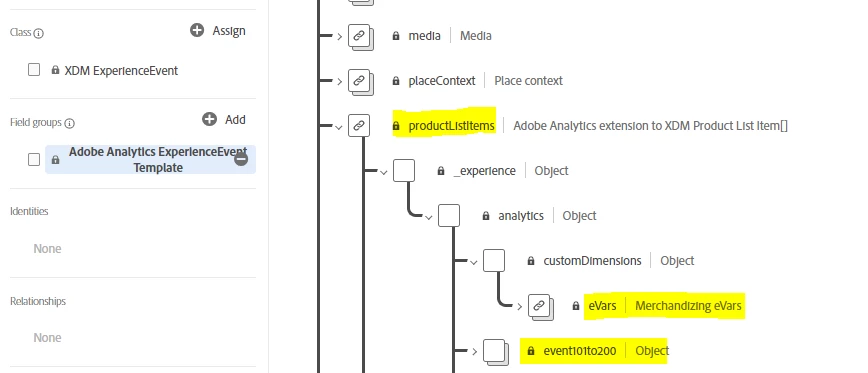
However, if we use the Adobe Analytics Template Field Group just by itself(_experience.analytics.customDimensions.eVars.eVar1) or within the productListItems (i.e. productListItems[]._experience.analytics.customDimensions.eVars.eVar1), we won't be able to auto-map specific evar/props/events to the given metrics (Cart Additions, Cart Removals, Product Views), is that right?
Thanks
@hs_vk ,
@hs_vk wrote:
To send data to (or to use without any mapping) the Cart Additions, Cart Removals, Product Views (OOTB/standard AA metrics) - do we need to use the Commerce details field group i.e. productListItems and its respective fields like commerce.productListAdds.value?
Think of it this way:
The "productListItems" field group is used to build the equivalent of AA's s.products string. So you will definitely need to set this productListItems whenever you want to track products for any ecommerce step.
Separately, the "commerce" field group is used to track the equivalent of AA's ecommerce success events, e.g. scAdd, scRemove, etc. Referring to the documentation on mapped variables https://experienceleague.adobe.com/docs/analytics/implementation/aep-edge/variable-mapping.html?lang=en, you can see that you need to set the commerce fields to count your success events properly. E.g. where you would have set "scAdd" in your AA implementation, you will need to set "commerce.productListAdds.value" = 1.
@hs_vk wrote:
However, if we use the Adobe Analytics Template Field Group just by itself(_experience.analytics.customDimensions.eVars.eVar1) or within the productListItems (i.e. productListItems[]._experience.analytics.customDimensions.eVars.eVar1), we won't be able to auto-map specific evar/props/events to the given metrics (Cart Additions, Cart Removals, Product Views), is that right?
If you set productListItems[]._experience.analytics.customDimensions.eVars.eVar1, then you're setting the equivalent of a Merchandising eVar1 in your s.products string. And recalling how Merchandising eVars work, then those eVars would be able to reported with your given metrics properly.