Adobe Launch -Visitor ID is not being captured in browser | Community
Skip to main content
sheethalk173495
July 27, 2018
Solved

Adobe Launch -Visitor ID is not being captured in browser

  • July 27, 2018
  • 3 replies
  • 3694 views

Hi,

I have configured a dummy website as localhost using Adobe Launch. I am trying to get "s_vi" using "_satellite.cookie.get('s_vi'); " .An HTTP response from a web server sets cookies in a browser. This is how the s_vi cookie is set.

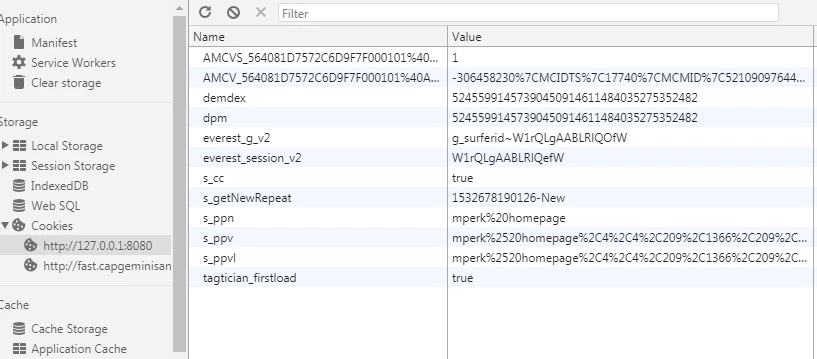
In my current localhost website unable to capture the s_vi cookie. Kindly suggest and let me know your comments on this.

This post is no longer active and is closed to new replies. Need help? Start a new post to ask your question.
Best answer by satishk44666483

Hi,

Using below method you will get Adobe Experience Cloud Visitor ID.

_satellite.getVisitorId().getMarketingCloudVisitorID();

Thanks - Satish

3 replies

satishk44666483
satishk44666483Accepted solution
Level 2
July 27, 2018

Hi,

Using below method you will get Adobe Experience Cloud Visitor ID.

_satellite.getVisitorId().getMarketingCloudVisitorID();

Thanks - Satish

jantzen_b
Adobe Employee
Adobe Employee
July 27, 2018

If your website is new, you likely wouldn't have an s_vi cookie and therefore no legacy Analytics Visitor ID. If you are deploying a new web property we fully recommend deploying the Experience Cloud ID Service (formerly Visitor ID Service & Marketing Cloud ID Service).

According to the screenshot above, you likely already have deployed the ID service since you've an AMCV cookie present. Using the code provided in the previous answer will return your Analytics MID value that is used for visitor identification in Analytics for Experience Cloud ID Service users.

_satellite.getVisitorId().getMarketingCloudVisitorID();

analytics101
Level 2
October 13, 2018

I am setting

s.visitorID.getMarketingCloudVisitorID();

I am able to store a value in an evar and get that into report

but can't see the value as a default variable as we usually see in DTM.
