Adobe DTM migration to Launch, why previous rules evar,prop and event carried away on next rules? | Community
Skip to main content
Level 2
February 1, 2021
Solved

Adobe DTM migration to Launch, why previous rules evar,prop and event carried away on next rules?

  • February 1, 2021
  • 1 reply
  • 1236 views

Hello guys, I tried to migration Launch, i have already proceed into migration and right now the progress is on development.


i face some issue, where existing DTM this issue not happen.

1. direct call rules: if theres multiple event, on the pageview and then direct call rules, the event will be carried away

2. if we do it issue number 1, duplicate value of event will be occur ex: event: event5, event 5 while the other evar/props not duplicate

3. if i call another rules, the previous rules will be caried away on next rules include evar/props, ex:

Rules1:

  • event: event5
  • eVar1: www
  • eVar100: path:

Rules2:

  • event: event5(from previous rules), event6
  • eVar1: www(normal)
  • eVar7: getData
  • eVar100: path(from previous rules)

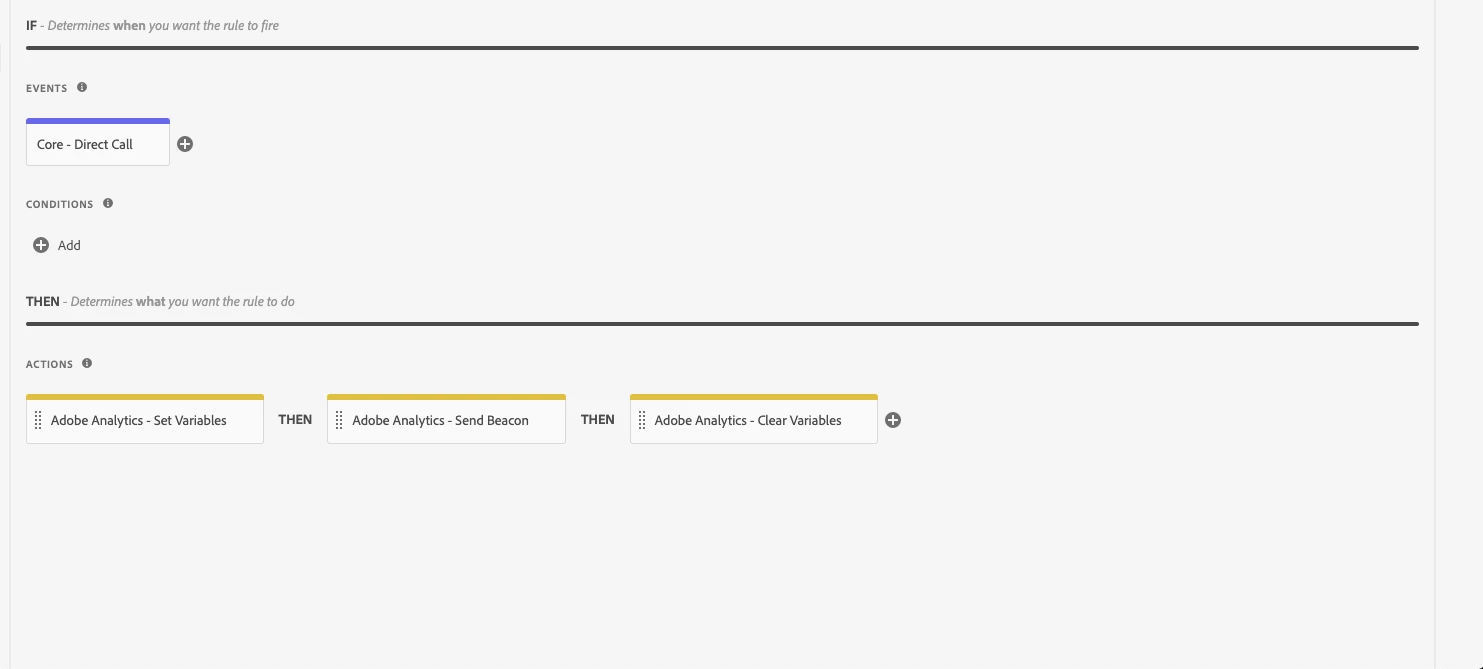
here the rules configuration on launch, i just add clear variable hoping the variables wont get carried away on next rules on same page. please help is there missing step of this migration.


Thanks in advance.


This post is no longer active and is closed to new replies. Need help? Start a new post to ask your question.
Best answer by yuhuisg

It sounds like a problem where the AA variables are persisting within the same page, which is to be expected.

So you have 2 options:

  1. Use "Clear Vars" in all of your rules, so that variables don't persist.
  2. Use "registerPostTrackCallback" to clear out the variables that you don't want to persist https://experienceleague.adobe.com/docs/analytics/implementation/vars/functions/registerposttrackcallback.html

1 reply

yuhuisg
Community Advisor
yuhuisgCommunity AdvisorAccepted solution
Community Advisor
February 3, 2021

It sounds like a problem where the AA variables are persisting within the same page, which is to be expected.

So you have 2 options:

  1. Use "Clear Vars" in all of your rules, so that variables don't persist.
  2. Use "registerPostTrackCallback" to clear out the variables that you don't want to persist https://experienceleague.adobe.com/docs/analytics/implementation/vars/functions/registerposttrackcallback.html
buildmeupAuthor
Level 2
February 4, 2021
thanks alot, i already fix this by applying "clear vars", before i just testing on certain rules
