Adobe Client DataLayer - Firing one rule on two events
Hi,
I have a dev/stage & prod environments set up on adobeaemcloud.com where I am tracking page load & component click rules. We have ACDL implemented here so events like cmp:show, cmp:click & cmp:loaded are triggered on page load, component clicks or when a certain component on page loads.
We have a component that loads on all pages & returns some location-based information. This component triggers cmp:loaded event.
Also when the page datalayer is ready it triggers cmp:show.
I have below custom code added to the events section of the rules to fire rules on cmp:show.
I believe that cmp:loaded for the component is triggered a few secs after cmp:show. See below images where cmp:show is in array 0 and cmp:loaded is in array 290
page event cmp:click
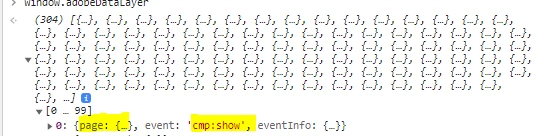
component event cmp:loaded

I have two separate rules for each event - page load rule & component load rule both firing on every page. However I am looking to have just one page load rule with below logic:
Trigger rule when both cmp:show & cmp:loaded (for the specific component) are triggered
If cmp:loaded is not available (less likely scenario), trigger rule on cmp:show
Once this is done, I would use Set Variables action to collect the data passed within both the page & above component
Page Load Rule Event custom code (Adobe Recommended)
var pageShownEventHandler = function(evt) {
// defensive coding to avoid a null pointer exception
if(evt.hasOwnProperty("eventInfo") && evt.eventInfo.hasOwnProperty("path")) {
//trigger Launch Rule and pass event
console.debug("cmp:show event: " + evt.eventInfo.path);
var event = {
//include the path of the component that triggered the event
path: evt.eventInfo.path,
//get the state of the component that triggered the event
component: window.adobeDataLayer.getState(evt.eventInfo.path)
};

//Trigger the Launch Rule, passing in the new `event` object
// the `event` obj can now be referenced by the reserved name `event` by other Launch data elements
// i.e `event.component['someKey']`
trigger(event);
}
}

//set the namespace to avoid a potential race condition
window.adobeDataLayer = window.adobeDataLayer || [];
//push the event listener for cmp:show into the data layer
window.adobeDataLayer.push(function (dl) {
//add event listener for `cmp:show` and callback to the `pageShownEventHandler` function
dl.addEventListener("cmp:show", pageShownEventHandler);
});
I believe there is a way to combine both events through JS but I am not great at coding & not completely sure if there are any other ways to implement this.
Thanks