Accessing non standard "Additional Parameters" in Launch Direct Call Rule | Community
Skip to main content
Level 2
October 10, 2019
Solved

Accessing non standard "Additional Parameters" in Launch Direct Call Rule

  • October 10, 2019
  • 7 replies
  • 8906 views

Hello,

This article describes the very powerful feature added to Adobe Launch that allows DCRs to include additional event data as a second parameter to the call to _satellite.track(...) - Direct Call Rule with Additional Parameters in Adobe Launch

This functionality would be extremely useful for us but have an unusual problem. Our dataLayer contains keys with a '.' character, e.g. { foo.bar: "example" }. I can't access these values as I would expect, using %event.detail["foo.bar"]% through the UI. This does work as custom code (option 2 in the docs reference above).

Am I missing something or is this unsupported?

Thanks

Tom
This post is no longer active and is closed to new replies. Need help? Start a new post to ask your question.
Best answer by Stewart_Schilling

Here is a work-around.  The idea here is to automatically map every key in the event.detail object to a data element so that you can reference each key in the UI.   This is done using a Core > Custom Code Condition with the following javascript:

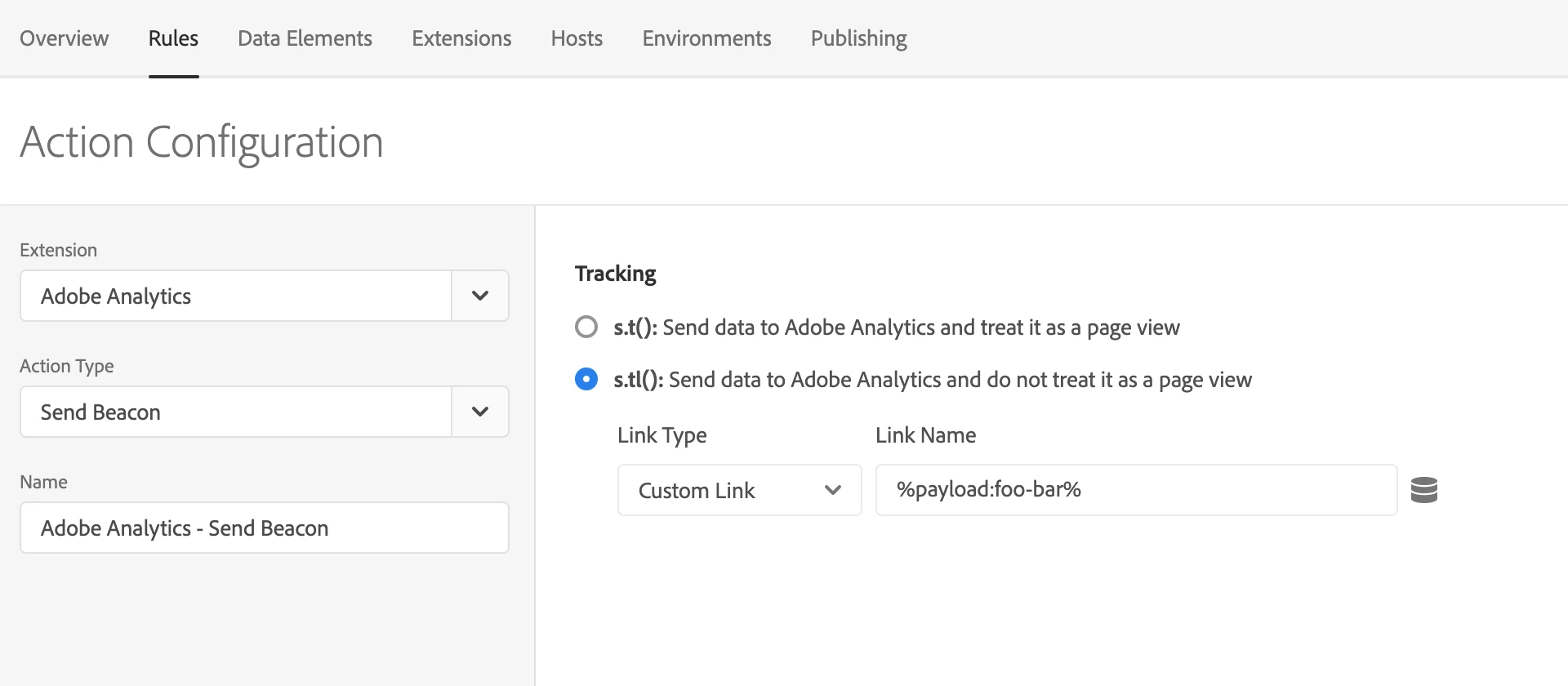
In any action (or any subsequent condition) you can then reference the key using %palyload:foo-bar%

The period character is not allowed in data element names, so it had to be replaced...

Brackets are allowed, so you _could_ change this code to use payload[foo-bar] instead of payload:foo-bar if you wanted.

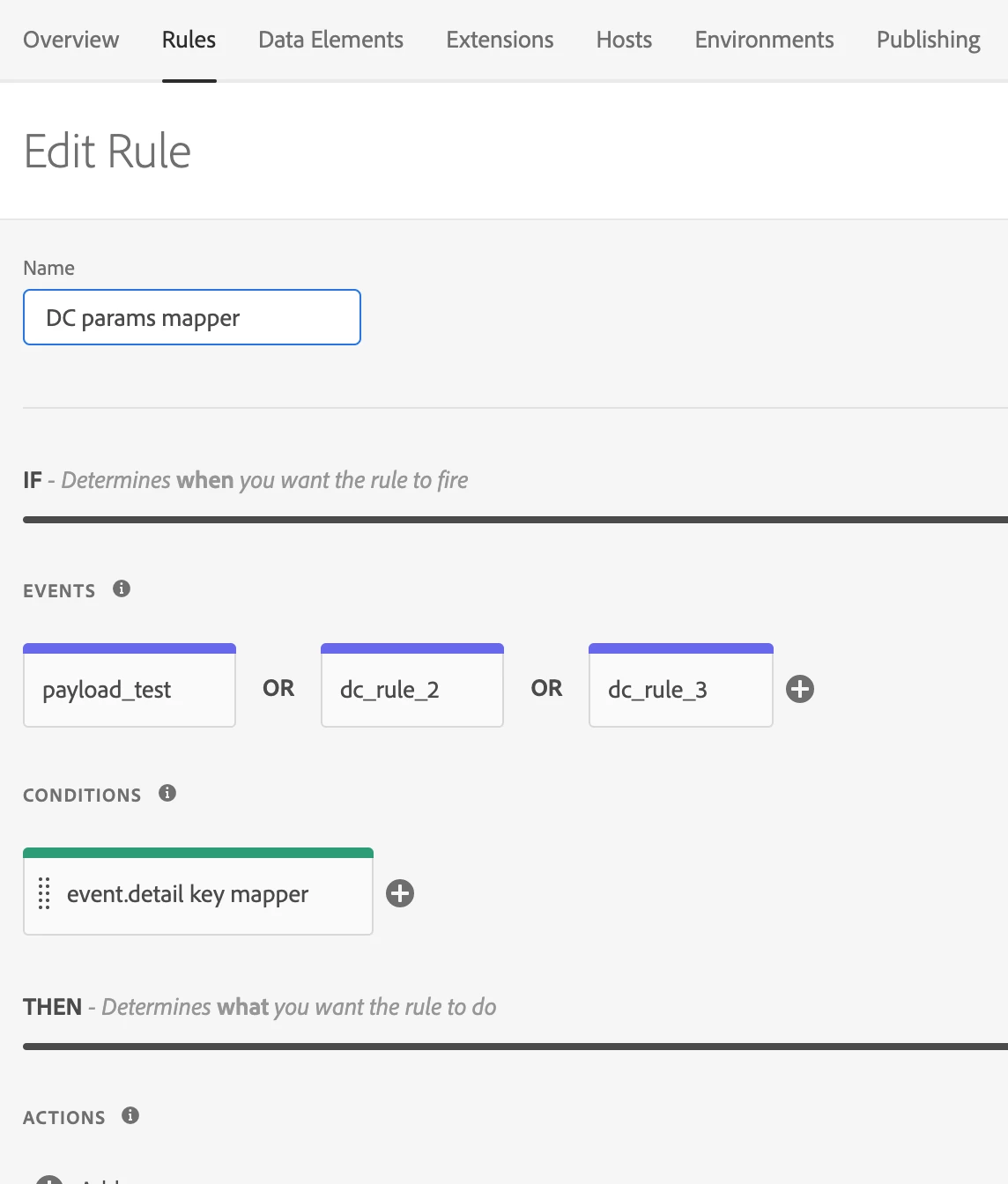
Anyway...  The way that I put this together in my test environment was to create a single direct call rule that fires on any DC trigger that you care about.  I set the rule order to 10 so that this rule will execute before the other DC rules on the same trigger:

This ^^^ keeps the mapping function centralized so that if you ever wanted to modify it, you wouldn't need to touch every DC rule. Note that there are no actions on this rule.  Also, I used the custom condition for the key mapper so that the task will be done synchronously.  Had I used a custom code action, the process would be asynchronous and would most likely not be done by the time the rule below is triggered.

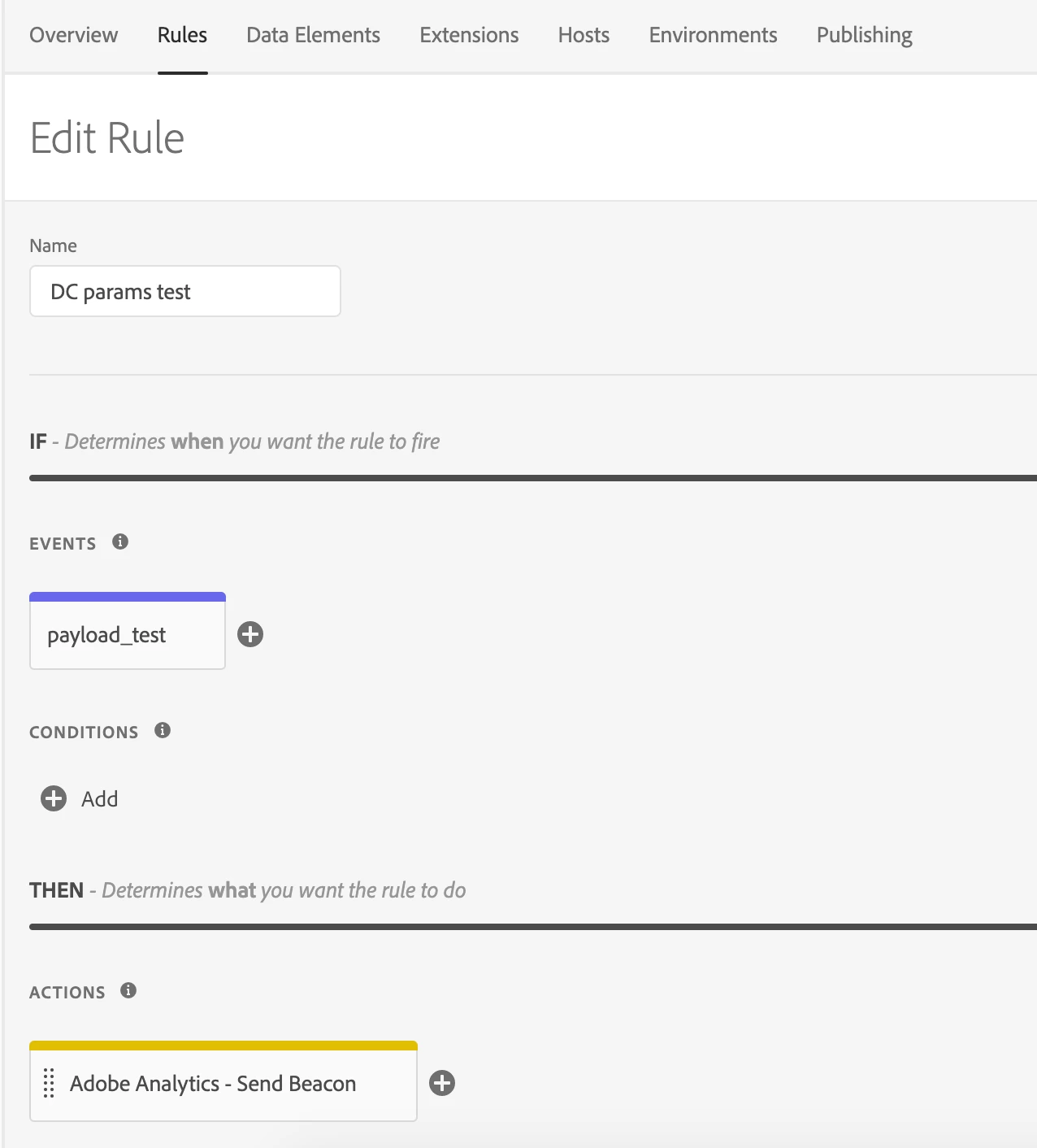
Below is the typical DC rule that triggers on the same _satellite.track call, but executes at the default rule order of 50.

Here is the detail of the AA Send beacon call.

7 replies

Stewart_Schilling
Community Advisor
Community Advisor
October 10, 2019

Did you try %event.detail.foo.bar% ?

Level 2
October 11, 2019

I did, and it didn't work unfortunately! It's to be expected really, as that would be syntax to reference the value of "bar" in an object structured like this:

{ foo : { bar : 'example'}}...

Stewart_Schilling
Community Advisor
Community Advisor
October 11, 2019

I don't think that bracket notation is supported at all within a %% expression in the UI.

I think that you are stuck unless you transform the object before passing it (or get away from the practice of using dot notation in key names).  

To be honest, my first reaction when you said that you had object keys like "foo.bar" was bewilderment.

In my mind, I had to ask, "why would anyone do such a thing?"

Level 2
October 14, 2019

There is some method to the madness! We make heavy use of context data in our applications, and those use a namespace - so all our custom dimensions on iOS/Android/etc look like "foo.XYZ". We mirrored the format of our dataLayer object to the context data we use on our applications (which make up > 90% of our traffic) - that way we have a consistent descriptive framework for all of our data (which makes QA easier, for example).

So, we don't want to change the DL, and transformation would be a bit ugly too... really we need that sweet, sweet bracket notation!

Stewart_Schilling
Community Advisor
Community Advisor
October 14, 2019

If it were possible to get at this data from Core > Custom Code data elements would that solve the problem?

You'd have to create a data element for each context variable.

Stewart_Schilling
Community Advisor
Stewart_SchillingCommunity AdvisorAccepted solution
Community Advisor
October 14, 2019

Here is a work-around.  The idea here is to automatically map every key in the event.detail object to a data element so that you can reference each key in the UI.   This is done using a Core > Custom Code Condition with the following javascript:

In any action (or any subsequent condition) you can then reference the key using %palyload:foo-bar%

The period character is not allowed in data element names, so it had to be replaced...

Brackets are allowed, so you _could_ change this code to use payload[foo-bar] instead of payload:foo-bar if you wanted.

Anyway...  The way that I put this together in my test environment was to create a single direct call rule that fires on any DC trigger that you care about.  I set the rule order to 10 so that this rule will execute before the other DC rules on the same trigger:

This ^^^ keeps the mapping function centralized so that if you ever wanted to modify it, you wouldn't need to touch every DC rule. Note that there are no actions on this rule.  Also, I used the custom condition for the key mapper so that the task will be done synchronously.  Had I used a custom code action, the process would be asynchronous and would most likely not be done by the time the rule below is triggered.

Below is the typical DC rule that triggers on the same _satellite.track call, but executes at the default rule order of 50.

Here is the detail of the AA Send beacon call.

Level 2
November 12, 2019

This was really helpful - thanks! It would be great to reference the elements directly, but this is a nice workaround.