XF model.json not fetching the child nodes of the component | Community
Skip to main content
bsr060893
Level 3
August 19, 2020
Solved

XF model.json not fetching the child nodes of the component

  • August 19, 2020
  • 2 replies
  • 3931 views

Hi,


I used a image component for creating a XF.
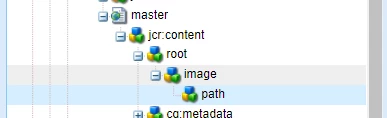
My custom image component will store the file reference as the child of the image node in content tree.

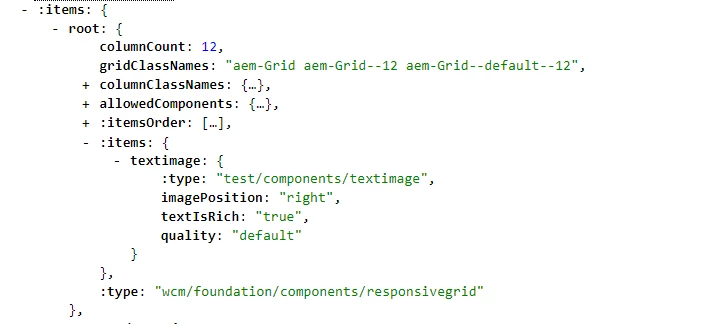
My model.json is not able to retrive the properties on the child node but only from the component node i.e image node.


Is there a way to include the child nodes of the component as well?


This post is no longer active and is closed to new replies. Need help? Start a new post to ask your question.
Best answer by Vijayalakshmi_S

Hi @bsr060893,

Could you please confirm if your custom image component has a Sling Model and Exporter is enabled on the same via annotation.

Below link explains how to enable a JSON export for a component. 

https://docs.adobe.com/content/help/en/experience-manager-65/developing/components/json-exporter-components.html


There is nothing like default exporter.

XF page or Site page is accessible via "model.json" is because the respective page component has Sling Model with Exporter. Also the container components used within in turn has its own Sling Model with Exporter. 

Given your existing set up, the only possible way to expose XF or Site Page as JSON would be to make use of JSON rendering of Sling Default Get Servlet.  - "tidy.infinity.json or tidy.-1.json" which will expose the entire node structure with utmost depth. (To avoid custom implementation)


2 replies

Vijayalakshmi_S
Vijayalakshmi_SAccepted solution
Level 10
August 19, 2020

Hi @bsr060893,

Could you please confirm if your custom image component has a Sling Model and Exporter is enabled on the same via annotation.

Below link explains how to enable a JSON export for a component. 

https://docs.adobe.com/content/help/en/experience-manager-65/developing/components/json-exporter-components.html


There is nothing like default exporter.

XF page or Site page is accessible via "model.json" is because the respective page component has Sling Model with Exporter. Also the container components used within in turn has its own Sling Model with Exporter. 

Given your existing set up, the only possible way to expose XF or Site Page as JSON would be to make use of JSON rendering of Sling Default Get Servlet.  - "tidy.infinity.json or tidy.-1.json" which will expose the entire node structure with utmost depth. (To avoid custom implementation)
 

bsr060893
bsr060893Author
Level 3
August 19, 2020
I have added to image core component . This scenario I understand It didn't fetch as in the model exporter the child node property may not be included. I am trying to understand is a way to customize the output json
raghavc
Level 4
August 20, 2020

@bsr060893 : 'path' node is still part of the Image component , So you can use the below code to read the properties of the path node in Image Sling Model class. As the path node will not have any sling resource type, sling exporter will not process it automatically. 


@Inject @Via(value = "path", type = ChildResource.class) String getPropertyName();

bsr060893
bsr060893Author
Level 3
August 20, 2020

Hi @raghavc ,


I have many such components which doesn't have the model exporter and saves the content data as the child nodes under the component node in content tree.


Is there any generic solution for including he child nodes?