Workflow stopped working with ACS Commons due to some JS issues | Community
Skip to main content
ShaileshBassi
Community Advisor
Community Advisor
June 24, 2022

Workflow stopped working with ACS Commons due to some JS issues

  • June 24, 2022
  • 2 replies
  • 1117 views

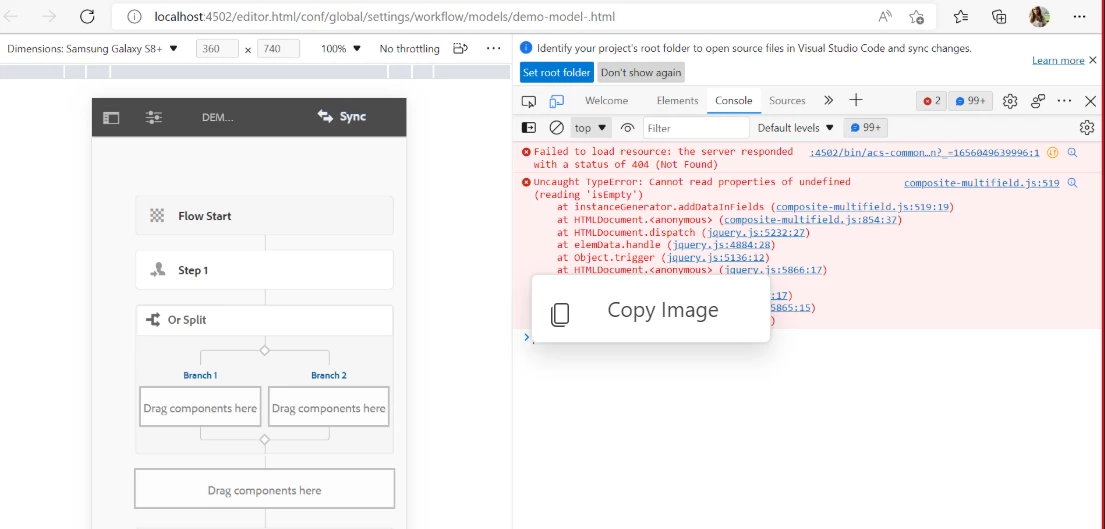
I am getting the below issue. 


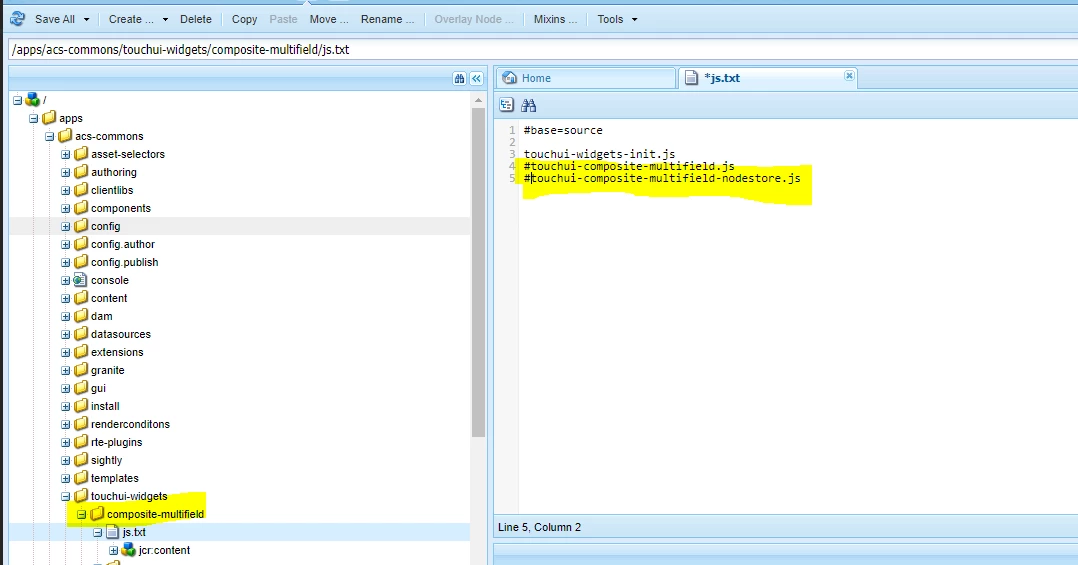
For temporarily fixing the issue commented the js call from "/apps/acs-commons/touchui-widgets/composite-multifield/js.txt" 
AEM 6.5.12

ACS Commons - 5.3.0

Can anyone please help with the pointers why this could happen and how can this be fixed.


Thanks


This post is no longer active and is closed to new replies. Need help? Start a new post to ask your question.

2 replies

Shiv_Prakash_Patel
Community Advisor
Community Advisor
June 24, 2022

Hi @shaileshbassi ,

I tried to figure out this issue but seems to working fine with AEM 6.5.12 and ACS Commons -5.3.0.


You can try following steps to resolve this.


Hope this will help at some extent !

Thanks

Shiv Prakash
ShaileshBassi
Community Advisor
Community Advisor
June 24, 2022

Currently it is happening only with the dev instance, not all the instances. 

I cloned the cq-quickstart from the dev environment to my local and performed re-build of the clientlibs as well, but no luck.

Thanks

DEBAL_DAS
New Member
June 24, 2022

Definitely I would like to know about your workflow model , is there any custom workflow process step involve here.


One thing I have noticed you didn't save in your workflow model as it is showing Sync in 1st screenshot, if I am not wrong.


Please save your changes  by clicking Sync and then validate whether you are still facing the issue.

Debal Das, Senior AEM Consultant
ShaileshBassi
Community Advisor
Community Advisor
June 24, 2022

I tried by re-sync as well, but it is the same. This error comes up when I either add the "OR Split" or "And Split" to my workflow model.

Not sure what has gone wrong with this specific environment, that the JS is breaking.


Thanks

DEBAL_DAS
New Member
June 24, 2022

Do one thing create a similar workflow model like the issued one on dev environment with different title/name [but don't make any change in issued workflow model] and then test that new workflow.

Also please check the already existing workflow with "OR Split" or "And Split" on dev.

Debal Das, Senior AEM Consultant