WKND SPA React build error | Community
Skip to main content
September 12, 2021
Solved

WKND SPA React build error

  • September 12, 2021
  • 2 replies
  • 4801 views

Hi community,


i am going through second chapter of wknd spa tutorial where add a new component to the SPA and deploy the changes to a local AEM instance, here is the link

https://experienceleague.adobe.com/docs/experience-manager-learn/getting-started-with-aem-headless/spa-editor/react/integrate-spa.html?lang=en

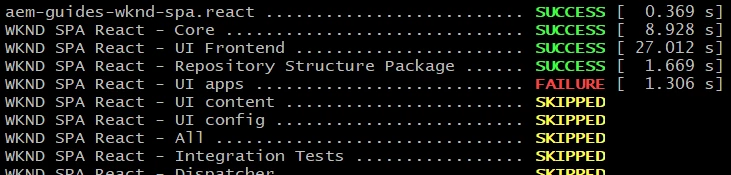
and when tried to build the ui.apps module and getting error

$ cd ../ui.apps
$ mvn clean install -PautoInstallPackage


Could someone please assist what could have gone wrong here.


Appreciate your help.


Thanks

This post is no longer active and is closed to new replies. Need help? Start a new post to ask your question.
Best answer by Kishore_Kumar_

Hi @imalakaamir ,


mvn clean install -PautoInstallPackage

Lets split this command.


  • mvn clean - It will delete the target folder.
  • mvn clean install - It will delete the target folder and install the content package (based on packaging type mentioned in pom.xml) in the target folder and also in local repository (.m2 folder).
  • mvn clean install -PautoInstallPackage - It is a maven profile. It will pick the content package and install in your local AEM instance.

For you mvn clean itself failing. It is not able to delete the target folder. PFB some of the reason where it will fail.

https://maven.apache.org/plugins/maven-clean-plugin/faq.html
https://stackoverflow.com/questions/19489720/maven-failed-to-clean-project-failed-to-delete-org-ow2-util-asm-asm-tree


2 replies

Kishore_Kumar_
September 12, 2021

Hi @imalakaamir ,


Delete the target folder in ui.apps folder manually and then try to build it.

September 12, 2021

Hi @kishore_kumar_ ,


Thanks for the advise bit reluctant of deleting the whole folder manually as i don't understand what's happening in ui.app/target folder - sorry i am still very new to AEM, apologies.  Would you mind pointing me some link or doc in order to understand more about ui.app/target. I tried googling it but couldn't see much tbh.


Thanks once again.


Kishore_Kumar_
Kishore_Kumar_Accepted solution
September 12, 2021

Hi @imalakaamir ,


mvn clean install -PautoInstallPackage

Lets split this command.


  • mvn clean - It will delete the target folder.
  • mvn clean install - It will delete the target folder and install the content package (based on packaging type mentioned in pom.xml) in the target folder and also in local repository (.m2 folder).
  • mvn clean install -PautoInstallPackage - It is a maven profile. It will pick the content package and install in your local AEM instance.

For you mvn clean itself failing. It is not able to delete the target folder. PFB some of the reason where it will fail.

https://maven.apache.org/plugins/maven-clean-plugin/faq.html
https://stackoverflow.com/questions/19489720/maven-failed-to-clean-project-failed-to-delete-org-ow2-util-asm-asm-tree


Asutosh_Jena_
Community Advisor
Community Advisor
September 12, 2021

Hi @imalakaamir 


Everytime we try to build the project by running the command (mvn clean install), maven will clean the target folder of all the modules and will build the project. Once the build is completed, the generated artifact i.e., zip or jar will be placed under the target folder for the specific module.


If it's a core module, jar file will be placed under target and if it's a ui.apps or ui.content module, zip file will be placed under the target module.


Here in this case, maven is not able to clean the target folder which is why you are getting an error while building the project. Please go ahead and delete the target folder under ui.apps and try to rebuild the project. It will fix the build issue.


Please follow the below link to know more about the maven commands which are used to clean the target folder.

https://github.com/AdobeDocs/experience-manager-cloud-service.en/blob/master/help/implementing/developing/introduction/aem-project-content-package-structure.md


Archetype defining different folder structure here:

https://experienceleague.adobe.com/docs/experience-manager-core-components/using/developing/archetype/overview.html?lang=en


Thanks!