
Solved
Why some containers are not rendered in Content Tree sidebar?
I've been working in a template.
So far, it only has containers and a title in the structure:
- Root container
- Main container
- Title
- Container
- Main container
I want to leave the possibility to the editor to add components in "Main container", in the same level as "Title" or "Container".
But in Edit mode, the sidebar looks like this:
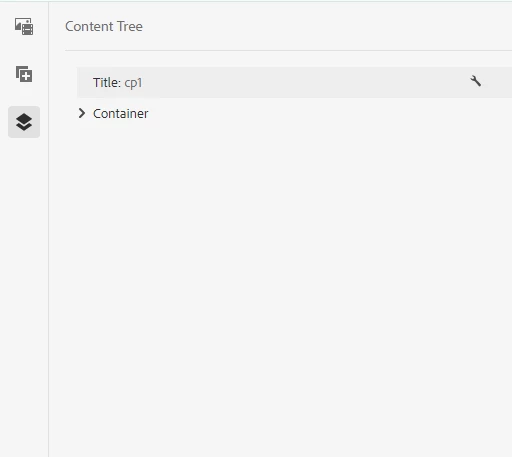
There is no possibility to add to "Main container" (or "Root container").
My template structure looks like this:
<?xml version="1.0" encoding="UTF-8"?>
<jcr:root xmlns:jcr="http://www.jcp.org/jcr/1.0" xmlns:nt="http://www.jcp.org/jcr/nt/1.0" xmlns:cq="http://www.day.com/jcr/cq/1.0" xmlns:sling="http://sling.apache.org/jcr/sling/1.0"
    jcr:primaryType="cq:Page">
    <jcr:content
        cq:deviceGroups="[mobile/groups/responsive]"
        cq:lastModified="{Date}2024-07-17T10:51:42.552+02:00"
        cq:lastModifiedBy="admin"
        cq:template="/conf/mysite/settings/wcm/templates/page-content"
        jcr:primaryType="cq:PageContent"
        sling:resourceType="mysite/components/page">
        <root
            jcr:primaryType="nt:unstructured"
            sling:resourceType="mysite/components/container"
            layout="responsiveGrid">
            <container
                jcr:primaryType="nt:unstructured"
                sling:resourceType="mysite/components/container"
                layout="responsiveGrid">
                <title
                    jcr:primaryType="nt:unstructured"
                    sling:resourceType="mysite/components/title"
                    editable="{Boolean}true"/>
                <container
                    jcr:primaryType="nt:unstructured"
                    sling:resourceType="mysite/components/container"
                    editable="{Boolean}true"
                    layout="responsiveGrid">
                    <cq:responsive jcr:primaryType="nt:unstructured">
                        <default
                            jcr:primaryType="nt:unstructured"
                            offset="0"
                            width="10"/>
                    </cq:responsive>
                </container>
                <cq:responsive jcr:primaryType="nt:unstructured">
                    <default
                        jcr:primaryType="nt:unstructured"
                        offset="0"
                        width="12"/>
                </cq:responsive>
            </container>
        </root>
        <cq:responsive jcr:primaryType="nt:unstructured">
            <breakpoints jcr:primaryType="nt:unstructured">
                <phone
                    jcr:primaryType="nt:unstructured"
                    title="Smaller Screen"
                    width="{Long}768"/>
                <tablet
                    jcr:primaryType="nt:unstructured"
                    title="Tablet"
                    width="{Long}1200"/>
            </breakpoints>
        </cq:responsive>
    </jcr:content>
</jcr:root>
Why are some containers showing in Content tree where others don't?
How do I configure this?
Thanks!