Why publish port 4503 url is not connecting to Apache server in Dispatcher ?? | Community
Skip to main content
Level 2
July 22, 2019

Why publish port 4503 url is not connecting to Apache server in Dispatcher ??

  • July 22, 2019
  • 6 replies
  • 14235 views

When i am trying  to connect the apache server with the publish 4503 for dispatcher. when i am hitting localhost:80/content/we-retail/us/en.html after starting publish instance . then i am getting  this 404 error .
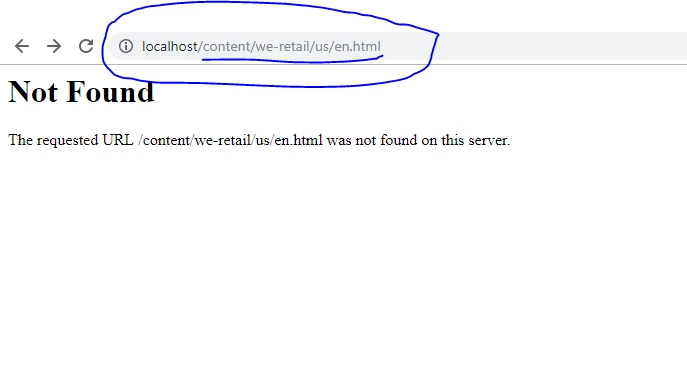
Apache server gets started and when i am hitting localhost:80/index.html it works and displays as

It works!

But i am not able to connect apache server with my publisher. And i am not able to cache publish resources in my htdocs files under apache server.

Please help me.

This post is no longer active and is closed to new replies. Need help? Start a new post to ask your question.

6 replies

Himanshu_Singhal
Community Advisor
Community Advisor
July 22, 2019

Please check your dispatcher logs and make sure that AEM Dispatcher settings are correct. Or if you're getting any specific error, please share it...

Level 2
July 22, 2019

Dispatcher log is empty.

However i am getting the below in error.log

[Mon Jul 22 11:38:25 2019] [warn] Dispatcher set as handler, but not configured in server [01HW466704.India.domain.com].

[Mon Jul 22 11:38:25 2019] [error] [client ::1] Attempt to serve directory: C:/Tool/httpd-2.2.34-win32/Apache2/htdocs/

Adobe Employee
July 25, 2019

Hi Sumank,

Based on this error.log snippet you shared and also the httpd.conf file shared -- I found a forum [1] which may address why your Dispatcher handler configurations are not picking.

Please modify your httpd.conf file --- use this below 'IfModule' tag based on your LoadModule statement :

LoadModule dispatcher_module  modules/disp_apache2.2.dll

...

<IfModule dispatcher_module>

Do NOT use this (current httpd.conf referencing wrong module ):

<IfModule disp_apache2.c>

Please try and let us know --

Regards,

Lisa

[1] Problem installing AEM Dispatcher on Max OSX

Level 6
July 22, 2019

Hi Sumak,

DIspatcher module is called out properly. Since Dispatcher log is empty Apache not able to recognize you added disp module as recommended ...

Level 2
July 22, 2019

DIspatcher module is called out properly.

I have added the following file into modules folder.

disp_apache2.2.dll

And i included this below file into httpd.conf

LoadModule dispatcher_module  modules/disp_apache2.2.dll

but still i get  the same error as mentioned above.

Please help me

Level 2
July 25, 2019

This is my httpd.conf file. Where is the problem in code please help me.

#

# This is the main Apache HTTP server configuration file.  It contains the

# configuration directives that give the server its instructions.

# See <URL:http://httpd.apache.org/docs/2.2> for detailed information.

# In particular, see

# <URL:http://httpd.apache.org/docs/2.2/mod/directives.html>

# for a discussion of each configuration directive.

#

# Do NOT simply read the instructions in here without understanding

# what they do.  They're here only as hints or reminders.  If you are unsure

# consult the online docs. You have been warned. 

#

# Configuration and logfile names: If the filenames you specify for many

# of the server's control files begin with "/" (or "drive:/" for Win32), the

# server will use that explicit path.  If the filenames do *not* begin

# with "/", the value of ServerRoot is prepended -- so 'log/access_log'

# with ServerRoot set to '/www' will be interpreted by the

# server as '/www/log/access_log', where as '/log/access_log' will be

# interpreted as '/log/access_log'.

#

# NOTE: Where filenames are specified, you must use forward slashes

# instead of backslashes (e.g., "c:/apache" instead of "c:\apache").

# If a drive letter is omitted, the drive on which httpd.exe is located

# will be used by default.  It is recommended that you always supply

# an explicit drive letter in absolute paths to avoid confusion.

#

# ServerRoot: The top of the directory tree under which the server's

# configuration, error, and log files are kept.

#

# Do not add a slash at the end of the directory path.  If you point

# ServerRoot at a non-local disk, be sure to point the LockFile directive

# at a local disk.  If you wish to share the same ServerRoot for multiple

# httpd daemons, you will need to change at least LockFile and PidFile.

#

ServerRoot "C:\Tool\httpd-2.2.34-win32\Apache2"

#

# Listen: Allows you to bind Apache to specific IP addresses and/or

# ports, instead of the default. See also the <VirtualHost>

# directive.

#

# Change this to Listen on specific IP addresses as shown below to

# prevent Apache from glomming onto all bound IP addresses.

#

#Listen 12.34.56.78:8181

Listen 8181

#

# Dynamic Shared Object (DSO) Support

#

# To be able to use the functionality of a module which was built as a DSO you

# have to place corresponding `LoadModule' lines at this location so the

# directives contained in it are actually available _before_ they are used.

# Statically compiled modules (those listed by `httpd -l') do not need

# to be loaded here.

#

# Example:

# LoadModule foo_module modules/mod_foo.so

#

LoadModule actions_module modules/mod_actions.so

LoadModule alias_module modules/mod_alias.so

LoadModule asis_module modules/mod_asis.so

LoadModule auth_basic_module modules/mod_auth_basic.so

#LoadModule auth_digest_module modules/mod_auth_digest.so

#LoadModule authn_alias_module modules/mod_authn_alias.so

#LoadModule authn_anon_module modules/mod_authn_anon.so

#LoadModule authn_dbd_module modules/mod_authn_dbd.so

#LoadModule authn_dbm_module modules/mod_authn_dbm.so

LoadModule authn_default_module modules/mod_authn_default.so

LoadModule authn_file_module modules/mod_authn_file.so

#LoadModule authnz_ldap_module modules/mod_authnz_ldap.so

#LoadModule authz_dbm_module modules/mod_authz_dbm.so

LoadModule authz_default_module modules/mod_authz_default.so

LoadModule authz_groupfile_module modules/mod_authz_groupfile.so

LoadModule authz_host_module modules/mod_authz_host.so

#LoadModule authz_owner_module modules/mod_authz_owner.so

LoadModule authz_user_module modules/mod_authz_user.so

LoadModule autoindex_module modules/mod_autoindex.so

#LoadModule cache_module modules/mod_cache.so

#LoadModule cern_meta_module modules/mod_cern_meta.so

LoadModule cgi_module modules/mod_cgi.so

#LoadModule charset_lite_module modules/mod_charset_lite.so

#LoadModule dav_module modules/mod_dav.so

#LoadModule dav_fs_module modules/mod_dav_fs.so

#LoadModule dav_lock_module modules/mod_dav_lock.so

#LoadModule dbd_module modules/mod_dbd.so

#LoadModule deflate_module modules/mod_deflate.so

LoadModule dir_module modules/mod_dir.so

#LoadModule disk_cache_module modules/mod_disk_cache.so

#LoadModule dumpio_module modules/mod_dumpio.so

LoadModule env_module modules/mod_env.so

#LoadModule expires_module modules/mod_expires.so

#LoadModule ext_filter_module modules/mod_ext_filter.so

#LoadModule file_cache_module modules/mod_file_cache.so

#LoadModule filter_module modules/mod_filter.so

#LoadModule headers_module modules/mod_headers.so

#LoadModule ident_module modules/mod_ident.so

#LoadModule imagemap_module modules/mod_imagemap.so

LoadModule include_module modules/mod_include.so

#LoadModule info_module modules/mod_info.so

LoadModule isapi_module modules/mod_isapi.so

#LoadModule ldap_module modules/mod_ldap.so

#LoadModule logio_module modules/mod_logio.so

LoadModule log_config_module modules/mod_log_config.so

#LoadModule log_forensic_module modules/mod_log_forensic.so

#LoadModule mem_cache_module modules/mod_mem_cache.so

LoadModule mime_module modules/mod_mime.so

#LoadModule mime_magic_module modules/mod_mime_magic.so

LoadModule negotiation_module modules/mod_negotiation.so

#LoadModule proxy_module modules/mod_proxy.so

#LoadModule proxy_ajp_module modules/mod_proxy_ajp.so

#LoadModule proxy_balancer_module modules/mod_proxy_balancer.so

#LoadModule proxy_connect_module modules/mod_proxy_connect.so

#LoadModule proxy_ftp_module modules/mod_proxy_ftp.so

#LoadModule proxy_http_module modules/mod_proxy_http.so

#LoadModule proxy_scgi_module modules/mod_proxy_scgi.so

#LoadModule reqtimeout_module modules/mod_reqtimeout.so

LoadModule rewrite_module modules/mod_rewrite.so

LoadModule setenvif_module modules/mod_setenvif.so

#LoadModule speling_module modules/mod_speling.so

#LoadModule ssl_module modules/mod_ssl.so

#LoadModule status_module modules/mod_status.so

#LoadModule substitute_module modules/mod_substitute.so

#LoadModule unique_id_module modules/mod_unique_id.so

#LoadModule userdir_module modules/mod_userdir.so

#LoadModule usertrack_module modules/mod_usertrack.so

#LoadModule version_module modules/mod_version.so

#LoadModule vhost_alias_module modules/mod_vhost_alias.so

LoadModule dispatcher_module  modules/disp_apache2.2.dll

<IfModule !mpm_netware_module>

<IfModule !mpm_winnt_module>

<IfModule disp_apache2.c>

    # location of the configuration file. eg: 'conf/dispatcher.any'

    DispatcherConfig conf/dispatcher.any


    # location of the dispatcher log file. eg: 'logs/dispatcher.log'

    DispatcherLog    logs/dispatcher.log


    # log level for the dispatcher log, can be either specified

    # as a string or an integer (in parentheses)

    # error(0): Errors

    # warn(1):  Warnings

    # info(2):  Infos

    # debug(3): Debug

    # trace(4): Trace

    DispatcherLogLevel debug


    # if turned on, the dispatcher looks like a normal module

    DispatcherNoServerHeader Off


    # if turned on, request to / are not handled by the dispatcher

    # use the mod_alias then for the correct mapping

    DispatcherDeclineRoot Off


    # if turned on, the dispatcher uses the URL already processed

    # by handlers preceeding the dispatcher (i.e. mod_rewrite)

    # instead of the original one passed to the web server.

    DispatcherUseProcessedURL Off


    # if turned to 1, the dispatcher does not spool an error

    # response to the client (where the status code is greater

    # or equal than 400), but passes the status code to

    # Apache, which e.g. allows an ErrorDocument directive

    # to process such a status code.

    #

    # Additionally, one can specify the status code ranges that should

    # be left to web server to handle, e.g.

    #

    # DispatcherPassError 400-404,501

    DispatcherPassError 0

    #

    # DispatcherKeepAliveTimeout specifies the number of seconds a

    # connection to a backend should be kept alive. If not set or

    # set to zero, connections are not kept alive.

    #

    #DispatcherKeepAliveTimeout 60

</IfModule>

#

# If you wish httpd to run as a different user or group, you must run

# httpd as root initially and it will switch. 

#

# User/Group: The name (or #number) of the user/group to run httpd as.

# It is usually good practice to create a dedicated user and group for

# running httpd, as with most system services.

#

User daemon

Group daemon

</IfModule>

</IfModule>

# 'Main' server configuration

#

# The directives in this section set up the values used by the 'main'

# server, which responds to any requests that aren't handled by a

# <VirtualHost> definition.  These values also provide defaults for

# any <VirtualHost> containers you may define later in the file.

#

# All of these directives may appear inside <VirtualHost> containers,

# in which case these default settings will be overridden for the

# virtual host being defined.

#

#

# ServerAdmin: Your address, where problems with the server should be

# e-mailed.  This address appears on some server-generated pages, such

# as error documents.  e.g. admin@your-domain.com

#

ServerAdmin kumar.suman5@tcs.com

#

# ServerName gives the name and port that the server uses to identify itself.

# This can often be determined automatically, but we recommend you specify

# it explicitly to prevent problems during startup.

#

# If your host doesn't have a registered DNS name, enter its IP address here.

#

#ServerName www.example.com:80

#

# DocumentRoot: The directory out of which you will serve your

# documents. By default, all requests are taken from this directory, but

# symbolic links and aliases may be used to point to other locations.

#

DocumentRoot "C:\Tool\httpd-2.2.34-win32\Apache2\htdocs"

#

# Each directory to which Apache has access can be configured with respect

# to which services and features are allowed and/or disabled in that

# directory (and its subdirectories).

#

# First, we configure the "default" to be a very restrictive set of

# features. 

#

<Directory />

    <IfModule disp_apache2.c>

        ModMimeUsePathInfo On

        # enable dispatcher for ALL request. if this is too restrictive,

        # move it to another location

        SetHandler dispatcher-handler

    </IfModule>

    Options FollowSymLinks

    AllowOverride none

</Directory>

#

# Note that from this point forward you must specifically allow

# particular features to be enabled - so if something's not working as

# you might expect, make sure that you have specifically enabled it

# below.

#

#

# This should be changed to whatever you set DocumentRoot to.

#

<Directory "C:\Tool\httpd-2.2.34-win32\Apache2\htdocs">

    #

    # Possible values for the Options directive are "None", "All",

    # or any combination of:

    #   Indexes Includes FollowSymLinks SymLinksifOwnerMatch ExecCGI MultiViews

    #

    # Note that "MultiViews" must be named *explicitly* --- "Options All"

    # doesn't give it to you.

    #

    # The Options directive is both complicated and important.  Please see

    # http://httpd.apache.org/docs/2.2/mod/core.html#options

    # for more information.

    #

    Options Indexes FollowSymLinks

    #

    # AllowOverride controls what directives may be placed in .htaccess files.

    # It can be "All", "None", or any combination of the keywords:

    #   Options FileInfo AuthConfig Limit

    #

    AllowOverride None

    #

    # Controls who can get stuff from this server.

    #

    Order allow,deny

    Allow from all

</Directory>

#

# DirectoryIndex: sets the file that Apache will serve if a directory

# is requested.

#

<IfModule dir_module>

    DirectoryIndex index.html

</IfModule>

#

# The following lines prevent .htaccess and .htpasswd files from being

# viewed by Web clients.

#

<FilesMatch "^\.ht">

    Order allow,deny

    allow from all

    Satisfy All

</FilesMatch>

#

# ErrorLog: The location of the error log file.

# If you do not specify an ErrorLog directive within a <VirtualHost>

# container, error messages relating to that virtual host will be

# logged here.  If you *do* define an error logfile for a <VirtualHost>

# container, that host's errors will be logged there and not here.

#

ErrorLog "logs/error.log"

#

# LogLevel: Control the number of messages logged to the error_log.

# Possible values include: debug, info, notice, warn, error, crit,

# alert, emerg.

#

LogLevel warn

<IfModule log_config_module>

    #

    # The following directives define some format nicknames for use with

    # a CustomLog directive (see below).

    #

    LogFormat "%h %l %u %t \"%r\" %>s %b \"%{Referer}i\" \"%{User-Agent}i\"" combined

    LogFormat "%h %l %u %t \"%r\" %>s %b" common

    <IfModule logio_module>

      # You need to enable mod_logio.c to use %I and %O

      LogFormat "%h %l %u %t \"%r\" %>s %b \"%{Referer}i\" \"%{User-Agent}i\" %I %O" combinedio

    </IfModule>

    #

    # The location and format of the access logfile (Common Logfile Format).

    # If you do not define any access logfiles within a <VirtualHost>

    # container, they will be logged here.  Contrariwise, if you *do*

    # define per-<VirtualHost> access logfiles, transactions will be

    # logged therein and *not* in this file.

    #

    CustomLog "logs/access.log" common

    #

    # If you prefer a logfile with access, agent, and referer information

    # (Combined Logfile Format) you can use the following directive.

    #

    #CustomLog "logs/access.log" combined

</IfModule>

<IfModule alias_module>

    #

    # Redirect: Allows you to tell clients about documents that used to

    # exist in your server's namespace, but do not anymore. The client

    # will make a new request for the document at its new location.

    # Example:

    # Redirect permanent /foo http://www.example.com/bar

    #

    # Alias: Maps web paths into filesystem paths and is used to

    # access content that does not live under the DocumentRoot.

    # Example:

    # Alias /webpath /full/filesystem/path

    #

    # If you include a trailing / on /webpath then the server will

    # require it to be present in the URL.  You will also likely

    # need to provide a <Directory> section to allow access to

    # the filesystem path.

    #

    # ScriptAlias: This controls which directories contain server scripts.

    # ScriptAliases are essentially the same as Aliases, except that

    # documents in the target directory are treated as applications and

    # run by the server when requested rather than as documents sent to the

    # client.  The same rules about trailing "/" apply to ScriptAlias

    # directives as to Alias.

    #

    ScriptAlias /cgi-bin/ "c:/Apache2/cgi-bin/"

</IfModule>

<IfModule cgid_module>

    #

    # ScriptSock: On threaded servers, designate the path to the UNIX

    # socket used to communicate with the CGI daemon of mod_cgid.

    #

    #Scriptsock logs/cgisock

</IfModule>

#

# "c:/Apache2/cgi-bin" should be changed to whatever your ScriptAliased

# CGI directory exists, if you have that configured.

#

<Directory "C:\Tool\httpd-2.2.34-win32\Apache2\htdocs">

    AllowOverride All

    Options None

    Order allow,deny

    Allow from all

</Directory>

#

# DefaultType: the default MIME type the server will use for a document

# if it cannot otherwise determine one, such as from filename extensions.

# If your server contains mostly text or HTML documents, "text/plain" is

# a good value.  If most of your content is binary, such as applications

# or images, you may want to use "application/octet-stream" instead to

# keep browsers from trying to display binary files as though they are

# text.

#

DefaultType text/plain

<IfModule headers_module>

    #

    # Avoid passing HTTP_PROXY environment to CGI's on this or any proxied

    # backend servers which have lingering "httpoxy" defects.

    # 'Proxy' request header is undefined by the IETF, not listed by IANA

    #

    RequestHeader unset Proxy early

</IfModule>

<IfModule mime_module>

    #

    # TypesConfig points to the file containing the list of mappings from

    # filename extension to MIME-type.

    #

    TypesConfig conf/mime.types

    #

    # AddType allows you to add to or override the MIME configuration

    # file specified in TypesConfig for specific file types.

    #

    #AddType application/x-gzip .tgz

    #

    # AddEncoding allows you to have certain browsers uncompress

    # information on the fly. Note: Not all browsers support this.

    #

    #AddEncoding x-compress .Z

    #AddEncoding x-gzip .gz .tgz

    #

    # If the AddEncoding directives above are commented-out, then you

    # probably should define those extensions to indicate media types:

    #

    AddType application/x-compress .Z

    AddType application/x-gzip .gz .tgz

    #

    # AddHandler allows you to map certain file extensions to "handlers":

    # actions unrelated to filetype. These can be either built into the server

    # or added with the Action directive (see below)

    #

    # To use CGI scripts outside of ScriptAliased directories:

    # (You will also need to add "ExecCGI" to the "Options" directive.)

    #

    #AddHandler cgi-script .cgi

    # For type maps (negotiated resources):

    #AddHandler type-map var

    #

    # Filters allow you to process content before it is sent to the client.

    #

    # To parse .shtml files for server-side includes (SSI):

    # (You will also need to add "Includes" to the "Options" directive.)

    #

    #AddType text/html .shtml

    #AddOutputFilter INCLUDES .shtml

</IfModule>

#

# The mod_mime_magic module allows the server to use various hints from the

# contents of the file itself to determine its type.  The MIMEMagicFile

# directive tells the module where the hint definitions are located.

#

#MIMEMagicFile conf/magic

#

# Customizable error responses come in three flavors:

# 1) plain text 2) local redirects 3) external redirects

#

# Some examples:

#ErrorDocument 500 "The server made a boo boo."

#ErrorDocument 404 /missing.html

#ErrorDocument 404 "/cgi-bin/missing_handler.pl"

#ErrorDocument 402 http://www.example.com/subscription_info.html

#

#

# MaxRanges: Maximum number of Ranges in a request before

# returning the entire resource, or one of the special

# values 'default', 'none' or 'unlimited'.

# Default setting is to accept 200 Ranges.

#MaxRanges unlimited

#

# EnableMMAP and EnableSendfile: On systems that support it,

# memory-mapping or the sendfile syscall is used to deliver

# files.  This usually improves server performance, but must

# be turned off when serving from networked-mounted

# filesystems or if support for these functions is otherwise

# broken on your system.

#

#EnableMMAP off

#EnableSendfile off

# Supplemental configuration

#

# The configuration files in the conf/extra/ directory can be

# included to add extra features or to modify the default configuration of

# the server, or you may simply copy their contents here and change as

# necessary.

# Server-pool management (MPM specific)

#Include conf/extra/httpd-mpm.conf

# Multi-language error messages

#Include conf/extra/httpd-multilang-errordoc.conf

# Fancy directory listings

#Include conf/extra/httpd-autoindex.conf

# Language settings

#Include conf/extra/httpd-languages.conf

# User home directories

#Include conf/extra/httpd-userdir.conf

# Real-time info on requests and configuration

#Include conf/extra/httpd-info.conf

# Virtual hosts

#Include conf/extra/httpd-vhosts.conf

# Local access to the Apache HTTP Server Manual

#Include conf/extra/httpd-manual.conf

# Distributed authoring and versioning (WebDAV)

#Include conf/extra/httpd-dav.conf

# Various default settings

#Include conf/extra/httpd-default.conf

# Secure (SSL/TLS) connections

#Include conf/extra/httpd-ssl.conf

#

# Note: The following must must be present to support

#       starting without SSL on platforms with no /dev/random equivalent

#       but a statically compiled-in mod_ssl.

#

<IfModule ssl_module>

SSLRandomSeed startup builtin

SSLRandomSeed connect builtin

</IfModule>

Level 6
July 22, 2019

Please comment Vhost config and run the plain Httpd.conf  .

Double check with the below URL :

http://www.aemcq5tutorials.com/tutorials/set-up-dispatcher-in-aem/

Make sure to setup dispatcher log to debug mode. 

Level 2
July 25, 2019

it'a already commented.

Level 6
July 22, 2019

Hi Aemmarc,

We can tweek and install Apache on windows machine. 

How to Install Apache Web Server on Windows — SitePoint

Level 6
July 25, 2019

Hi Sumank,

please see below

<Directory />

    <IfModule disp_apache2.c>

        #ModMimeUsePathInfo On

        # enable dispatcher for ALL request. if this is too restrictive,

        # move it to another location

        SetHandler dispatcher-handler

    </IfModule>

      Options FollowSymLinks

    AllowOverride None

</Directory>

cal-netsolution
Level 2
July 26, 2019

Hi Suman, please check if you have made the configuration in dispatcher.any file in line number 30. Please see the screenshot, where you need to mention the publish port. And make sure you have placed the dispatcher.any file from downloaded dispatcher module to Apache installation directory inside /conf folder.

Source image file 18888 not available

Hope this helps!

Cal