What is the purpose of granite.ui.quickactions category and compatibility with AEM 6.5 | Community
Skip to main content
JakeCham
Level 6
June 26, 2021
Solved

What is the purpose of granite.ui.quickactions category and compatibility with AEM 6.5

  • June 26, 2021
  • 3 replies
  • 3090 views

Hi Team,


I have a  problem of not loading my clientlib while page is still on create state. Once I have added granite.ui.quickactions category to  client lib it is getting loaded to the page when it is still on create state.I got the clue from this forum with the help of Anudeep_Garnepudi.

Here I have some problems

1) granite.ui.quickactions is compatible with AEM 6.5

2) Since I have added granite.ui.quickactions category in to clientlib folder , can't I specifically put where that client library is getting loaded ?

3) though Clientlib is getting loaded still my js is not firing while page  is on create state. After page creations everything works well as expected

4) Is that fine to use granite.ui.quickactions category on purpose of loading a clientlib on page creation ?


This post is no longer active and is closed to new replies. Need help? Start a new post to ask your question.
Best answer by vmadala

Hello @jakecham 

I understand that you want to execute JS code when you clicked on the "create -> page" button. I've achieved this in my local, please see the below steps.

Please let me know if you need more info.


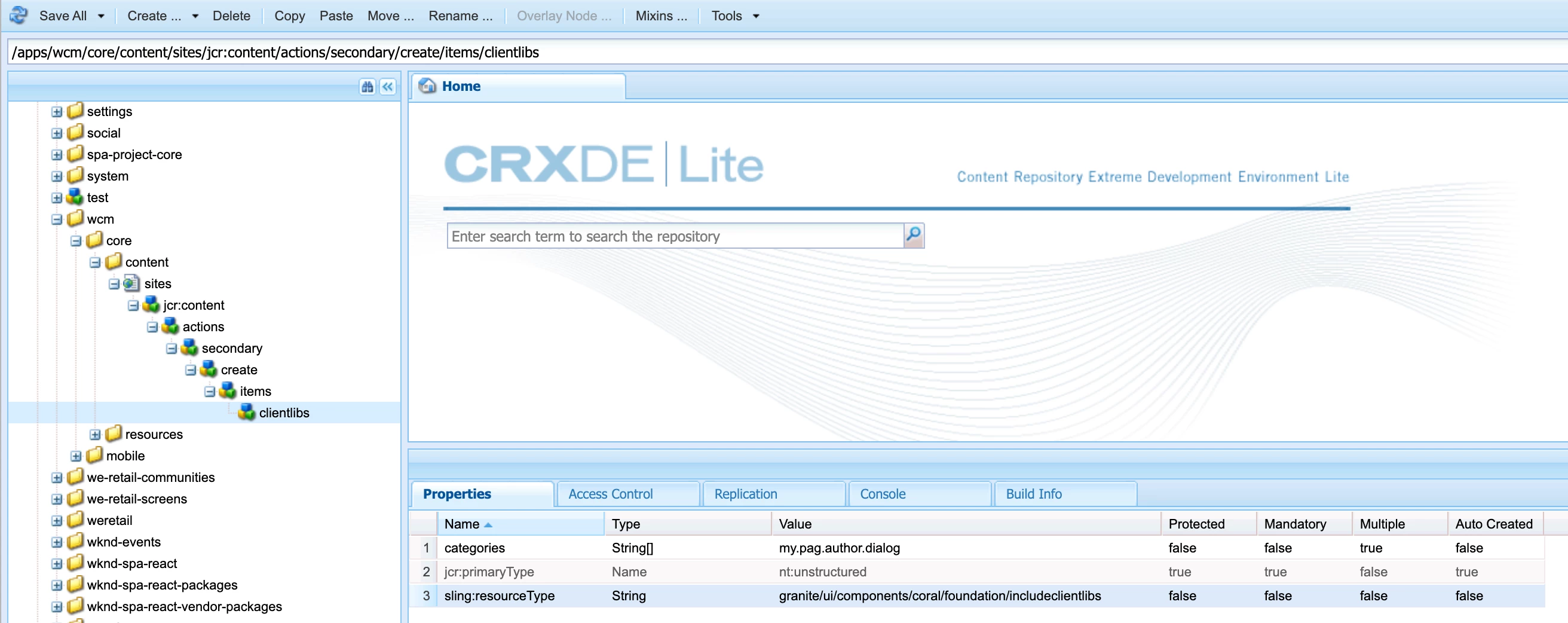
1. Overlay the node items from this path, "/libs/wcm/core/content/sites/jcr:content/actions/secondary/create/items", will create a node items node under /apps folder as shown in the screen-1.
2. Create a clientlibs node, with the sling:resourceType is "granite/ui/components/coral/foundation/includeclientlibs" and specify the clientlib, categories with the values as shown in the screen-1.
3. create clientlib folder as shown in the screen-2 and write your JS code as shown in the screenshot.
4. See screen-3 for reference alert.

I hope this method helps you.


Thanks,
Venkat.M

3 replies

vmadala
Level 3
June 26, 2021

Hello @jakecham ,

As per my understanding, You want to load your javascript code during page creation, which is in page properties/editor mode. We've achieved this in our project. Please see below sample  code:
1. Create a clientlib, under page component "/apps/<your-app>/components/structure/page" as shown in the below screenshot.
2. Add "categories" name as shown in the below screenshot.
3. Add "extraClientlibs" propery to the cq:dialog node under the page component.


Let me know if you need more info.

Level 2
January 20, 2022

what is the purpose of "categories" node property here ??? how can we know that for a particular node what will be the value of this "categories" property ????

vmadala
Level 3
June 26, 2021

Hello @jakecham ,

As per my understanding, You want to load your javascript code during page creation, which is in page properties/editor mode. We've achieved this in our project. Please see below sample  code:
1. Create a clientlib, under page component "/apps/<your-app>/components/structure/page" as shown in the below screenshot.
2. Add "categories" name as shown in the below screenshot.
3. Add "extraClientlibs" property to the cq:dialog node under the page component.


Let me know if you need more info.

JakeCham
JakeChamAuthor
Level 6
June 26, 2021
Hi vmadala I want to add the clientlib before u press the create button while page creation.What u have suggested is the normal way of adding a clientlib to cqdialog and it is not going to work for my test scenario
vmadala
vmadalaAccepted solution
Level 3
June 27, 2021

Hello @jakecham 

I understand that you want to execute JS code when you clicked on the "create -> page" button. I've achieved this in my local, please see the below steps.

Please let me know if you need more info.


1. Overlay the node items from this path, "/libs/wcm/core/content/sites/jcr:content/actions/secondary/create/items", will create a node items node under /apps folder as shown in the screen-1.
2. Create a clientlibs node, with the sling:resourceType is "granite/ui/components/coral/foundation/includeclientlibs" and specify the clientlib, categories with the values as shown in the screen-1.
3. create clientlib folder as shown in the screen-2 and write your JS code as shown in the screenshot.
4. See screen-3 for reference alert.

I hope this method helps you.


Thanks,
Venkat.M

Level 2
January 20, 2022

what is the purpose of "categories" node property here ??? how can we know that for a particular node what will be the value of this "categories" property ????