
Way to customise cancel inheritance message | Community
Skip to main content
Umesh_Thakur
Community Advisor
Community Advisor
April 6, 2021
Solved

Way to customise cancel inheritance message

  • April 6, 2021
  • 3 replies
  • 1536 views

Dear Members,

We have one requirement to customise the message, that we are getting while canceling the inheritance on a live copy page.

So  can anyone suggest a way, if we have to accomplish the above requirement.

Step to get the message:

1. Open any live copy page in editor.html.

2. Click on a component then you will have on Cancel Inheritance Icon.

3. On click on the icon You will get one alert confirmation box with "Do you really want to cancel the inheritance?" message.


Though we can take help from front-end to show the customise message but I wanted to use the existing feature, if possible so I am checking.


Thanks

Umesh Thakur
This post is no longer active and is closed to new replies. Need help? Start a new post to ask your question.
Best answer by Vijayalakshmi_S

Hi @umesh_thakur,

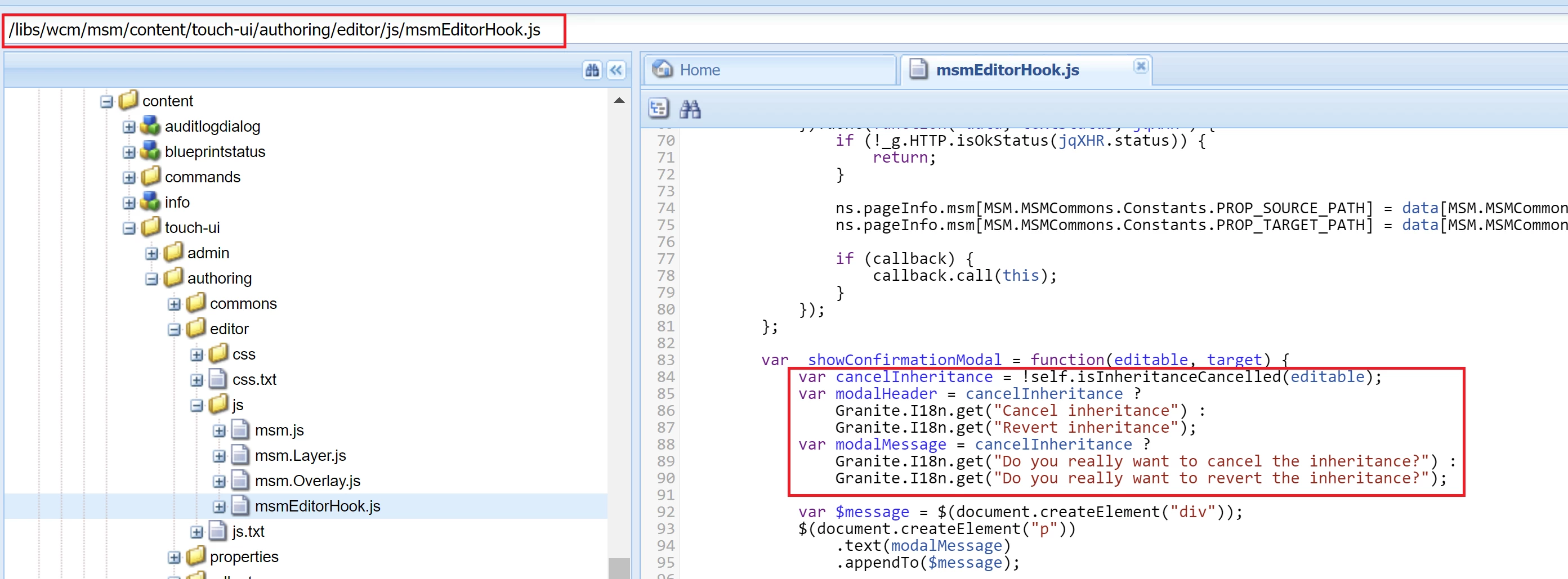
Cancel Inheritance modal from Component Tool bar action is rendered from this JS - /libs/wcm/msm/content/touch-ui/authoring/editor/js/msmEditorHook.js


3 replies

kautuk_sahni
Community Manager
Community Manager
April 6, 2021
Kautuk Sahni
arunpatidar
Community Advisor
Community Advisor
April 6, 2021

Hi,

The coral dialog is from Javascript https://localhost:4502/libs/wcm/msm/content/touch-ui/authoring/commons.min.js

you may try to create i18n key with a different message that can help.

Arun Patidar
Umesh_Thakur
Community Advisor
Community Advisor
April 6, 2021
Hi Arun, Thanks for your response. I have checked path but commons.min.js file itself is not available in my author instance. there is one .js file at /libs/wcm/msm/content/touch-ui/authoring/commons/js/msmTouchUICommons.js and I can see the message here. But when I try to changes some text on it, that is not reflecting in the pop-up. I restated the instance and did empty cache and hard reload on the browser. It didn't work for me.
Vijayalakshmi_S
Vijayalakshmi_SAccepted solution
Level 10
April 6, 2021

Hi @umesh_thakur,

Cancel Inheritance modal from Component Tool bar action is rendered from this JS - /libs/wcm/msm/content/touch-ui/authoring/editor/js/msmEditorHook.js


Umesh_Thakur
Community Advisor
Community Advisor
April 7, 2021
Thanks @Vijaylakshmi, it worked for me.