Want to Add space between the 2 fields of the Component. | Community
Skip to main content
Level 2
May 26, 2020
Solved

Want to Add space between the 2 fields of the Component.

  • May 26, 2020
  • 3 replies
  • 7775 views

 I have a component , I want to add an extra space between the 2 fields. Is there any properties available in AEM to achieve this. (like Width ,height) 



Thanks in Advance.

This post is no longer active and is closed to new replies. Need help? Start a new post to ask your question.
Best answer by Ravi_Pampana

Hi,


You can create a css file add the custom styles you want and add it to authoring category to reflect the changes.


category-name: cq.authoring.dialog.all 


Style I added for testing:

.coral-Form--vertical .coral-Form-field.coral3-Textfield {

margin-bottom: 50px;
}
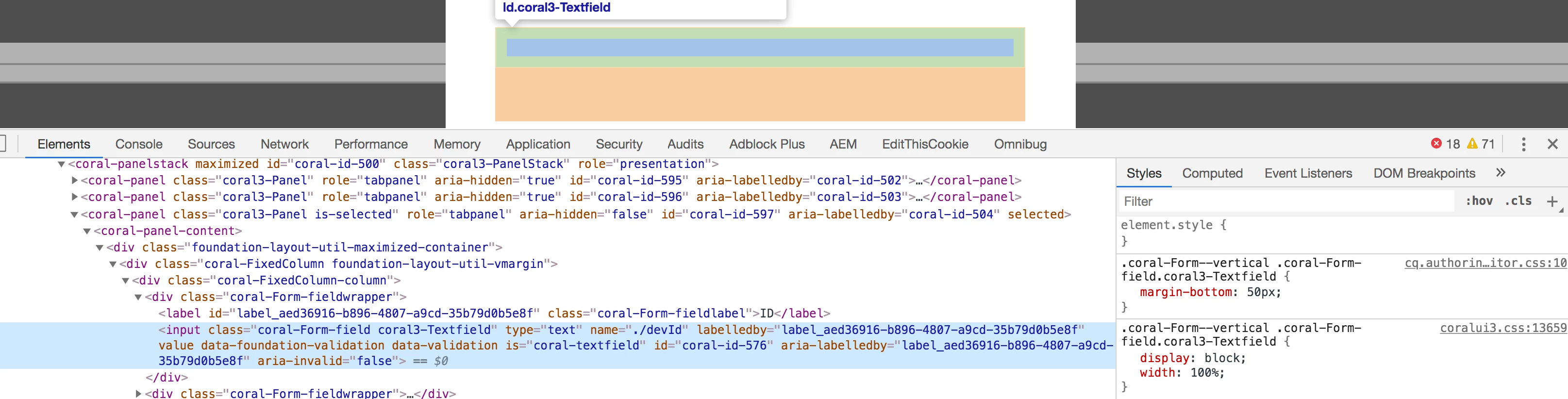


Otherwise try adding some hidden fields and see you are getting required space

Hope this helps !

3 replies

Ravi_Pampana
Community Advisor
Ravi_PampanaCommunity AdvisorAccepted solution
Community Advisor
May 26, 2020

Hi,


You can create a css file add the custom styles you want and add it to authoring category to reflect the changes.


category-name: cq.authoring.dialog.all 


Style I added for testing:

.coral-Form--vertical .coral-Form-field.coral3-Textfield {

margin-bottom: 50px;
}


Otherwise try adding some hidden fields and see you are getting required space

Hope this helps !

arunpatidar
Community Advisor
Community Advisor
May 26, 2020

Hi,

There is no property to add height or width.

All the available properties for text field can be found at https://helpx.adobe.com/experience-manager/6-3/sites/developing/using/reference-materials/granite-ui/api/jcr_root/libs/granite/ui/components/coral/foundation/form/textfield/index.html


To add a custom layout, you can add id or class to the field and handle using css

https://helpx.adobe.com/experience-manager/6-3/sites/developing/using/reference-materials/granite-ui/api/jcr_root/libs/granite/ui/docs/server/commonattrs.html


If you just want to add some space between 2 textfields(Textfield2 and Textfield 1) then you can inject an empty heading type field(not a clean solution though) https://helpx.adobe.com/experience-manager/6-3/sites/developing/using/reference-materials/granite-ui/api/jcr_root/libs/granite/ui/components/coral/foundation/heading/index.html


Arun Patidar
Theo_Pendle
Level 8
May 26, 2020

Hi @dhanubrp,

Personally, I wouldn't use empty fields as the next developer who comes along will instinctively wonder "why are there empty fields here?". It's not very elegant.

Here is an OOTB method using CSS that you can do in 10s.

On your fields, add the following property:

wrapperClass -- String -- padding-b-2

padding-b-2 is an OOTB utility class, so no need to add your own CSS.
wrapperClass will add that class name to the wrapper element.

You could also use the granite:class property with the same value, but it's best to use wrapperClass as a general rule. This is because granite:class adds a class to the actual input and wrapperClass adds a class to the wrapper which contains the input and the label. For bottom padding it makes no difference but you can image that for top padding, if you use granite:class, you'd have padding between the input and label, and nobody wants that 😛 

Here is the result:

padding-b-2 stands for 2rem of bottom padding, but of course, if you want more or less padding, or if you want to use a margin, etc. you can use a different utility class. Find the list here: http://localhost:4502/libs/cq/gui/components/authoring/editors/clientlibs/sites/page.min.css

This comes with a warning: these utility classes are only usable specifically in dialogs of the Page Editor. If you want to use the same trick somewhere else in the TouchUI, you may have to find another way.