Upload images from desktop to DAM using Image Component | Community
Skip to main content
tahseenr6602905
Level 2
September 12, 2018
Solved

Upload images from desktop to DAM using Image Component

  • September 12, 2018
  • 5 replies
  • 6153 views

Hi,

I am looking for a solution to upload images from desktop and add it to the DAM, instead  of adding the image as a child node of the image component. Do I need to edit the javascript for the dialog component or have a model use AssetManagement API to manually copy to the DAM?

Thank you,

Tahseen

This post is no longer active and is closed to new replies. Need help? Start a new post to ask your question.
Best answer by Techaspect_Solu

Hi,

As Arun Patidar suggested you can write a listener and call a servlet using AssetManager API to implement your functionality.

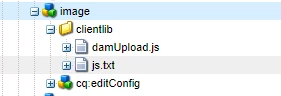
Here's is how we implemented the same and were able to upload the asset to DAM as we uploaded it to the image component.

We are using the OOTB Image component and adding a listener file to get the asset and call a servlet. Here is the listener file that we used:

function damUpload() {

    var imgPath = $(".cq-FileUpload-thumbnail-img img").attr("src").split('image')[0];

    var imgName = $(".cq-FileUpload-thumbnail-img img").attr("title");

    var data = 'imgPath=' + imgPath + '&imgName=' + imgName;


     $.ajax({

        type: 'POST',

        url: '/bin/updamfile',

        data: data,

        success: function(msg) {

        }

    });

};

$(document).ready(function() {

    $(document).on("click", ".cq-dialog-submit", function() {

        damUpload();

    });

});

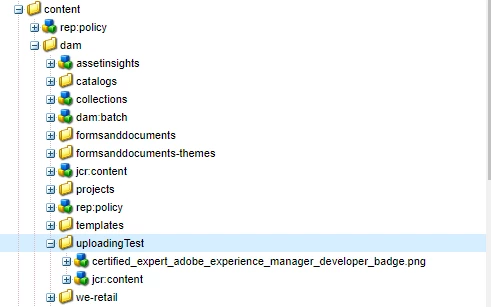
The servlet will create the asset in dam under the path "/content/dam/uploadingTest/" . Here's the servlet:

import java.io.IOException;

import java.io.InputStream;

import java.rmi.ServerException;

import javax.jcr.Node;

import org.apache.felix.scr.annotations.Reference;

import org.apache.felix.scr.annotations.sling.SlingServlet;

import org.apache.sling.api.SlingHttpServletRequest;

import org.apache.sling.api.SlingHttpServletResponse;

import org.apache.sling.api.resource.ResourceResolver;

import org.apache.sling.api.resource.ResourceResolverFactory;

import org.slf4j.Logger;

import org.slf4j.LoggerFactory;

@SlingServlet(paths = "/bin/updamfile", methods = "POST", metatype = true)

public class HandleDamFile extends org.apache.sling.api.servlets.SlingAllMethodsServlet {

private static final long serialVersionUID = 2598426539166789515L;

// Inject a Sling ResourceResolverFactory

@Reference

private ResourceResolverFactory resolverFactory;

@Override

protected void doGet(SlingHttpServletRequest request, SlingHttpServletResponse response)

  throws ServerException, IOException {

}

@Override

protected void doPost(SlingHttpServletRequest request, SlingHttpServletResponse response)

  throws ServerException, IOException {

  try {

  String imgPath = request.getParameter("imgPath");

  String imgName = request.getParameter("imgName");

  imgPath = imgPath.replace("_jcr_content", "jcr:content") + "/image/file";

  Node imgNode = request.getResourceResolver().getResource(imgPath).adaptTo(Node.class);

  final InputStream stream = imgNode.getNode("jcr:content").getProperty("jcr:data").getStream();

  // Save the uploaded file into the Adobe CQ DAM

  uploadToDam(stream, imgName, request.getResource().getResourceResolver());

  }

  catch (Exception e) {

  e.printStackTrace();

  }

}

// Save the uploaded file into the AEM DAM using AssetManager APIs

private void uploadToDam(InputStream is, String imgName, ResourceResolver resourceResolver) {

  try {

  // Use AssetManager to place the file into the AEM DAM

  com.day.cq.dam.api.AssetManager assetMgr = resourceResolver.adaptTo(com.day.cq.dam.api.AssetManager.class);

  String newFile = "/content/dam/uploadingTest/" + imgName;

  assetMgr.createAsset(newFile, is, "image/jpeg", true);

  LOG.info("asset created");

  } catch (Exception e) {

  e.printStackTrace();

   }

  }

}

Here are some screenshots for better understanding:

1. The image component:
2. The asset created under the mentioned path after successful implementation:

Hope this helps!

Regards,

TechAspect Solutions

5 replies

arunpatidar
Community Advisor
Community Advisor
September 13, 2018

Hi,

You can try this with the help of AssetsManager API on dialog submit.

But you have to modify code to read image and upload in DAM instead of content.Then delete uploaded image from content and set property in image component to point at upload image at DAM

Adobe Experience Manager Help | Uploading files to Adobe Experience Manager DAM using AssetManager API

But why don't you go with upload first and then use later, using pathbrowser/pathfield coral components instead of upload image.

Arun Patidar
tahseenr6602905
Level 2
September 17, 2018

Hi Arun,

The requirement is that images can be drag and dropped or browsed from desktop and added to an article. To increase reusability, that image should be copied to DAM. I have tried both solutions before but they do not fulfill all of the requirements. Is there any image component which directly uploads to DAM or any patch to make an image component to do it?

Thanks,

Tahseen

arunpatidar
Community Advisor
Community Advisor
September 18, 2018

Hi,

I am not sure about if any of the component exist but what you can try to write a listener which listen file upload and create image in DAM, this will help you to upload same image in DAM which you can reuse later.

Arun Patidar
Techaspect_Solu
Techaspect_SoluAccepted solution
Level 7
September 18, 2018

Hi,

As Arun Patidar suggested you can write a listener and call a servlet using AssetManager API to implement your functionality.

Here's is how we implemented the same and were able to upload the asset to DAM as we uploaded it to the image component.

We are using the OOTB Image component and adding a listener file to get the asset and call a servlet. Here is the listener file that we used:

function damUpload() {

    var imgPath = $(".cq-FileUpload-thumbnail-img img").attr("src").split('image')[0];

    var imgName = $(".cq-FileUpload-thumbnail-img img").attr("title");

    var data = 'imgPath=' + imgPath + '&imgName=' + imgName;


     $.ajax({

        type: 'POST',

        url: '/bin/updamfile',

        data: data,

        success: function(msg) {

        }

    });

};

$(document).ready(function() {

    $(document).on("click", ".cq-dialog-submit", function() {

        damUpload();

    });

});

The servlet will create the asset in dam under the path "/content/dam/uploadingTest/" . Here's the servlet:

import java.io.IOException;

import java.io.InputStream;

import java.rmi.ServerException;

import javax.jcr.Node;

import org.apache.felix.scr.annotations.Reference;

import org.apache.felix.scr.annotations.sling.SlingServlet;

import org.apache.sling.api.SlingHttpServletRequest;

import org.apache.sling.api.SlingHttpServletResponse;

import org.apache.sling.api.resource.ResourceResolver;

import org.apache.sling.api.resource.ResourceResolverFactory;

import org.slf4j.Logger;

import org.slf4j.LoggerFactory;

@SlingServlet(paths = "/bin/updamfile", methods = "POST", metatype = true)

public class HandleDamFile extends org.apache.sling.api.servlets.SlingAllMethodsServlet {

private static final long serialVersionUID = 2598426539166789515L;

// Inject a Sling ResourceResolverFactory

@Reference

private ResourceResolverFactory resolverFactory;

@Override

protected void doGet(SlingHttpServletRequest request, SlingHttpServletResponse response)

  throws ServerException, IOException {

}

@Override

protected void doPost(SlingHttpServletRequest request, SlingHttpServletResponse response)

  throws ServerException, IOException {

  try {

  String imgPath = request.getParameter("imgPath");

  String imgName = request.getParameter("imgName");

  imgPath = imgPath.replace("_jcr_content", "jcr:content") + "/image/file";

  Node imgNode = request.getResourceResolver().getResource(imgPath).adaptTo(Node.class);

  final InputStream stream = imgNode.getNode("jcr:content").getProperty("jcr:data").getStream();

  // Save the uploaded file into the Adobe CQ DAM

  uploadToDam(stream, imgName, request.getResource().getResourceResolver());

  }

  catch (Exception e) {

  e.printStackTrace();

  }

}

// Save the uploaded file into the AEM DAM using AssetManager APIs

private void uploadToDam(InputStream is, String imgName, ResourceResolver resourceResolver) {

  try {

  // Use AssetManager to place the file into the AEM DAM

  com.day.cq.dam.api.AssetManager assetMgr = resourceResolver.adaptTo(com.day.cq.dam.api.AssetManager.class);

  String newFile = "/content/dam/uploadingTest/" + imgName;

  assetMgr.createAsset(newFile, is, "image/jpeg", true);

  LOG.info("asset created");

  } catch (Exception e) {

  e.printStackTrace();

   }

  }

}

Here are some screenshots for better understanding:

1. The image component:

2. The asset created under the mentioned path after successful implementation:
Hope this helps!

Regards,

TechAspect Solutions

smacdonald2008
Level 10
September 18, 2018

Excellent Response Tech Aspect and Arun!