Update workflow model labels | Community
Skip to main content
This post is no longer active and is closed to new replies. Need help? Start a new post to ask your question.
Best answer by Avdhesh-Pandey

@nilesh_mali, there is a workaround that I could implement for one of my requirement,

Created a "cq:ClientLibraryFolder" folder under components in ui.apps.

Set categories as below

categories="[coralui3,coralui2]"

and in the js.txt, add a new file with below code

(function(document, $) { 'use strict'; $(document).on('foundation-contentloaded', function(e) { var selection = $(".foundation-collection-item.foundation-selections-item.is-selected"); if (selection !== null) { var itemPath = selection.data("foundationCollectionItemId"); if (itemPath === '/var/workflow/models/YOUR-WORKFLOW-MODEL') { $("input[name='model']").closest('form').find($("textarea[name='startComment']").prev('label')).html('TEXT-TO-REPLACE'); } } }); })(document, Granite.$);


Here, itemPath is your Workflow model path in case you want the changes to be specific to a particular WorkFlow.


Hope this workaround works for you!


4 replies

iamnjain
Community Advisor
Community Advisor
October 14, 2023

Hi @nilesh_mali


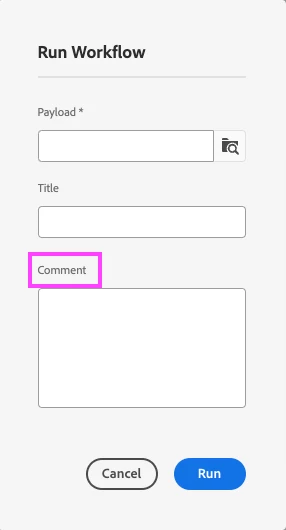
You want to change the "comment" label to something else for a particular WF?
Is this your query?

Nilesh_Mali
October 14, 2023

Yes. I want to change the "comment" label to something else for a particular WF.

iamnjain
Community Advisor
Community Advisor
October 17, 2023

Hi @nilesh_mali 


We cannot overlay these nodes and hence won't be able to customize it.

Hope it helps.


rampai
Community Advisor
Community Advisor
October 15, 2023

Hi @nilesh_mali ,


I am not sure how to customize this for a specific model although this value is coming from "/libs/cq/workflow/admin/console/content/models/runmodeldialog/items/form/items/startComment".


You can try adding a new button to the Workflow console for your custom requirement. 


Below article demonstrates how you can do it for Sites console. You can follow similar steps and do it for Workflow models view instead.


AEM - How to add a custom button to the sites.html and render it based on specific paths ? (linkedin.com)


e.g. target should be ".cq-workflow-admin-models" instead of ".cq-siteadmin-admin-childpages"


Thanks,

Ram

kautuk_sahni
Community Manager
Community Manager
October 26, 2023

@nilesh_mali Did you find the suggestions from users helpful? Please let us know if more information is required. Otherwise, please mark the answer as correct for posterity. If you have found out solution yourself, please share it with the community.

Kautuk Sahni
Avdhesh-Pandey
Avdhesh-PandeyAccepted solution
December 1, 2023

@nilesh_mali, there is a workaround that I could implement for one of my requirement,

Created a "cq:ClientLibraryFolder" folder under components in ui.apps.

Set categories as below

categories="[coralui3,coralui2]"

and in the js.txt, add a new file with below code

(function(document, $) { 'use strict'; $(document).on('foundation-contentloaded', function(e) { var selection = $(".foundation-collection-item.foundation-selections-item.is-selected"); if (selection !== null) { var itemPath = selection.data("foundationCollectionItemId"); if (itemPath === '/var/workflow/models/YOUR-WORKFLOW-MODEL') { $("input[name='model']").closest('form').find($("textarea[name='startComment']").prev('label')).html('TEXT-TO-REPLACE'); } } }); })(document, Granite.$);


Here, itemPath is your Workflow model path in case you want the changes to be specific to a particular WorkFlow.


Hope this workaround works for you!


Nilesh_Mali
December 1, 2023

Its working as expected. 

Thank you @avdhesh-pandey !!